


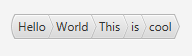
Shown below is a screenshot of the BreadCrumbBar control:
| Modifier and Type | Class and Description |
|---|---|
| public static class | BreadCrumbBar.
Represents an Event which is fired when a bread crumb was activated. |
| public static class |
| Modifier and Type | Field and Description |
|---|---|
| private final BooleanProperty | |
| private final ObjectProperty | |
| private static final String | DEFAULT_STYLE_CLASS
* Stylesheet Handling * * |
| private final Callback | defaultCrumbNodeFactory
Default crumb node factory. |
| private ObjectProperty | |
| private final ObjectProperty | |
| private static final String |
| Access | Constructor and Description |
|---|---|
| public | |
| public | BreadCrumbBar(TreeItem<T> selectedCrumb)
Creates a bread crumb bar with the given TreeItem as the currently selected crumb. |
| Modifier and Type | Method and Description |
|---|---|
| public final BooleanProperty | Returns: aBooleanPropertyEnable or disable auto navigation (default is enabled). |
| public static <T> TreeItem | buildTreeModel(T... crumbs)
Construct a tree model from the flat list which then can be set as selectedCrumb node to be shown |
| protected Skin | createDefaultSkin()
Overrides javafx. Create a new instance of the default skin for this control. |
| public final ObjectProperty | Returns: an ObjectProperty of the CrumbFactory.Return an ObjectProperty of the CrumbFactory. |
| public final Callback | |
| public final EventHandler | Returns: the EventHandler currently used when a user selects a crumb.Return the EventHandler currently used when a user selects a crumb. |
| public final TreeItem | |
| public String | getUserAgentStylesheet()
Overrides javafx. An implementation may specify its own user-agent styles for this Region, and its children, by overriding this method. |
| public final boolean | Returns: whether auto-navigation is enabled.Return whether auto-navigation is enabled. |
| public final ObjectProperty | onCrumbActionProperty()
Returns: an ObjectProperty representing the crumbAction EventHandler being used. |
| public final ObjectProperty | selectedCrumbProperty()
Represents the bottom-most path node (the node on the most-right side in terms of the bread crumb bar). |
| public final void | |
| public final void | setCrumbFactory(Callback<TreeItem<T>, Button> value)
Sets the crumb factory to create (custom) |
| public final void | setOnCrumbAction(EventHandler<BreadCrumbBar.
Set a new EventHandler for when a user selects a crumb. |
| public final void | setSelectedCrumb(TreeItem<T> selectedCrumb)
Select one node in the BreadCrumbBar for being the bottom-most path node. |
| autoNavigation | back to summary |
|---|---|
| private final BooleanProperty autoNavigation | |
| crumbFactory | back to summary |
|---|---|
| private final ObjectProperty<Callback<TreeItem<T>, Button>> crumbFactory | |
| DEFAULT_STYLE_CLASS | back to summary |
|---|---|
| private static final String DEFAULT_STYLE_CLASS * Stylesheet Handling * * | |
| defaultCrumbNodeFactory | back to summary |
|---|---|
| private final Callback<TreeItem<T>, Button> defaultCrumbNodeFactory Default crumb node factory. This factory is used when no custom factory is specified by the user. | |
| onCrumbAction | back to summary |
|---|---|
| private ObjectProperty<EventHandler<BreadCrumbBar. | |
| selectedCrumb | back to summary |
|---|---|
| private final ObjectProperty<TreeItem<T>> selectedCrumb | |
| STYLE_CLASS_FIRST | back to summary |
|---|---|
| private static final String STYLE_CLASS_FIRST | |
| BreadCrumbBar | back to summary |
|---|---|
| public BreadCrumbBar() Creates an empty bread crumb bar | |
| BreadCrumbBar | back to summary |
|---|---|
| public BreadCrumbBar(TreeItem<T> selectedCrumb) Creates a bread crumb bar with the given TreeItem as the currently selected crumb. | |
| autoNavigationEnabledProperty | back to summary |
|---|---|
| public final BooleanProperty autoNavigationEnabledProperty() Enable or disable auto navigation (default is enabled). If auto navigation is enabled, it will automatically navigate to the crumb which was clicked by the user.
| |
| buildTreeModel | back to summary |
|---|---|
| public static <T> TreeItem Construct a tree model from the flat list which then can be set as selectedCrumb node to be shown | |
| createDefaultSkin | back to summary |
|---|---|
| protected Skin Overrides javafx. Doc from javafx. Create a new instance of the default skin for this control. This is called to create a skin for the control if
no skin is provided via CSS
| |
| crumbFactoryProperty | back to summary |
|---|---|
| public final ObjectProperty Return an ObjectProperty of the CrumbFactory.
| |
| getCrumbFactory | back to summary |
|---|---|
| public final Callback Returns the cell factory that will be used to create | |
| getOnCrumbAction | back to summary |
|---|---|
| public final EventHandler Return the EventHandler currently used when a user selects a crumb.
| |
| getSelectedCrumb | back to summary |
|---|---|
| public final TreeItem Get the current target path | |
| getUserAgentStylesheet | back to summary |
|---|---|
| public String getUserAgentStylesheet() Overrides javafx. Doc from javafx. An implementation may specify its own user-agent styles for this Region, and its children, by overriding this method. These styles are used in addition to whatever user-agent stylesheets are in use. This provides a mechanism for third parties to introduce styles for custom controls. The URL is a hierarchical URI of the form [scheme:][//authority][path]. If the URL does not have a [scheme:] component, the URL is considered to be the [path] component only. Any leading '/' character of the [path] is ignored and the [path] is treated as a path relative to the root of the application's classpath. Subclasses overriding this method should not assume any particular implementation approach as to the number and frequency with which it is called. For this reason, attempting any kind of dynamic implementation (i.e. returning different user agent stylesheet values) based on some state change is highly discouraged, as there is no guarantee when, or even if, this method will be called. Some JavaFX CSS implementations may choose to cache this response for an indefinite period of time, and therefore there should be no expectation around when this method is called.
| |
| isAutoNavigationEnabled | back to summary |
|---|---|
| public final boolean isAutoNavigationEnabled() Return whether auto-navigation is enabled.
| |
| onCrumbActionProperty | back to summary |
|---|---|
public final ObjectProperty
| |
| selectedCrumbProperty | back to summary |
|---|---|
| public final ObjectProperty Represents the bottom-most path node (the node on the most-right side in terms of the bread crumb bar). The full path is then being constructed using getParent() of the tree-items. Consider the following hierarchy: [Root] > [Folder] > [SubFolder] > [myfile.txt] To show the above bread crumb bar, you have to set the [myfile.txt] tree-node as selected crumb. | |
| setAutoNavigationEnabled | back to summary |
|---|---|
| public final void setAutoNavigationEnabled(boolean enabled) Enable or disable auto navigation (default is enabled). If auto navigation is enabled, it will automatically navigate to the crumb which was clicked by the user. | |
| setCrumbFactory | back to summary |
|---|---|
| public final void setCrumbFactory(Callback<TreeItem<T>, Button> value) Sets the crumb factory to create (custom) | |
| setOnCrumbAction | back to summary |
|---|---|
| public final void setOnCrumbAction(EventHandler<BreadCrumbBar. Set a new EventHandler for when a user selects a crumb. | |
| setSelectedCrumb | back to summary |
|---|---|
| public final void setSelectedCrumb(TreeItem<T> selectedCrumb) Select one node in the BreadCrumbBar for being the bottom-most path node. | |
| Modifier and Type | Field and Description |
|---|---|
| public static final EventType | CRUMB_ACTION
The event type that should be listened to by people interested in
knowing when the |
| private final TreeItem |
| Access | Constructor and Description |
|---|---|
| public | BreadCrumbActionEvent(TreeItem<TE> selectedCrumb)
Creates a new event that can subsequently be fired. |
| Modifier and Type | Method and Description |
|---|---|
| public TreeItem |
| CRUMB_ACTION | back to summary |
|---|---|
| public static final EventType<BreadCrumbBar. The event type that should be listened to by people interested in
knowing when the | |
| selectedCrumb | back to summary |
|---|---|
| private final TreeItem<TE> selectedCrumb | |
| BreadCrumbActionEvent | back to summary |
|---|---|
| public BreadCrumbActionEvent(TreeItem<TE> selectedCrumb) Creates a new event that can subsequently be fired. | |
| getSelectedCrumb | back to summary |
|---|---|
| public TreeItem Returns the crumb which was the action target. | |
----------
 \         \
 /         /
----------
| Modifier and Type | Field and Description |
|---|---|
| private final double | |
| private final double | |
| private final ObjectProperty |
| Access | Constructor and Description |
|---|---|
| public | |
| public |
| Modifier and Type | Method and Description |
|---|---|
| private Path | |
| public double | |
| private void |
| arrowHeight | back to summary |
|---|---|
| private final double arrowHeight | |
| arrowWidth | back to summary |
|---|---|
| private final double arrowWidth | |
| first | back to summary |
|---|---|
| private final ObjectProperty<Boolean> first | |
| BreadCrumbButton | back to summary |
|---|---|
| public BreadCrumbButton(String text) Create a BreadCrumbButton
| |
| BreadCrumbButton | back to summary |
|---|---|
| public BreadCrumbButton(String text, Node gfx) Create a BreadCrumbButton | |
| createButtonShape | back to summary |
|---|---|
| private Path createButtonShape() Create an arrow path Based upon Uwe / Andy Till code snippet found here: | |
| getArrowWidth | back to summary |
|---|---|
| public double getArrowWidth() Gets the crumb arrow with | |
| updateShape | back to summary |
|---|---|
| private void updateShape() | |