


getItems() in a
visual, scrollable, grid-like fashion. In other words, whereas a ListView
shows one ListCell per row, in a GridView there will be zero or more
GridCell instances on a single row.
This approach means that the number of GridCell instances instantiated will be a significantly smaller number than the number of items in the GridView items list, as only enough GridCells are created for the visible area of the GridView. This helps to improve performance and reduce memory consumption.
Because each GridCell extends from Cell, the same approach
of cell factories that is taken in other UI controls is also taken in GridView.
This has two main benefits:
text property set, whereas a more complex
GridCell can have an arbitrarily complex scenegraph set inside its
graphic property (as it accepts any Node).
The following screenshot shows the GridView with the ColorGridCell
being used:
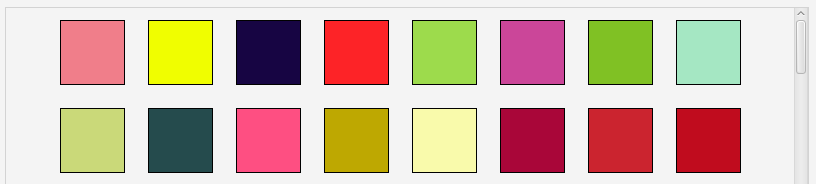
To create this GridView was simple. Note that the majority of the code below is related to randomly creating the colours to be represented:
GridView<Color> myGrid = new GridView<>(list);
myGrid.setCellFactory(new Callback<GridView<Color>, GridCell<Color>>() {
    public GridCell<Color> call(GridView<Color> gridView) {
        return new ColorGridCell();
    }
});
Random r = new Random(System.currentTimeMillis());
for(int i = 0; i < 500; i++) {
    list.add(new Color(r.nextDouble(), r.nextDouble(), r.nextDouble(), 1.0));
}
GridCell
| Modifier and Type | Class and Description |
|---|---|
| private static class |
| Modifier and Type | Field and Description |
|---|---|
| private ObjectProperty | |
| private DoubleProperty | |
| private DoubleProperty | |
| private static final String | DEFAULT_STYLE_CLASS
* Stylesheet Handling * * |
| private DoubleProperty | |
| private ObjectProperty | |
| private DoubleProperty | verticalCellSpacing
Property for specifying how much spacing there is between each cell in a column (i.e. how much vertical spacing there is). |
| Access | Constructor and Description |
|---|---|
| public | |
| public | GridView(ObservableList<T>
The items to display inside the GridView. items)Creates a default GridView control with the provided items prepopulated. |
| Modifier and Type | Method and Description |
|---|---|
| public final ObjectProperty | cellFactoryProperty()
Property representing the cell factory that is currently set in this GridView, or null if no cell factory has been set (in which case the default cell factory provided by the GridView skin will be used). |
| public final DoubleProperty | |
| public final DoubleProperty | |
| protected Skin | createDefaultSkin()
Overrides javafx. Create a new instance of the default skin for this control. |
| public final Callback | getCellFactory()
Returns the cell factory that will be used to create |
| public final double | |
| public final double | |
| public static List | Returns: The CssMetaData associated with this class, which may include the CssMetaData of its super classes.Hides javafx. Gets the |
| public List | getControlCssMetaData()
Overrides javafx. Gets the unmodifiable list of the control's CSS-styleable properties. |
| public final double | getHorizontalCellSpacing()
Returns the amount of horizontal spacing there is between cells in the same row. |
| public final ObservableList | |
| public String | getUserAgentStylesheet()
Overrides javafx. An implementation may specify its own user-agent styles for this Region, and its children, by overriding this method. |
| public final double | getVerticalCellSpacing()
Returns the amount of vertical spacing there is between cells in the same column. |
| public final DoubleProperty | horizontalCellSpacingProperty()
Property for specifying how much spacing there is between each cell in a row (i.e. how much horizontal spacing there is). |
| public final ObjectProperty | |
| public final void | setCellFactory(Callback<GridView<T>, GridCell<T>> value)
Sets the cell factory to use to create |
| public final void | |
| public final void | |
| public final void | setHorizontalCellSpacing(double
The amount of spacing to use. value)Sets the amount of horizontal spacing there should be between cells in the same row. |
| public final void | |
| public final void | setVerticalCellSpacing(double
The amount of spacing to use. value)Sets the amount of vertical spacing there should be between cells in the same column. |
| public final DoubleProperty |
| cellFactory | back to summary |
|---|---|
| private ObjectProperty<Callback<GridView<T>, GridCell<T>>> cellFactory | |
| cellHeight | back to summary |
|---|---|
| private DoubleProperty cellHeight | |
| cellWidth | back to summary |
|---|---|
| private DoubleProperty cellWidth | |
| DEFAULT_STYLE_CLASS | back to summary |
|---|---|
| private static final String DEFAULT_STYLE_CLASS * Stylesheet Handling * * | |
| horizontalCellSpacing | back to summary |
|---|---|
| private DoubleProperty horizontalCellSpacing | |
| items | back to summary |
|---|---|
| private ObjectProperty<ObservableList<T>> items | |
| verticalCellSpacing | back to summary |
|---|---|
| private DoubleProperty verticalCellSpacing Property for specifying how much spacing there is between each cell in a column (i.e. how much vertical spacing there is). | |
| GridView | back to summary |
|---|---|
| public GridView() Creates a default, empty GridView control. | |
| GridView | back to summary |
|---|---|
| public GridView(ObservableList<T> items) Creates a default GridView control with the provided items prepopulated.
| |
| cellFactoryProperty | back to summary |
|---|---|
| public final ObjectProperty Property representing the cell factory that is currently set in this GridView, or null if no cell factory has been set (in which case the default cell factory provided by the GridView skin will be used). The cell factory is used for instantiating enough GridCell instances for the visible area of the GridView. Refer to the GridView class documentation for more information and examples. | |
| cellHeightProperty | back to summary |
|---|---|
| public final DoubleProperty cellHeightProperty() Property representing the height that all cells should be. | |
| cellWidthProperty | back to summary |
|---|---|
| public final DoubleProperty cellWidthProperty() Property representing the width that all cells should be. | |
| createDefaultSkin | back to summary |
|---|---|
| protected Skin Overrides javafx. Doc from javafx. Create a new instance of the default skin for this control. This is called to create a skin for the control if
no skin is provided via CSS
| |
| getCellFactory | back to summary |
|---|---|
| public final Callback Returns the cell factory that will be used to create | |
| getCellHeight | back to summary |
|---|---|
| public final double getCellHeight() Returns the height that all cells should be. | |
| getCellWidth | back to summary |
|---|---|
| public final double getCellWidth() Returns the width that all cells should be. | |
| getClassCssMetaData | back to summary |
|---|---|
| public static List Hides javafx. Doc from javafx. Gets the
| |
| getControlCssMetaData | back to summary |
|---|---|
| public List Overrides javafx. Doc from javafx. Gets the unmodifiable list of the control's CSS-styleable properties.
| |
| getHorizontalCellSpacing | back to summary |
|---|---|
| public final double getHorizontalCellSpacing() Returns the amount of horizontal spacing there is between cells in the same row. | |
| getItems | back to summary |
|---|---|
| public final ObservableList Returns the currently-in-use items list that is being used by the GridView. | |
| getUserAgentStylesheet | back to summary |
|---|---|
| public String getUserAgentStylesheet() Overrides javafx. Doc from javafx. An implementation may specify its own user-agent styles for this Region, and its children, by overriding this method. These styles are used in addition to whatever user-agent stylesheets are in use. This provides a mechanism for third parties to introduce styles for custom controls. The URL is a hierarchical URI of the form [scheme:][//authority][path]. If the URL does not have a [scheme:] component, the URL is considered to be the [path] component only. Any leading '/' character of the [path] is ignored and the [path] is treated as a path relative to the root of the application's classpath. Subclasses overriding this method should not assume any particular implementation approach as to the number and frequency with which it is called. For this reason, attempting any kind of dynamic implementation (i.e. returning different user agent stylesheet values) based on some state change is highly discouraged, as there is no guarantee when, or even if, this method will be called. Some JavaFX CSS implementations may choose to cache this response for an indefinite period of time, and therefore there should be no expectation around when this method is called.
| |
| getVerticalCellSpacing | back to summary |
|---|---|
| public final double getVerticalCellSpacing() Returns the amount of vertical spacing there is between cells in the same column. | |
| horizontalCellSpacingProperty | back to summary |
|---|---|
| public final DoubleProperty horizontalCellSpacingProperty() Property for specifying how much spacing there is between each cell in a row (i.e. how much horizontal spacing there is). | |
| itemsProperty | back to summary |
|---|---|
| public final ObjectProperty The items to be displayed in the GridView (as rendered via | |
| setCellFactory | back to summary |
|---|---|
| public final void setCellFactory(Callback<GridView<T>, GridCell<T>> value) Sets the cell factory to use to create | |
| setCellHeight | back to summary |
|---|---|
| public final void setCellHeight(double value) Sets the height that all cells should be. | |
| setCellWidth | back to summary |
|---|---|
| public final void setCellWidth(double value) Sets the width that all cells should be. | |
| setHorizontalCellSpacing | back to summary |
|---|---|
| public final void setHorizontalCellSpacing(double value) Sets the amount of horizontal spacing there should be between cells in the same row.
| |
| setItems | back to summary |
|---|---|
| public final void setItems(ObservableList<T> value) Sets a new | |
| setVerticalCellSpacing | back to summary |
|---|---|
| public final void setVerticalCellSpacing(double value) Sets the amount of vertical spacing there should be between cells in the same column.
| |
| verticalCellSpacingProperty | back to summary |
|---|---|
| public final DoubleProperty verticalCellSpacingProperty() | |
| Modifier and Type | Field and Description |
|---|---|
| private static final CssMetaData | |
| private static final CssMetaData | |
| private static final CssMetaData | |
| private static final List | |
| private static final CssMetaData |
| Access | Constructor and Description |
|---|---|
| private |
| CELL_HEIGHT | back to summary |
|---|---|
| private static final CssMetaData<GridView<?>, Number> CELL_HEIGHT | |
| CELL_WIDTH | back to summary |
|---|---|
| private static final CssMetaData<GridView<?>, Number> CELL_WIDTH | |
| HORIZONTAL_CELL_SPACING | back to summary |
|---|---|
| private static final CssMetaData<GridView<?>, Number> HORIZONTAL_CELL_SPACING | |
| STYLEABLES | back to summary |
|---|---|
| private static final List<CssMetaData<? extends Styleable, ?>> STYLEABLES | |
| VERTICAL_CELL_SPACING | back to summary |
|---|---|
| private static final CssMetaData<GridView<?>, Number> VERTICAL_CELL_SPACING | |
| StyleableProperties | back to summary |
|---|---|
| private StyleableProperties() | |