


action list. These actions are
represented as buttons on the control. These buttons can be moved to any side
of the ListView using the sideProperty().
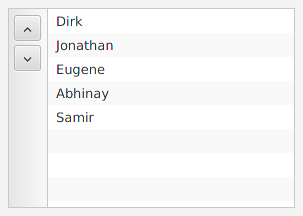
    ListActionView view = new ListActionView<>();
    view.getItems().add("One", "Two", "Three");
    view.getActions().add(new ListActionView.ListAction() {
        {
            setGraphic(new FontAwesome().create(FontAwesome.Glyph.BOLT));
        }

       @Override
        public void initialize(ListView listView) {
            setEventHandler(e -> System.out.println("Action fired!"));
        }
    });
    view.getActions().add(ActionUtils.ACTION_SEPARATOR);
| Modifier and Type | Class and Description |
|---|---|
| public abstract static class | ListActionView.
Type of ListActionView to which this ListAction will be added. T>Specialized actions for ListActionView which get access to the internal ListView. |
| Modifier and Type | Field and Description |
|---|---|
| private final ObservableList | |
| private ObjectProperty | |
| private static final String | |
| private final ObservableList | |
| private ObjectProperty |
| Access | Constructor and Description |
|---|---|
| public |
| Modifier and Type | Method and Description |
|---|---|
| public final ObjectProperty | cellFactoryProperty()
Setting a custom cell factory has the effect of deferring all cell creation, allowing for total customization of the cell. |
| protected Skin | createDefaultSkin()
Overrides javafx. Create a new instance of the default skin for this control. |
| public final ObservableList | Returns: An ObservableList of actions.The list of actions shown on one of the sides of the ListView. |
| public final Callback | |
| public final ObservableList | |
| public Side | Returns: The current position of the action buttons in the ListActionView.The current position of the action buttons in the ListActionView. |
| public String | getUserAgentStylesheet()
Overrides javafx. An implementation may specify its own user-agent styles for this Region, and its children, by overriding this method. |
| public final void | |
| public void | |
| public ObjectProperty |
| actions | back to summary |
|---|---|
| private final ObservableList<Action> actions | |
| cellFactory | back to summary |
|---|---|
| private ObjectProperty<Callback<ListView<T>, ListCell<T>>> cellFactory | |
| DEFAULT_STYLE | back to summary |
|---|---|
| private static final String DEFAULT_STYLE | |
| items | back to summary |
|---|---|
| private final ObservableList<T> items | |
| side | back to summary |
|---|---|
| private ObjectProperty<Side> side | |
| ListActionView | back to summary |
|---|---|
| public ListActionView() | |
| cellFactoryProperty | back to summary |
|---|---|
| public final ObjectProperty Setting a custom cell factory has the effect of deferring all cell creation, allowing for total customization of the cell. Internally, the ListView is responsible for reusing ListCells - all that is necessary is for the custom cell factory to return from this function a ListCell which might be usable for representing any item in the ListView. Refer to the | |
| createDefaultSkin | back to summary |
|---|---|
| protected Skin Overrides javafx. Doc from javafx. Create a new instance of the default skin for this control. This is called to create a skin for the control if
no skin is provided via CSS
| |
| getActions | back to summary |
|---|---|
| public final ObservableList The list of actions shown on one of the sides of the ListView.
All actions except, For actions dependent on the internal ListView, an instance of
| |
| getCellFactory | back to summary |
|---|---|
| public final Callback Returns the current cell factory. | |
| getItems | back to summary |
|---|---|
| public final ObservableList The list of items for the list view.
| |
| getSide | back to summary |
|---|---|
| public Side getSide() The current position of the action buttons in the ListActionView. | |
| getUserAgentStylesheet | back to summary |
|---|---|
| public String getUserAgentStylesheet() Overrides javafx. Doc from javafx. An implementation may specify its own user-agent styles for this Region, and its children, by overriding this method. These styles are used in addition to whatever user-agent stylesheets are in use. This provides a mechanism for third parties to introduce styles for custom controls. The URL is a hierarchical URI of the form [scheme:][//authority][path]. If the URL does not have a [scheme:] component, the URL is considered to be the [path] component only. Any leading '/' character of the [path] is ignored and the [path] is treated as a path relative to the root of the application's classpath. Subclasses overriding this method should not assume any particular implementation approach as to the number and frequency with which it is called. For this reason, attempting any kind of dynamic implementation (i.e. returning different user agent stylesheet values) based on some state change is highly discouraged, as there is no guarantee when, or even if, this method will be called. Some JavaFX CSS implementations may choose to cache this response for an indefinite period of time, and therefore there should be no expectation around when this method is called.
| |
| setCellFactory | back to summary |
|---|---|
| public final void setCellFactory(Callback<ListView<T>, ListCell<T>> value) Sets a new cell factory for the list view. This forces all old
| |
| setSide | back to summary |
|---|---|
| public void setSide(Side side) The position to place the action buttons in this ListActionView. Whenever this changes the ListActionView will immediately update the location of the action buttons to reflect the same.
| |
| sideProperty | back to summary |
|---|---|
| public ObjectProperty The position of the action buttons in the ListActionView. | |
action list.
| Access | Constructor and Description |
|---|---|
| public | ListAction(Node
Graphic to be shown in relation to this action. graphic)Creates a new instance of ListAction with the graphic node. |
| public | ListAction(Node
Graphic to be shown in relation to this action. graphic, String The text for the Action. text)Creates a new instance of ListAction with the provided graphic and text. |
| Modifier and Type | Method and Description |
|---|---|
| public abstract void | initialize(ListView<T>
The list view listView)Can be used to define properties or bindings for actions which are directly dependent on the list view. |
| protected final void | setEventHandler(Consumer<ActionEvent> eventHandler)
Overrides org.
|
| ListAction | back to summary |
|---|---|
| public ListAction(Node graphic) Creates a new instance of ListAction with the graphic node.
| |
| ListAction | back to summary |
|---|---|
| public ListAction(Node graphic, String text) Creates a new instance of ListAction with the provided graphic and text. | |
| initialize | back to summary |
|---|---|
| public abstract void initialize(ListView<T> listView) Can be used to define properties or bindings for actions which are directly dependent on the list view.
| |
| setEventHandler | back to summary |
|---|---|
| protected final void setEventHandler(Consumer<ActionEvent> eventHandler) Overrides org.
| |