


TextField to contain nodes
inside the text field itself, without being on top of the users typed-in text.
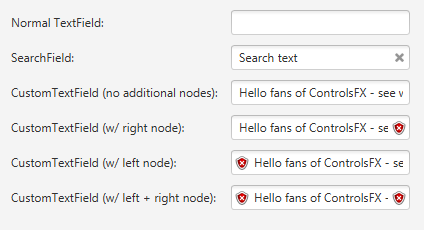
The following screenshot is taken from the HelloControlsFX sample application,
and shows a normal TextField, with a clearable text field,
followed by three CustomTextFields. Note what happens with long text input -
it is prevented from going beneath the left and right graphics. Of course, if
the keyboard caret moves to the right, the text will become visible, but this
is because it will all scroll to the left (as is the case in a normal TextField).
TextFields, CustomPasswordField
| Modifier and Type | Field and Description |
|---|---|
| private ObjectProperty | left
Hides javafx. |
| private ObjectProperty |
| Access | Constructor and Description |
|---|---|
| public |
| Modifier and Type | Method and Description |
|---|---|
| protected Skin | createDefaultSkin()
Overrides javafx. Create a new instance of the default skin for this control. |
| public final Node | |
| public final Node | |
| public String | getUserAgentStylesheet()
Overrides javafx. An implementation may specify its own user-agent styles for this Region, and its children, by overriding this method. |
| public final ObjectProperty | leftProperty()
Returns: An ObjectProperty wrapping the |
| public final ObjectProperty | Returns: An ObjectProperty.Property representing the |
| public final void | |
| public final void |
| left | back to summary |
|---|---|
| private ObjectProperty<Node> left Hides javafx. Properties | |
| right | back to summary |
|---|---|
| private ObjectProperty<Node> right Hides javafx. | |
| CustomTextField | back to summary |
|---|---|
| public CustomTextField() Instantiates a default CustomTextField. | |
| createDefaultSkin | back to summary |
|---|---|
| protected Skin Overrides javafx. Doc from javafx. Create a new instance of the default skin for this control. This is called to create a skin for the control if
no skin is provided via CSS
| |
| getLeft | back to summary |
|---|---|
| public final Node getLeft() | |
| getRight | back to summary |
|---|---|
| public final Node getRight() | |
| getUserAgentStylesheet | back to summary |
|---|---|
| public String getUserAgentStylesheet() Overrides javafx. Doc from javafx. An implementation may specify its own user-agent styles for this Region, and its children, by overriding this method. These styles are used in addition to whatever user-agent stylesheets are in use. This provides a mechanism for third parties to introduce styles for custom controls. The URL is a hierarchical URI of the form [scheme:][//authority][path]. If the URL does not have a [scheme:] component, the URL is considered to be the [path] component only. Any leading '/' character of the [path] is ignored and the [path] is treated as a path relative to the root of the application's classpath. Subclasses overriding this method should not assume any particular implementation approach as to the number and frequency with which it is called. For this reason, attempting any kind of dynamic implementation (i.e. returning different user agent stylesheet values) based on some state change is highly discouraged, as there is no guarantee when, or even if, this method will be called. Some JavaFX CSS implementations may choose to cache this response for an indefinite period of time, and therefore there should be no expectation around when this method is called.
| |
| leftProperty | back to summary |
|---|---|
public final ObjectProperty
| |
| rightProperty | back to summary |
|---|---|
| public final ObjectProperty Property representing the
| |
| setLeft | back to summary |
|---|---|
| public final void setLeft(Node value) Sets the | |
| setRight | back to summary |
|---|---|
| public final void setRight(Node value) Sets the | |