


Nodes with a border,
in a way somewhat analogous to the Swing BorderFactory (although with
less options as a lot of what the Swing BorderFactory offers resulted in
ugly borders!).
The Borders class provides a fluent API for specifying the properties of
each border. It is possible to create multiple borders around a Node simply
by continuing to call additional methods before you call the final
Borders#build() method. To use the Borders class, you simply call
Borders#wrap(Node), passing in the Node you wish to wrap the border(s)
around.
Firstly, lets wrap a JavaFX Button node with a simple line border that looks
like the following:

Here's the code:
Button button = new Button("Hello World!");
Node wrappedButton = Borders.wrap(button).lineBorder().buildAll();
Easy, isn't it!? You can make the border look a little nicer by replacing
the line border with an etched border. An etched border
has a subtle inner (or outer) line that makes the border stand out a bit more,
like this:

Now that's one good looking border! Here's the code:
Button button = new Button("Hello World!");
Node wrappedButton = Borders.wrap(button).etchedBorder().buildAll();
In some circumstances you want to have multiple borders. For example,
you might two line borders. That's easy:
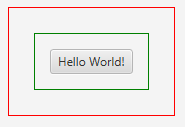
Node wrappedButton = Borders.wrap(button)
    .lineBorder().color(Color.RED).build()
    .lineBorder().color(Color.GREEN).build()
    .build();
You simply chain the borders together, going from inside to outside!
Because of all the configuration options it isn't possible to list all the functionality of all the border types, so refer to the rest of the javadocs for inspiration.
| Modifier and Type | Class and Description |
|---|---|
| public static interface | Borders.
The public interface used by the |
| public class | Borders.
A fluent API that is only indirectly instantiable via the |
| public class | Borders.
A fluent API that is only indirectly instantiable via the |
| public class | Borders.
A fluent API that is only indirectly instantiable via the |
| private static class | Borders.
Private support classes |
| Modifier and Type | Field and Description |
|---|---|
| private final List | |
| private static final Color | DEFAULT_BORDER_COLOR
Static fields |
| private final Node | node
Internal fields |
| Modifier and Type | Method and Description |
|---|---|
| public Borders | |
| public Node | build()
Returns the original node wrapped in zero or more borders, as specified using the fluent API. |
| public Borders. | emptyBorder()
Often times it is useful to have a bit of whitespace around a Node, to separate it from what it is next to. |
| public Borders. | etchedBorder()
The etched border look is essentially equivalent to the |
| public Borders. | |
| public static Borders |
| borders | back to summary |
|---|---|
| private final List<Borders. | |
| DEFAULT_BORDER_COLOR | back to summary |
|---|---|
| private static final Color DEFAULT_BORDER_COLOR Static fields | |
| node | back to summary |
|---|---|
| private final Node node Internal fields | |
| Borders | back to summary |
|---|---|
| private Borders(Node n) Private Constructor | |
| addBorder | back to summary |
|---|---|
| public Borders addBorder(Borders. Allows for developers to develop custom | |
| build | back to summary |
|---|---|
| public Node build() Returns the original node wrapped in zero or more borders, as specified using the fluent API. | |
| emptyBorder | back to summary |
|---|---|
| public Borders. Often times it is useful to have a bit of whitespace around a Node, to separate it from what it is next to. Call this method to begin building a border that will wrap the node with a given amount of whitespace (which can vary between the top, right, bottom, and left sides). | |
| etchedBorder | back to summary |
|---|---|
| public Borders. The etched border look is essentially equivalent to the | |
| lineBorder | back to summary |
|---|---|
| public Borders. Creates a nice, simple border around the node. Note that there are many
configuration options in | |
| wrap | back to summary |
|---|---|
| public static Borders wrap(Node n) Fluent API entry method(s) | |
Borders API to wrap nodes with
zero or more Border implementations. ControlsFX ships with a few
Border implementations (current EmptyBorders, LineBorders,
and EtchedBorders). As noted in Borders#addBorder(Border),
this interface is relatively pointless, unless you plan to wrap a node
with multiple borders and you want to use a custom Border
implementation for at least one border. In this case, you can simply
call Borders#addBorder(Border) with your custom border, when
appropriate.
| Modifier and Type | Method and Description |
|---|---|
| public Node |
| wrap | back to summary |
|---|---|
| public Node wrap(Node n) Given a | |
Borders
fluent API, and which allows for an empty border
to be wrapped around a given Node.
| Modifier and Type | Field and Description |
|---|---|
| private double | |
| private double | |
| private final Borders | |
| private double | |
| private double |
| Access | Constructor and Description |
|---|---|
| private |
| Modifier and Type | Method and Description |
|---|---|
| public Borders | build()
Builds the |
| public Node | |
| private BorderStroke | |
| public Borders. | padding(double padding)
Specifies that the wrapped Node should have the given padding around all four sides of itself. |
| public Borders. | padding(double top, double right, double bottom, double left)
Specifies that the wrapped Node should be wrapped with the given padding for each of its four sides, going in the order top, right, bottom, and finally left. |
| bottom | back to summary |
|---|---|
| private double bottom | |
| left | back to summary |
|---|---|
| private double left | |
| parent | back to summary |
|---|---|
| private final Borders parent | |
| right | back to summary |
|---|---|
| private double right | |
| top | back to summary |
|---|---|
| private double top | |
| EmptyBorders | back to summary |
|---|---|
| private EmptyBorders(Borders parent) | |
| build | back to summary |
|---|---|
| public Borders build() Builds the | |
| buildAll | back to summary |
|---|---|
| public Node buildAll() A convenience method, this is equivalent to calling
| |
| buildStroke | back to summary |
|---|---|
| private BorderStroke buildStroke() | |
| padding | back to summary |
|---|---|
| public Borders. Specifies that the wrapped Node should have the given padding around all four sides of itself. | |
| padding | back to summary |
|---|---|
| public Borders. Specifies that the wrapped Node should be wrapped with the given padding for each of its four sides, going in the order top, right, bottom, and finally left. | |
Borders
fluent API, and which allows for an etched border
to be wrapped around a given Node.
| Modifier and Type | Field and Description |
|---|---|
| private double | |
| private double | |
| private Color | |
| private double | |
| private double | |
| private double | |
| private double | |
| private double | |
| private double | |
| private double | |
| private double | |
| private final Borders | |
| private boolean | |
| private Color | |
| private String | |
| private double | |
| private double |
| Access | Constructor and Description |
|---|---|
| private |
| Modifier and Type | Method and Description |
|---|---|
| public Borders | build()
Builds the |
| public Node | |
| public Borders. | |
| public Borders. | |
| public Borders. | innerPadding(double topPadding, double rightPadding, double bottomPadding, double leftPadding)
Specifies that the line wrapping the node should have inner padding as specified, with each padding being independently configured, going in the order top, right, bottom, and left. |
| public Borders. | |
| public Borders. | outerPadding(double topPadding, double rightPadding, double bottomPadding, double leftPadding)
Specifies that the line wrapping the node should have outer padding as specified, with each padding being independently configured, going in the order top, right, bottom, and left. |
| public Borders. | |
| public Borders. | radius(double topLeft, double topRight, double bottomRight, double bottomLeft)
Specifies that the etched line wrapping the node should have corner radii as specified, with each radius being independently configured, going in the order top-left, top-right, bottom-right, and finally bottom-left. |
| public Borders. | |
| public Borders. | |
| public Borders. |
| bottomLeftRadius | back to summary |
|---|---|
| private double bottomLeftRadius | |
| bottomRightRadius | back to summary |
|---|---|
| private double bottomRightRadius | |
| highlightColor | back to summary |
|---|---|
| private Color highlightColor | |
| innerBottomPadding | back to summary |
|---|---|
| private double innerBottomPadding | |
| innerLeftPadding | back to summary |
|---|---|
| private double innerLeftPadding | |
| innerRightPadding | back to summary |
|---|---|
| private double innerRightPadding | |
| innerTopPadding | back to summary |
|---|---|
| private double innerTopPadding | |
| outerBottomPadding | back to summary |
|---|---|
| private double outerBottomPadding | |
| outerLeftPadding | back to summary |
|---|---|
| private double outerLeftPadding | |
| outerRightPadding | back to summary |
|---|---|
| private double outerRightPadding | |
| outerTopPadding | back to summary |
|---|---|
| private double outerTopPadding | |
| parent | back to summary |
|---|---|
| private final Borders parent | |
| raised | back to summary |
|---|---|
| private boolean raised | |
| shadowColor | back to summary |
|---|---|
| private Color shadowColor | |
| title | back to summary |
|---|---|
| private String title | |
| topLeftRadius | back to summary |
|---|---|
| private double topLeftRadius | |
| topRightRadius | back to summary |
|---|---|
| private double topRightRadius | |
| EtchedBorders | back to summary |
|---|---|
| private EtchedBorders(Borders parent) | |
| build | back to summary |
|---|---|
| public Borders build() Builds the | |
| buildAll | back to summary |
|---|---|
| public Node buildAll() A convenience method, this is equivalent to calling
| |
| highlight | back to summary |
|---|---|
| public Borders. Specifies the highlight colour to use in the etched border. | |
| innerPadding | back to summary |
|---|---|
| public Borders. Specifies the inner padding of the four lines of this border. | |
| innerPadding | back to summary |
|---|---|
| public Borders. Specifies that the line wrapping the node should have inner padding as specified, with each padding being independently configured, going in the order top, right, bottom, and left. | |
| outerPadding | back to summary |
|---|---|
| public Borders. Specifies the outer padding of the four lines of this border. | |
| outerPadding | back to summary |
|---|---|
| public Borders. Specifies that the line wrapping the node should have outer padding as specified, with each padding being independently configured, going in the order top, right, bottom, and left. | |
| radius | back to summary |
|---|---|
| public Borders. Specifies the radius of the four corners of the lines of this border. | |
| radius | back to summary |
|---|---|
| public Borders. Specifies that the etched line wrapping the node should have corner radii as specified, with each radius being independently configured, going in the order top-left, top-right, bottom-right, and finally bottom-left. | |
| raised | back to summary |
|---|---|
| public Borders. Specifies the order in which the highlight and shadow colours are placed. A raised etched border has the shadow colour on the outside of the border, whereas a non-raised (or lowered) etched border has the shadow colour on the inside of the border. | |
| shadow | back to summary |
|---|---|
| public Borders. Specifies the shadow colour to use in the etched border. | |
| title | back to summary |
|---|---|
| public Borders. If desired, this specifies the title text to show in this border. | |
Borders
fluent API, and which allows for a line border
to be wrapped around a given Node.
| Modifier and Type | Field and Description |
|---|---|
| private Color | |
| private double | |
| private double | |
| private double | |
| private double | |
| private double | |
| private double | |
| private double | |
| private Color | |
| private double | |
| private double | |
| private double | |
| private double | |
| private double | |
| private final Borders | |
| private Color | |
| private double | |
| private BorderStrokeStyle | |
| private String | |
| private Color | |
| private double | |
| private double | |
| private double |
| Access | Constructor and Description |
|---|---|
| private |
| Modifier and Type | Method and Description |
|---|---|
| public Borders | build()
Builds the |
| public Node | |
| public Borders. | |
| public Borders. | |
| public Borders. | |
| public Borders. | innerPadding(double topPadding, double rightPadding, double bottomPadding, double leftPadding)
Specifies that the line wrapping the node should have inner padding as specified, with each padding being independently configured, going in the order top, right, bottom, and left. |
| public Borders. | |
| public Borders. | outerPadding(double topPadding, double rightPadding, double bottomPadding, double leftPadding)
Specifies that the line wrapping the node should have outer padding as specified, with each padding being independently configured, going in the order top, right, bottom, and left. |
| public Borders. | |
| public Borders. | radius(double topLeft, double topRight, double bottomRight, double bottomLeft)
Specifies that the line wrapping the node should have corner radii as specified, with each radius being independently configured, going in the order top-left, top-right, bottom-right, and finally bottom-left. |
| public Borders. | strokeStyle(BorderStrokeStyle strokeStyle)
Specifies which |
| public Borders. | thickness(double thickness)
Specifies the thickness of the line to use on all four sides of this border. |
| public Borders. | thickness(double topThickness, double rightThickness, double bottomThickness, double leftThickness)
Specifies that the wrapped Node should be wrapped with the given line thickness for each of its four sides, going in the order top, right, bottom, and finally left. |
| public Borders. |
| bottomColor | back to summary |
|---|---|
| private Color bottomColor | |
| bottomLeftRadius | back to summary |
|---|---|
| private double bottomLeftRadius | |
| bottomRightRadius | back to summary |
|---|---|
| private double bottomRightRadius | |
| bottomThickness | back to summary |
|---|---|
| private double bottomThickness | |
| innerBottomPadding | back to summary |
|---|---|
| private double innerBottomPadding | |
| innerLeftPadding | back to summary |
|---|---|
| private double innerLeftPadding | |
| innerRightPadding | back to summary |
|---|---|
| private double innerRightPadding | |
| innerTopPadding | back to summary |
|---|---|
| private double innerTopPadding | |
| leftColor | back to summary |
|---|---|
| private Color leftColor | |
| leftThickness | back to summary |
|---|---|
| private double leftThickness | |
| outerBottomPadding | back to summary |
|---|---|
| private double outerBottomPadding | |
| outerLeftPadding | back to summary |
|---|---|
| private double outerLeftPadding | |
| outerRightPadding | back to summary |
|---|---|
| private double outerRightPadding | |
| outerTopPadding | back to summary |
|---|---|
| private double outerTopPadding | |
| parent | back to summary |
|---|---|
| private final Borders parent | |
| rightColor | back to summary |
|---|---|
| private Color rightColor | |
| rightThickness | back to summary |
|---|---|
| private double rightThickness | |
| strokeStyle | back to summary |
|---|---|
| private BorderStrokeStyle strokeStyle | |
| title | back to summary |
|---|---|
| private String title | |
| topColor | back to summary |
|---|---|
| private Color topColor | |
| topLeftRadius | back to summary |
|---|---|
| private double topLeftRadius | |
| topRightRadius | back to summary |
|---|---|
| private double topRightRadius | |
| topThickness | back to summary |
|---|---|
| private double topThickness | |
| LineBorders | back to summary |
|---|---|
| private LineBorders(Borders parent) | |
| build | back to summary |
|---|---|
| public Borders build() Builds the | |
| buildAll | back to summary |
|---|---|
| public Node buildAll() A convenience method, this is equivalent to calling
| |
| color | back to summary |
|---|---|
| public Borders. Specifies the colour to use for all four sides of this border. | |
| color | back to summary |
|---|---|
| public Borders. Specifies that the wrapped Node should be wrapped with the given colours for each of its four sides, going in the order top, right, bottom, and finally left. | |
| innerPadding | back to summary |
|---|---|
| public Borders. Specifies the outer padding of the four lines of this border. | |
| innerPadding | back to summary |
|---|---|
| public Borders. Specifies that the line wrapping the node should have inner padding as specified, with each padding being independently configured, going in the order top, right, bottom, and left. | |
| outerPadding | back to summary |
|---|---|
| public Borders. Specifies the inner padding of the four lines of this border. | |
| outerPadding | back to summary |
|---|---|
| public Borders. Specifies that the line wrapping the node should have outer padding as specified, with each padding being independently configured, going in the order top, right, bottom, and left. | |
| radius | back to summary |
|---|---|
| public Borders. Specifies the radius of the four corners of the line of this border. | |
| radius | back to summary |
|---|---|
| public Borders. Specifies that the line wrapping the node should have corner radii as specified, with each radius being independently configured, going in the order top-left, top-right, bottom-right, and finally bottom-left. | |
| strokeStyle | back to summary |
|---|---|
| public Borders. Specifies which | |
| thickness | back to summary |
|---|---|
| public Borders. Specifies the thickness of the line to use on all four sides of this border. | |
| thickness | back to summary |
|---|---|
| public Borders. Specifies that the wrapped Node should be wrapped with the given line thickness for each of its four sides, going in the order top, right, bottom, and finally left. | |
| title | back to summary |
|---|---|
| public Borders. If desired, this specifies the title text to show in this border. | |
| Modifier and Type | Field and Description |
|---|---|
| private final BorderStroke[] | |
| private static final double | |
| private final String | |
| private static final int |
| Access | Constructor and Description |
|---|---|
| public |
| Modifier and Type | Method and Description |
|---|---|
| public Node | wrap(final Node n)
Implements org. Given a |
| borderStrokes | back to summary |
|---|---|
| private final BorderStroke[] borderStrokes | |
| GAP_PADDING | back to summary |
|---|---|
| private static final double GAP_PADDING | |
| title | back to summary |
|---|---|
| private final String title | |
| TITLE_PADDING | back to summary |
|---|---|
| private static final int TITLE_PADDING | |
| StrokeBorder | back to summary |
|---|---|
| public StrokeBorder(String title, BorderStroke... borderStrokes) | |
| wrap | back to summary |
|---|---|
| public Node wrap(final Node n) Implements org. Doc from org. Given a
| |