


MenuButton is closely associated with
the concept of selecting a MenuItem from a menu. Unlike MenuButton,
the SplitMenuButton is broken into two pieces, the "action" area and the
"menu open" area.
If the user clicks in the action area, the SplitMenuButton will act similarly
to a Button, firing whatever is
associated with the onAction property.
The menu open area of the control will show a menu if clicked. When the user selects an item from the menu, it is executed.
Note that the SplitMenuButton does not automatically assign whatever was last selected in the menu to be the action should the action region be clicked.
Example:
 SplitMenuButton m = new SplitMenuButton();
m.setText("Shutdown");
m.getItems().addAll(new MenuItem("Logout"), new MenuItem("Sleep"));
m.setOnAction(e -> System.out.println("Shutdown"));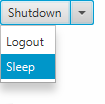
MnemonicParsing is enabled by default for SplitMenuButton.
MenuItem, Menu
| Modifier and Type | Field and Description |
|---|---|
| private static final String |
| Access | Constructor and Description |
|---|---|
| public | |
| public | SplitMenuButton(MenuItem...
The items to show within this button's menu items)Creates a new split menu button with the given list of menu items. |
| Modifier and Type | Method and Description |
|---|---|
| protected Skin | createDefaultSkin()
Overrides javafx. Create a new instance of the default skin for this control. |
| public void | executeAccessibleAction(AccessibleAction
the action to execute action, Object... optional list of parameters parameters)Overrides javafx. This method is called by the assistive technology to request the action indicated by the argument should be executed. |
| public void | |
| public Object | queryAccessibleAttribute(AccessibleAttribute
the requested attribute attribute, Object... optional list of parameters parameters)Overrides javafx. This method is called by the assistive technology to request the value for an attribute. |
| DEFAULT_STYLE_CLASS | back to summary |
|---|---|
| private static final String DEFAULT_STYLE_CLASS | |
| SplitMenuButton | back to summary |
|---|---|
| public SplitMenuButton() Creates a new empty split menu button. Use | |
| SplitMenuButton | back to summary |
|---|---|
| public SplitMenuButton(MenuItem... items) Creates a new split menu button with the given list of menu items.
| |
| createDefaultSkin | back to summary |
|---|---|
| protected Skin Overrides javafx. Doc from javafx. Create a new instance of the default skin for this control. This is called to create a skin for the control if
no skin is provided via CSS
| |
| executeAccessibleAction | back to summary |
|---|---|
| public void executeAccessibleAction(AccessibleAction action, Object... parameters) Overrides javafx. Doc from javafx. This method is called by the assistive technology to request the action indicated by the argument should be executed.
This method is commonly overridden by subclasses to implement
action that are required for a specific role.
| |
| fire | back to summary |
|---|---|
| public void fire() Overrides javafx. Call the action when button is pressed.
| |
| queryAccessibleAttribute | back to summary |
|---|---|
| public Object queryAccessibleAttribute(AccessibleAttribute attribute, Object... parameters) Overrides javafx. Doc from javafx. This method is called by the assistive technology to request the value for an attribute.
This method is commonly overridden by subclasses to implement
attributes that are required for a specific role.
| |