


The ImagePattern class fills a shape with an image pattern. The
user may specify the anchor rectangle, which defines the position,
width, and height of the image relative to the upper left corner of the
shape. If the shape extends out of the anchor rectangle, the image is tiled.
If the proportional variable is set to true (the default)
then the anchor rectangle should be specified relative to the unit
square (0.0->1.0) and will be stretched across the shape.
If the proportional variable is set to false, then the anchor
rectangle should be specified in the local coordinate system of the shape
and the image will be stretched to fit the anchor rectangle. The anchor
rectangle will not be stretched across the shape.
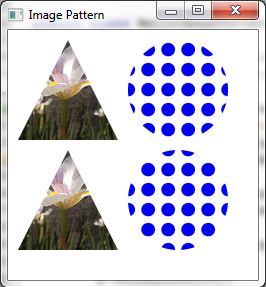
The example below demonstrates the use of the proportional
variable. The shapes on the top row use proportional coordinates
(the default) to specify the anchor rectangle. The shapes on the
bottom row use absolute coordinates. The flower image is stretched
to fill the entire triangle shape, while the dot pattern image is tiled
within the circle shape.
import javafx.scene.Scene;
import javafx.scene.image.Image;
import javafx.scene.paint.ImagePattern;
import javafx.scene.shape.Circle;
import javafx.scene.shape.Polygon;
import javafx.stage.Stage;

public class HelloImagePattern extends Application {

    private static final String flowerURL = "file:flower.png";
    private static final String dotsURL = "file:dots.png";

    @Override public void start(Stage stage) {
        stage.setTitle("Image Pattern");
        Group root = new Group();
        Scene scene = new Scene(root, 600, 450);

        Image dots = new Image(dotsURL);
        Image flower = new Image(flowerURL);

        Polygon p = new Polygon();

        p.setLayoutX(10);
        p.setLayoutY(10);
        p.getPoints().add(50.0);
        p.getPoints().add(0.0);
        p.getPoints().add(100.0);
        p.getPoints().add(100.0);
        p.getPoints().add(0.0);
        p.getPoints().add(100.0);

        p.setFill(new ImagePattern(flower, 0, 0, 1, 1, true));

        root.getChildren().add(p);

        Polygon p2 = new Polygon();

        p2.setLayoutX(10);
        p2.setLayoutY(120);
        p2.getPoints().add(50.0);
        p2.getPoints().add(0.0);
        p2.getPoints().add(100.0);
        p2.getPoints().add(100.0);
        p2.getPoints().add(0.0);
        p2.getPoints().add(100.0);

        p2.setFill(new ImagePattern(flower, 0, 0, 100, 100, false));

        root.getChildren().add(p2);

        Circle circ = new Circle(50);
        circ.setTranslateX(120);
        circ.setTranslateY(10);
        circ.setCenterX(50);
        circ.setCenterY(50);
        circ.setFill(new ImagePattern(dots, 0.2, 0.2, 0.4, 0.4, true));

        root.getChildren().add(circ);

        Circle circ2 = new Circle(50);
        circ2.setTranslateX(120);
        circ2.setTranslateY(10);
        circ2.setCenterX(50);
        circ2.setCenterY(50);
        circ2.setFill(new ImagePattern(dots, 20, 20, 40, 40, false));

        root.getChildren().add(circ2);
        stage.setScene(scene);
        stage.show();
    }
The code above produces the following:
| Modifier and Type | Field and Description |
|---|---|
| private double | |
| private Image | |
| private Object | |
| private boolean | |
| private double | |
| private double | |
| private double |
| Access | Constructor and Description |
|---|---|
| public | ImagePattern(Image
the image to be used as the paint. image)Creates a new instance of ImagePattern from the specified image. |
| public | ImagePattern(Image
the image to be used as the paint. image, double the x origin of the anchor rectangle. x, double the y origin of the anchor rectangle. y, double the width of the anchor rectangle. width, double the height of the anchor rectangle. height, boolean whether the coordinates are proportional
to the shape which ImagePattern fills proportional)Creates a new instance of ImagePattern. |
| Modifier and Type | Method and Description |
|---|---|
| pack-priv void | acc_addListener(AbstractNotifyListener platformChangeListener)
Overrides javafx.
|
| pack-priv Object | |
| pack-priv boolean | |
| pack-priv void | acc_removeListener(AbstractNotifyListener platformChangeListener)
Overrides javafx.
|
| public final double | |
| public final Image | |
| public final double | |
| public final double | |
| public final double | |
| public final boolean | isOpaque()
Implements abstract javafx. Gets whether this Paint is completely opaque. |
| public final boolean | Returns: boolean that is true if this paint is proportional.Gets a boolean that indicates whether start and end locations are proportional or absolute. |
| height | back to summary |
|---|---|
| private double height | |
| image | back to summary |
|---|---|
| private Image image | |
| platformPaint | back to summary |
|---|---|
| private Object platformPaint | |
| proportional | back to summary |
|---|---|
| private boolean proportional | |
| width | back to summary |
|---|---|
| private double width | |
| x | back to summary |
|---|---|
| private double x | |
| y | back to summary |
|---|---|
| private double y | |
| ImagePattern | back to summary |
|---|---|
| public ImagePattern(Image image) Creates a new instance of ImagePattern from the specified image. Default values are used for all other parameters.
| |
| ImagePattern | back to summary |
|---|---|
| public ImagePattern(Image image, double x, double y, double width, double height, boolean proportional) Creates a new instance of ImagePattern.
| |
| acc_addListener | back to summary |
|---|---|
| pack-priv void acc_addListener(AbstractNotifyListener platformChangeListener) Overrides javafx.
| |
| acc_getPlatformPaint | back to summary |
|---|---|
| pack-priv Object acc_getPlatformPaint() Implements abstract javafx.
| |
| acc_isMutable | back to summary |
|---|---|
| pack-priv boolean acc_isMutable() Overrides javafx.
| |
| acc_removeListener | back to summary |
|---|---|
| pack-priv void acc_removeListener(AbstractNotifyListener platformChangeListener) Overrides javafx.
| |
| getHeight | back to summary |
|---|---|
| public final double getHeight() Gets the height of the anchor rectangle.
| |
| getImage | back to summary |
|---|---|
| public final Image getImage() Gets the image to be used as a paint.
| |
| getWidth | back to summary |
|---|---|
| public final double getWidth() Gets the width of the anchor rectangle.
| |
| getX | back to summary |
|---|---|
| public final double getX() Gets the x origin of the anchor rectangle.
| |
| getY | back to summary |
|---|---|
| public final double getY() Gets the y origin of the anchor rectangle.
| |
| isOpaque | back to summary |
|---|---|
| public final boolean isOpaque() Implements abstract javafx. Doc from javafx. Gets whether this Paint is completely opaque. An opaque paint is one that has no alpha component in any of its colors. It may be possible for a Paint to be opaque and yet return false, if it cannot be easily determined whether the paint is actually opaque. For example, the ImagePattern may not be able to cheaply determine its opacity.
| |
| isProportional | back to summary |
|---|---|
| public final boolean isProportional() Gets a boolean that indicates whether start and end locations are
proportional or absolute. If this flag is true, the two end points are
defined in a coordinate space where coordinates in the range
| |