


ComboBoxBase abstract class for the most common
form of ComboBox, where a popup list is shown to users providing them with
a choice that they may select from. For more information around the general
concepts and API of ComboBox, refer to the ComboBoxBase class
documentation.
On top of ComboBoxBase, the ComboBox class introduces additional API. Most
importantly, it adds an items property that works in
much the same way as the ListView items
property. In other words, it is the content of the items list that is displayed
to users when they click on the ComboBox button.
The ComboBox exposes the valueProperty() from
javafx., but there are some important points
of the value property that need to be understood in relation to ComboBox.
These include:
selection in the selection model does not null the value
property - it remains the same as before.SelectionModel#selectedItemProperty() and
value property will be updated to have this value. This is inconsistent with
other controls that use a selection model, but done intentionally for ComboBox.By default, when the popup list is showing, the maximum number of rows
visible is 10, but this can be changed by modifying the
visibleRowCount property. If the number of
items in the ComboBox is less than the value of visibleRowCount,
then the items size will be used instead so that the popup list is not
exceedingly long.
As with ListView, it is possible to modify the
selection model that is used,
although this is likely to be rarely changed. This is because the ComboBox
enforces the need for a javafx.
instance, and it is not likely that there is much need for alternate
implementations. Nonetheless, the option is there should use cases be found
for switching the selection model.
As the ComboBox internally renders content with a ListView, API exists in
the ComboBox class to allow for a custom cell factory to be set. For more
information on cell factories, refer to the Cell and ListCell
classes. It is important to note that if a cell factory is set on a ComboBox,
cells will only be used in the ListView that shows when the ComboBox is
clicked. If you also want to customize the rendering of the 'button' area
of the ComboBox, you can set a custom ListCell instance in the
button cell property. One way of doing this
is with the following code (note the use of setButtonCell:
 Callback<ListView<String>, ListCell<String>> cellFactory = ...;
 ComboBox comboBox = new ComboBox();
 comboBox.setItems(items);
 comboBox.setButtonCell(cellFactory.call(null));
 comboBox.setCellFactory(cellFactory);
Because a ComboBox can be editable, and the
default means of allowing user input is via a TextField, a
string converter property is provided to allow
for developers to specify how to translate a users string into an object of
type T, such that the value property may contain it.
By default the converter simply returns the String input as the user typed it,
which therefore assumes that the type of the editable ComboBox is String. If
a different type is specified and the ComboBox is to be editable, it is
necessary to specify a custom StringConverter.
ComboBox allows for the items list to contain elements of any type, including
Node instances. Putting nodes into
the items list is strongly discouraged, as it can
lead to unexpected results. This is because
the default cell factory simply inserts Node
items directly into the cell, including in the ComboBox 'button' area too.
Because the scenegraph only allows for Nodes to be in one place at a time,
this means that when an item is selected it becomes removed from the ComboBox
list, and becomes visible in the button area. When selection changes the
previously selected item returns to the list and the new selection is removed.
Important points to note:
Node instances directly into the ComboBox items list or its data model.cell factory to create the nodes for a
given cell and update them on demand using the data stored in the item for that cell.Nodes in the updateItem method of
a custom cell factory.The following minimal example shows how to create a custom cell factory for ComboBox containing Nodes:
 ComboBox<Color> cmb = new ComboBox<>();
 cmb.getItems().addAll(
     Color.RED,
     Color.GREEN,
     Color.BLUE);

 cmb.setCellFactory(p -> {
     return new ListCell<>() {
         private final Rectangle rectangle;
         {
             setContentDisplay(ContentDisplay.GRAPHIC_ONLY);
             rectangle = new Rectangle(10, 10);
         }

         @Override protected void updateItem(Color item, boolean empty) {
             super.updateItem(item, empty);

             if (item == null || empty) {
                 setGraphic(null);
             } else {
                 rectangle.setFill(item);
                 setGraphic(rectangle);
             }
         }
     };
 });
This example has an anonymous custom ListCell class in the custom cell factory.
Note that the Rectangle (Node) object needs to be created in the instance initialization block
or the constructor of the custom ListCell class and updated/used in its updateItem method.
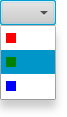
Admittedly the above approach is far more verbose, but it offers the required functionality without encountering the scenegraph constraints.
ComboBoxBase, Cell, ListCell, StringConverter
| Modifier and Type | Class and Description |
|---|---|
| pack-priv static class |
| Modifier and Type | Field and Description |
|---|---|
| private final ObjectProperty | |
| private final ObjectProperty | cellFactory
Providing a custom cell factory allows for complete customization of the rendering of items in the ComboBox. |
| private final ObjectProperty | |
| private static final String | |
| private ReadOnlyObjectWrapper | editor
The editor for the ComboBox. |
| private final ObjectProperty | items
The list of items to show within the ComboBox popup. |
| private ObjectProperty | |
| private int | |
| private ChangeListener | |
| private ObjectProperty | selectionModel
The selection model for the ComboBox. |
| private TextField | |
| private IntegerProperty | visibleRowCount
The maximum number of rows to be visible in the ComboBox popup when it is showing. |
| private boolean |
| Access | Constructor and Description |
|---|---|
| public | |
| public | ComboBox(ObservableList<T>
the list of items items)Creates a default ComboBox instance with the provided items list and
a default |
| Modifier and Type | Method and Description |
|---|---|
| public final ObjectProperty | Returns: the button cell propertyThe button cell is used to render what is shown in the ComboBox 'button' area. |
| public final void | cancelEdit()
If the ComboBox is |
| public final ObjectProperty | |
| public final void | commitValue()
If the ComboBox is |
| public final ObjectProperty | Returns: the converter propertyConverts the user-typed input (when the ComboBox is
|
| protected Skin | createDefaultSkin()
Overrides javafx. Create a new instance of the default skin for this control. |
| private static <T> StringConverter | |
| public final ReadOnlyObjectProperty | |
| public final ListCell | |
| public final Callback | |
| public final StringConverter | |
| public final TextField | |
| public final ObservableList | |
| public final Node | |
| public final SingleSelectionModel | |
| public final int | |
| public final ObjectProperty | |
| public final ObjectProperty | Returns: the placeholder propertyThis Node is shown to the user when the ComboBox has no content to show. |
| public Object | queryAccessibleAttribute(AccessibleAttribute
the requested attribute attribute, Object... optional list of parameters parameters)Overrides javafx. This method is called by the assistive technology to request the value for an attribute. |
| public final ObjectProperty | |
| public final void | |
| public final void | |
| public final void | |
| public final void | |
| public final void | |
| public final void | |
| public final void | |
| private void | |
| public final IntegerProperty |
| buttonCell | back to summary |
|---|---|
| private final ObjectProperty<ListCell<T>> buttonCell | |
| cellFactory | back to summary |
|---|---|
| private final ObjectProperty<Callback<ListView<T>, ListCell<T>>> cellFactory Providing a custom cell factory allows for complete customization of the
rendering of items in the ComboBox. Refer to the | |
| converter | back to summary |
|---|---|
| private final ObjectProperty<StringConverter<T>> converter | |
| DEFAULT_STYLE_CLASS | back to summary |
|---|---|
| private static final String DEFAULT_STYLE_CLASS Hides javafx. | |
| editor | back to summary |
|---|---|
| private ReadOnlyObjectWrapper<TextField> editor The editor for the ComboBox. The editor is null if the ComboBox is not
| |
| items | back to summary |
|---|---|
| private final ObjectProperty<ObservableList<T>> items The list of items to show within the ComboBox popup. | |
| placeholder | back to summary |
|---|---|
| private ObjectProperty<Node> placeholder | |
| previousItemCount | back to summary |
|---|---|
| private int previousItemCount | |
| selectedItemListener | back to summary |
|---|---|
| private ChangeListener<T> selectedItemListener | |
| selectionModel | back to summary |
|---|---|
| private ObjectProperty<SingleSelectionModel<T>> selectionModel The selection model for the ComboBox. A ComboBox only supports single selection. | |
| textField | back to summary |
|---|---|
| private TextField textField | |
| visibleRowCount | back to summary |
|---|---|
| private IntegerProperty visibleRowCount The maximum number of rows to be visible in the ComboBox popup when it is showing. By default this value is 10, but this can be changed to increase or decrease the height of the popup. | |
| wasSetAllCalled | back to summary |
|---|---|
| private boolean wasSetAllCalled | |
| ComboBox | back to summary |
|---|---|
| public ComboBox() Creates a default ComboBox instance with an empty
| |
| ComboBox | back to summary |
|---|---|
| public ComboBox(ObservableList<T> items) Creates a default ComboBox instance with the provided items list and
a default
| |
| buttonCellProperty | back to summary |
|---|---|
| public final ObjectProperty The button cell is used to render what is shown in the ComboBox 'button'
area. If a cell is set here, it does not change the rendering of the
ComboBox popup list - that rendering is controlled via the
| |
| cancelEdit | back to summary |
|---|---|
| public final void cancelEdit() If the ComboBox is
| |
| cellFactoryProperty | back to summary |
|---|---|
| public final ObjectProperty | |
| commitValue | back to summary |
|---|---|
| public final void commitValue() If the ComboBox is
| |
| converterProperty | back to summary |
|---|---|
| public final ObjectProperty Converts the user-typed input (when the ComboBox is
| |
| createDefaultSkin | back to summary |
|---|---|
| protected Skin Overrides javafx. Doc from javafx. Create a new instance of the default skin for this control. This is called to create a skin for the control if
no skin is provided via CSS | |
| defaultStringConverter | back to summary |
|---|---|
| private static <T> StringConverter | |
| editorProperty | back to summary |
|---|---|
| public final ReadOnlyObjectProperty | |
| getButtonCell | back to summary |
|---|---|
| public final ListCell | |
| getCellFactory | back to summary |
|---|---|
| public final Callback | |
| getConverter | back to summary |
|---|---|
| public final StringConverter | |
| getEditor | back to summary |
|---|---|
| public final TextField getEditor() | |
| getItems | back to summary |
|---|---|
| public final ObservableList | |
| getPlaceholder | back to summary |
|---|---|
| public final Node getPlaceholder() | |
| getSelectionModel | back to summary |
|---|---|
| public final SingleSelectionModel | |
| getVisibleRowCount | back to summary |
|---|---|
| public final int getVisibleRowCount() | |
| itemsProperty | back to summary |
|---|---|
| public final ObjectProperty | |
| placeholderProperty | back to summary |
|---|---|
| public final ObjectProperty This Node is shown to the user when the ComboBox has no content to show. The placeholder node is shown in the ComboBox popup area when the items list is null or empty.
| |
| queryAccessibleAttribute | back to summary |
|---|---|
| public Object queryAccessibleAttribute(AccessibleAttribute attribute, Object... parameters) Overrides javafx. Doc from javafx. This method is called by the assistive technology to request the value for an attribute.
This method is commonly overridden by subclasses to implement
attributes that are required for a specific role.
| |
| selectionModelProperty | back to summary |
|---|---|
| public final ObjectProperty | |
| setButtonCell | back to summary |
|---|---|
| public final void setButtonCell(ListCell<T> value) | |
| setCellFactory | back to summary |
|---|---|
| public final void setCellFactory(Callback<ListView<T>, ListCell<T>> value) | |
| setConverter | back to summary |
|---|---|
| public final void setConverter(StringConverter<T> value) | |
| setItems | back to summary |
|---|---|
| public final void setItems(ObservableList<T> value) | |
| setPlaceholder | back to summary |
|---|---|
| public final void setPlaceholder(Node value) | |
| setSelectionModel | back to summary |
|---|---|
| public final void setSelectionModel(SingleSelectionModel<T> value) | |
| setVisibleRowCount | back to summary |
|---|---|
| public final void setVisibleRowCount(int value) | |
| updateValue | back to summary |
|---|---|
| private void updateValue(T newValue) | |
| visibleRowCountProperty | back to summary |
|---|---|
| public final IntegerProperty visibleRowCountProperty() | |
| Modifier and Type | Field and Description |
|---|---|
| private boolean | |
| private final ComboBox | |
| private final ListChangeListener | |
| private final InvalidationListener | |
| private WeakListChangeListener |
| Access | Constructor and Description |
|---|---|
| public |
| Modifier and Type | Method and Description |
|---|---|
| private void | |
| protected int | getItemCount()
Implements abstract javafx. Gets the number of items available for the selection model. |
| protected T | getModelItem(int
The position of the item in the underlying data model. index)Implements abstract javafx. Gets the data model item associated with a specific index. |
| private void |
| atomic | back to summary |
|---|---|
| private boolean atomic | |
| comboBox | back to summary |
|---|---|
| private final ComboBox<T> comboBox | |
| itemsContentObserver | back to summary |
|---|---|
| private final ListChangeListener<T> itemsContentObserver | |
| itemsObserver | back to summary |
|---|---|
| private final InvalidationListener itemsObserver | |
| weakItemsContentObserver | back to summary |
|---|---|
| private WeakListChangeListener<T> weakItemsContentObserver | |
| ComboBoxSelectionModel | back to summary |
|---|---|
| public ComboBoxSelectionModel(final ComboBox<T> cb) | |
| doAtomic | back to summary |
|---|---|
| private void doAtomic(Runnable r) | |
| getItemCount | back to summary |
|---|---|
| protected int getItemCount() Implements abstract javafx. Doc from javafx. Gets the number of items available for the selection model. If the number of items can change dynamically, it is the responsibility of the concrete SingleSelectionModel implementation to ensure that items are selected or unselected as appropriate as the items change.
| |
| getModelItem | back to summary |
|---|---|
| protected T getModelItem(int index) Implements abstract javafx. Doc from javafx. Gets the data model item associated with a specific index.
| |
| updateItemsObserver | back to summary |
|---|---|
| private void updateItemsObserver(ObservableList<T> oldList, ObservableList<T> newList) | |