


A RadioMenuItem is a MenuItem that can be toggled (it uses
the Toggle mixin). This means that
RadioMenuItem has an API very similar in nature to other controls that use
Toggle, such as
javafx. and
javafx.. RadioMenuItem is
specifically designed for use within a Menu, so refer to that class
API documentation for more information on how to add a RadioMenuItem into it.
To create a simple, ungrouped RadioMenuItem, do the following:
RadioMenuItem radioItem = new RadioMenuItem("radio text");
radioItem.setSelected(false);
radioItem.setOnAction(e -> System.out.println("radio toggled"));
The problem with the example above is that this offers no benefit over using
a normal MenuItem. As already mentioned, the purpose of a
RadioMenuItem is to offer
multiple choices to the user, and only allow for one of these choices to be
selected at any one time (i.e. the selection should be mutually exclusive).
To achieve this, you can place zero or more RadioMenuItem's into groups. When
in groups, only one RadioMenuItem at a time within that group can be selected.
To put two RadioMenuItem instances into the same group, simply assign them
both the same value for toggleGroup. For example:
ToggleGroup toggleGroup = new ToggleGroup();

RadioMenuItem radioItem1 = new RadioMenuItem("Option 1");
radioItem1.setOnAction(e -> System.out.println("radio1 toggled"));
radioItem1.setToggleGroup(toggleGroup);

RadioMenuItem radioItem2 = new RadioMenuItem("Option 2");
radioItem2.setOnAction(e -> System.out.println("radio2 toggled"));
radioItem2.setToggleGroup(toggleGroup);

Menu menu = new Menu("Selection");
menu.getItems().addAll(radioItem1, radioItem2);
MenuBar menuBar = new MenuBar(menu);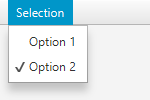
In this example, with both RadioMenuItem's assigned to the same
ToggleGroup, only one item may be
selected at any one time, and should
the selection change, the ToggleGroup will take care of deselecting the
previous item.
MenuItem, Menu
| Modifier and Type | Field and Description |
|---|---|
| private static final String | |
| private BooleanProperty | |
| private static final String | |
| private ObjectProperty | toggleGroup
Represents the |
| Access | Constructor and Description |
|---|---|
| public | |
| public | RadioMenuItem(String
the display text text)Constructs a RadioMenuItem and sets the display text with the specified text. |
| public | RadioMenuItem(String
the display text text, Node the graphic node graphic)Constructs a RadioMenuItem and sets the display text with the specified text
and sets the graphic |
| Modifier and Type | Method and Description |
|---|---|
| public final ToggleGroup | getToggleGroup()
Implements javafx. Returns The |
| public final boolean | isSelected()
Implements javafx. Indicates whether this |
| public final BooleanProperty | selectedProperty()
Implements javafx. The selected state for this |
| public final void | setSelected(boolean
true to make this Toggle selected.Implements javafx. Sets this |
| public final void | setToggleGroup(ToggleGroup
The new value)ToggleGroup.Implements javafx. Sets the |
| public final ObjectProperty | toggleGroupProperty()
Implements javafx. The |
| DEFAULT_STYLE_CLASS | back to summary |
|---|---|
| private static final String DEFAULT_STYLE_CLASS | |
| selected | back to summary |
|---|---|
| private BooleanProperty selected | |
| STYLE_CLASS_SELECTED | back to summary |
|---|---|
| private static final String STYLE_CLASS_SELECTED | |
| toggleGroup | back to summary |
|---|---|
| private ObjectProperty<ToggleGroup> toggleGroup Represents the | |
| RadioMenuItem | back to summary |
|---|---|
| public RadioMenuItem() Constructs a RadioMenuItem with no display text. | |
| RadioMenuItem | back to summary |
|---|---|
| public RadioMenuItem(String text) Constructs a RadioMenuItem and sets the display text with the specified text.
| |
| RadioMenuItem | back to summary |
|---|---|
| public RadioMenuItem(String text, Node graphic) Constructs a RadioMenuItem and sets the display text with the specified text
and sets the graphic | |
| getToggleGroup | back to summary |
|---|---|
| public final ToggleGroup getToggleGroup() Implements javafx. Doc from javafx. Returns The
| |
| isSelected | back to summary |
|---|---|
| public final boolean isSelected() Implements javafx. Doc from javafx. Indicates whether this
| |
| selectedProperty | back to summary |
|---|---|
| public final BooleanProperty selectedProperty() Implements javafx. Doc from javafx. The selected state for this
| |
| setSelected | back to summary |
|---|---|
| public final void setSelected(boolean value) Implements javafx. Doc from javafx. Sets this
| |
| setToggleGroup | back to summary |
|---|---|
| public final void setToggleGroup(ToggleGroup value) Implements javafx. Doc from javafx. Sets the
| |
| toggleGroupProperty | back to summary |
|---|---|
| public final ObjectProperty Implements javafx. Doc from javafx. The
| |