

NORTH, SOUTH, EAST,
WEST, and CENTER. When adding a
component to a container with a border layout, use one of these
five constants, for example:
   Panel p = new Panel();
   p.setLayout(new BorderLayout());
   p.add(new Button("Okay"), BorderLayout.SOUTH);
As a convenience, BorderLayout interprets the
absence of a string specification the same as the constant
CENTER:
   Panel p2 = new Panel();
   p2.setLayout(new BorderLayout());
   p2.add(new TextArea());  // Same as p.add(new TextArea(), BorderLayout.CENTER);
In addition, BorderLayout supports the relative
positioning constants, PAGE_START, PAGE_END,
LINE_START, and LINE_END.
In a container whose ComponentOrientation is set to
ComponentOrientation.LEFT_TO_RIGHT, these constants map to
NORTH, SOUTH, WEST, and
EAST, respectively.
For compatibility with previous releases, BorderLayout
also includes the relative positioning constants BEFORE_FIRST_LINE,
AFTER_LAST_LINE, BEFORE_LINE_BEGINS and
AFTER_LINE_ENDS. These are equivalent to
PAGE_START, PAGE_END, LINE_START
and LINE_END respectively. For
consistency with the relative positioning constants used by other
components, the latter constants are preferred.
Mixing both absolute and relative positioning constants can lead to
unpredictable results. If
you use both types, the relative constants will take precedence.
For example, if you add components using both the NORTH
and PAGE_START constants in a container whose
orientation is LEFT_TO_RIGHT, only the
PAGE_START will be laid out.
Note
Currently,
BorderLayout does not support vertical
orientations. The isVertical setting on the container's
ComponentOrientation is not respected.
The components are laid out according to their
preferred sizes and the constraints of the container's size.
The NORTH and SOUTH components may
be stretched horizontally; the EAST and
WEST components may be stretched vertically;
the CENTER component may stretch both horizontally
and vertically to fill any space left over.
Here is an example of five buttons in a window laid out using
the BorderLayout layout manager:
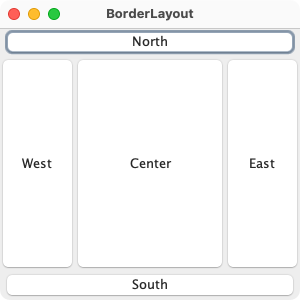
The code for this program is as follows:
import java.awt.BorderLayout;
import java.awt.Button;
import java.awt.EventQueue;
import java.awt.Frame;

public class BorderLayoutExample {

    public static void main(String[] args) throws Exception {
        EventQueue.invokeAndWait(() -> {
            Frame frame = new Frame("BorderLayout");
            frame.setLayout(new BorderLayout());
            frame.add(new Button("North"), BorderLayout.NORTH);
            frame.add(new Button("South"), BorderLayout.SOUTH);
            frame.add(new Button("East"), BorderLayout.EAST);
            frame.add(new Button("West"), BorderLayout.WEST);
            frame.add(new Button("Center"), BorderLayout.CENTER);
            frame.setSize(300, 300);
            frame.setVisible(true);
        });
    }
}
java.awt.Container#add(String, Component) , java.awt.ComponentOrientation
| Modifier and Type | Field and Description |
|---|---|
| public static final String | AFTER_LAST_LINE
Synonym for PAGE_END. |
| public static final String | AFTER_LINE_ENDS
Synonym for LINE_END. |
| public static final String | BEFORE_FIRST_LINE
Synonym for PAGE_START. |
| public static final String | BEFORE_LINE_BEGINS
Synonym for LINE_START. |
| pack-priv Component | center
Constant to specify components location to be the center portion of the border layout. |
| public static final String | CENTER
The center layout constraint (middle of container). |
| pack-priv Component | east
Constant to specify components location to be the east portion of the border layout. |
| public static final String | EAST
The east layout constraint (right side of container). |
| pack-priv Component | firstItem
A relative positioning constant, that can be used instead of north, south, east, west or center. |
| pack-priv Component | firstLine
A relative positioning constant, that can be used instead of north, south, east, west or center. |
| pack-priv int | hgap
Constructs a border layout with the horizontal gaps between components. |
| pack-priv Component | lastItem
A relative positioning constant, that can be used instead of north, south, east, west or center. |
| pack-priv Component | lastLine
A relative positioning constant, that can be used instead of north, south, east, west or center. |
| public static final String | LINE_END
The component goes at the end of the line direction for the layout. |
| public static final String | LINE_START
The component goes at the beginning of the line direction for the layout. |
| pack-priv Component | north
Constant to specify components location to be the north portion of the border layout. |
| public static final String | NORTH
The north layout constraint (top of container). |
| public static final String | PAGE_END
The component comes after the last line of the layout's content. |
| public static final String | PAGE_START
The component comes before the first line of the layout's content. |
| private static final long | serialVersionUID
Use serialVersionUID from JDK 1.1 for interoperability. |
| pack-priv Component | south
Constant to specify components location to be the south portion of the border layout. |
| public static final String | SOUTH
The south layout constraint (bottom of container). |
| pack-priv int | vgap
Constructs a border layout with the vertical gaps between components. |
| pack-priv Component | west
Constant to specify components location to be the west portion of the border layout. |
| public static final String | WEST
The west layout constraint (left side of container). |
| Access | Constructor and Description |
|---|---|
| public | |
| public | BorderLayout(int
the horizontal gap. hgap, int the vertical gap. vgap)Constructs a border layout with the specified gaps between components. |
| Modifier and Type | Method and Description |
|---|---|
| public void | addLayoutComponent(Component
the component to be added. comp, Object an object that specifies how and where
the component is added to the layout. constraints)Implements java. Adds the specified component to the layout, using the specified constraint object. |
| public void | addLayoutComponent(String name, Component comp)
Implements java.
Deprecated
replaced by
addLayoutComponent(Component, Object).
If the layout manager uses a per-component string,
adds the component |
| private Component | |
| public Object | Returns: the constraint for the specified component, or null if component is null or is not present in this layoutthe component to be queried comp)Gets the constraints for the specified component |
| public int | Returns: the horizontal gap between componentsReturns the horizontal gap between components. |
| public float | getLayoutAlignmentX(Container parent)
Implements java. Returns the alignment along the x axis. |
| public float | getLayoutAlignmentY(Container parent)
Implements java. Returns the alignment along the y axis. |
| public Component | Returns: the component at the given location, ornull if
the location is emptythe desired constraint, one of constraints)CENTER,
NORTH, SOUTH,
WEST, EAST,
PAGE_START, PAGE_END,
LINE_START, LINE_ENDGets the component that was added using the given constraint |
| public Component | Returns: the component at the given location, ornull if
the location is emptythe target, Object Container used to obtain
the constraint location based on the target
Container's component orientation.the desired absolute position, one of constraints)CENTER,
NORTH, SOUTH,
EAST, WESTReturns the component that corresponds to the given constraint location
based on the target |
| public int | |
| public void | invalidateLayout(Container target)
Implements java. Invalidates the layout, indicating that if the layout manager has cached information it should be discarded. |
| public void | layoutContainer(Container
the container in which to do the layout. target)Implements java. Lays out the container argument using this border layout. |
| public Dimension | maximumLayoutSize(Container
the component which needs to be laid out target)Implements java. Returns the maximum dimensions for this layout given the components in the specified target container. |
| public Dimension | Returns: the minimum dimensions needed to lay out the subcomponents of the specified container.the container in which to do the layout. target)Implements java. Determines the minimum size of the |
| public Dimension | Returns: the preferred dimensions to lay out the subcomponents of the specified container.the container in which to do the layout. target)Implements java. Determines the preferred size of the |
| public void | removeLayoutComponent(Component
the component to be removed. comp)Implements java. Removes the specified component from this border layout. |
| public void | |
| public void | |
| public String | Returns: a string representation of this border layout.Overrides java. Returns a string representation of the state of this border layout. |
| AFTER_LAST_LINE | back to summary |
|---|---|
| public static final String AFTER_LAST_LINE Synonym for PAGE_END. Exists for compatibility with previous versions. PAGE_END is preferred.
| |
| AFTER_LINE_ENDS | back to summary |
|---|---|
| public static final String AFTER_LINE_ENDS Synonym for LINE_END. Exists for compatibility with previous versions. LINE_END is preferred.
| |
| BEFORE_FIRST_LINE | back to summary |
|---|---|
| public static final String BEFORE_FIRST_LINE Synonym for PAGE_START. Exists for compatibility with previous versions. PAGE_START is preferred.
| |
| BEFORE_LINE_BEGINS | back to summary |
|---|---|
| public static final String BEFORE_LINE_BEGINS Synonym for LINE_START. Exists for compatibility with previous versions. LINE_START is preferred.
| |
| center | back to summary |
|---|---|
| pack-priv Component center Constant to specify components location to be the center portion of the border layout. | |
| CENTER | back to summary |
|---|---|
| public static final String CENTER The center layout constraint (middle of container). | |
| east | back to summary |
|---|---|
| pack-priv Component east Constant to specify components location to be the east portion of the border layout. | |
| EAST | back to summary |
|---|---|
| public static final String EAST The east layout constraint (right side of container). | |
| firstItem | back to summary |
|---|---|
| pack-priv Component firstItem A relative positioning constant, that can be used instead of north, south, east, west or center. Please read Description for firstLine. | |
| firstLine | back to summary |
|---|---|
| pack-priv Component firstLine A relative positioning constant, that can be used instead of
north, south, east, west or center.
mixing the two types of constants can lead to unpredictable results. If
you use both types, the relative constants will take precedence.
For example, if you add components using both the | |
| hgap | back to summary |
|---|---|
| pack-priv int hgap Constructs a border layout with the horizontal gaps
between components.
The horizontal gap is specified by
| |
| lastItem | back to summary |
|---|---|
| pack-priv Component lastItem A relative positioning constant, that can be used instead of north, south, east, west or center. Please read Description for firstLine. | |
| lastLine | back to summary |
|---|---|
| pack-priv Component lastLine A relative positioning constant, that can be used instead of north, south, east, west or center. Please read Description for firstLine. | |
| LINE_END | back to summary |
|---|---|
| public static final String LINE_END The component goes at the end of the line direction for the layout. For Western, left-to-right and top-to-bottom orientations, this is equivalent to EAST.
| |
| LINE_START | back to summary |
|---|---|
| public static final String LINE_START The component goes at the beginning of the line direction for the layout. For Western, left-to-right and top-to-bottom orientations, this is equivalent to WEST.
| |
| north | back to summary |
|---|---|
| pack-priv Component north Constant to specify components location to be the north portion of the border layout. | |
| NORTH | back to summary |
|---|---|
| public static final String NORTH The north layout constraint (top of container). | |
| PAGE_END | back to summary |
|---|---|
| public static final String PAGE_END The component comes after the last line of the layout's content. For Western, left-to-right and top-to-bottom orientations, this is equivalent to SOUTH.
| |
| PAGE_START | back to summary |
|---|---|
| public static final String PAGE_START The component comes before the first line of the layout's content. For Western, left-to-right and top-to-bottom orientations, this is equivalent to NORTH.
| |
| serialVersionUID | back to summary |
|---|---|
| private static final long serialVersionUID Use serialVersionUID from JDK 1.1 for interoperability. | |
| south | back to summary |
|---|---|
| pack-priv Component south Constant to specify components location to be the south portion of the border layout. | |
| SOUTH | back to summary |
|---|---|
| public static final String SOUTH The south layout constraint (bottom of container). | |
| vgap | back to summary |
|---|---|
| pack-priv int vgap Constructs a border layout with the vertical gaps
between components.
The vertical gap is specified by
| |
| west | back to summary |
|---|---|
| pack-priv Component west Constant to specify components location to be the west portion of the border layout. | |
| WEST | back to summary |
|---|---|
| public static final String WEST The west layout constraint (left side of container). | |
| BorderLayout | back to summary |
|---|---|
| public BorderLayout() Constructs a new border layout with no gaps between components. | |
| BorderLayout | back to summary |
|---|---|
| public BorderLayout(int hgap, int vgap) Constructs a border layout with the specified gaps
between components.
The horizontal gap is specified by
| |
| addLayoutComponent | back to summary |
|---|---|
| public void addLayoutComponent(Component comp, Object constraints) Implements java. Adds the specified component to the layout, using the specified
constraint object. For border layouts, the constraint must be
one of the following constants:
Most applications do not call this method directly. This method
is called when a component is added to a container using the
| |
| addLayoutComponent | back to summary |
|---|---|
| public void addLayoutComponent(String name, Component comp) Implements java. Doc from java. Deprecated replaced by If the layout manager uses a per-component string,
adds the component
| |
| getChild | back to summary |
|---|---|
| private Component getChild(String key, boolean ltr) Get the component that corresponds to the given constraint location
| |
| getConstraints | back to summary |
|---|---|
| public Object getConstraints(Component comp) Gets the constraints for the specified component
| |
| getHgap | back to summary |
|---|---|
| public int getHgap() Returns the horizontal gap between components.
| |
| getLayoutAlignmentX | back to summary |
|---|---|
| public float getLayoutAlignmentX(Container parent) Implements java. Returns the alignment along the x axis. This specifies how the component would like to be aligned relative to other components. The value should be a number between 0 and 1 where 0 represents alignment along the origin, 1 is aligned the furthest away from the origin, 0.5 is centered, etc. | |
| getLayoutAlignmentY | back to summary |
|---|---|
| public float getLayoutAlignmentY(Container parent) Implements java. Returns the alignment along the y axis. This specifies how the component would like to be aligned relative to other components. The value should be a number between 0 and 1 where 0 represents alignment along the origin, 1 is aligned the furthest away from the origin, 0.5 is centered, etc. | |
| getLayoutComponent | back to summary |
|---|---|
| public Component getLayoutComponent(Object constraints) Gets the component that was added using the given constraint
| |
| getLayoutComponent | back to summary |
|---|---|
| public Component getLayoutComponent(Container target, Object constraints) Returns the component that corresponds to the given constraint location
based on the target
| |
| getVgap | back to summary |
|---|---|
| public int getVgap() Returns the vertical gap between components.
| |
| invalidateLayout | back to summary |
|---|---|
| public void invalidateLayout(Container target) Implements java. Invalidates the layout, indicating that if the layout manager has cached information it should be discarded. | |
| layoutContainer | back to summary |
|---|---|
| public void layoutContainer(Container target) Implements java. Lays out the container argument using this border layout.
This method actually reshapes the components in the specified
container in order to satisfy the constraints of this
Most applications do not call this method directly. This method
is called when a container calls its
| |
| maximumLayoutSize | back to summary |
|---|---|
| public Dimension maximumLayoutSize(Container target) Implements java. Returns the maximum dimensions for this layout given the components in the specified target container.
| |
| minimumLayoutSize | back to summary |
|---|---|
| public Dimension minimumLayoutSize(Container target) Implements java. Determines the minimum size of the
This method is called when a container calls its
| |
| preferredLayoutSize | back to summary |
|---|---|
| public Dimension preferredLayoutSize(Container target) Implements java. Determines the preferred size of the
Most applications do not call this method directly. This method
is called when a container calls its
| |
| removeLayoutComponent | back to summary |
|---|---|
| public void removeLayoutComponent(Component comp) Implements java. Removes the specified component from this border layout. This
method is called when a container calls its
| |
| setHgap | back to summary |
|---|---|
| public void setHgap(int hgap) Sets the horizontal gap between components.
| |
| setVgap | back to summary |
|---|---|
| public void setVgap(int vgap) Sets the vertical gap between components.
| |
| toString | back to summary |
|---|---|
| public String toString() Overrides java. Returns a string representation of the state of this border layout.
| |

