

componentOrientation
property and may be one of two values:
ComponentOrientation.LEFT_TO_RIGHT
ComponentOrientation.RIGHT_TO_LEFT
align
property. The possible values are:
For example, the following picture shows a window using the flow layout manager (its default layout manager) to position three buttons:
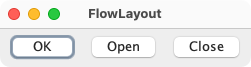
Here is the code for this program:
import java.awt.Button;
import java.awt.EventQueue;
import java.awt.FlowLayout;
import java.awt.Frame;

public class FlowLayoutExample {

    public static void main(String[] args) throws Exception {
        EventQueue.invokeAndWait(() -> {
            Frame frame = new Frame("FlowLayout");
            frame.setLayout(new FlowLayout());
            frame.add(new Button("OK"));
            frame.add(new Button("Open"));
            frame.add(new Button("Close"));
            frame.pack();
            frame.setVisible(true);
        });
    }
}
A flow layout lets each component assume its natural (preferred) size.
ComponentOrientation
| Modifier and Type | Field and Description |
|---|---|
| pack-priv int | align
|
| private boolean | |
| public static final int | CENTER
This value indicates that each row of components should be centered. |
| private static final int | |
| pack-priv int | hgap
The flow layout manager allows a separation of components with gaps. |
| public static final int | LEADING
This value indicates that each row of components should be justified to the leading edge of the container's orientation, for example, to the left in left-to-right orientations. |
| public static final int | LEFT
This value indicates that each row of components should be left-justified. |
| pack-priv int | newAlign
|
| public static final int | RIGHT
This value indicates that each row of components should be right-justified. |
| private int | serialVersionOnStream
This represents the |
| private static final long | serialVersionUID
Use serialVersionUID from JDK 1.1 for interoperability. |
| public static final int | TRAILING
This value indicates that each row of components should be justified to the trailing edge of the container's orientation, for example, to the right in left-to-right orientations. |
| pack-priv int | vgap
The flow layout manager allows a separation of components with gaps. |
| Access | Constructor and Description |
|---|---|
| public | FlowLayout()
Constructs a new |
| public | FlowLayout(int
the alignment value align)Constructs a new |
| public | FlowLayout(int
the alignment value align, int the horizontal gap between components
and between the components and the
borders of the hgap, int Containerthe vertical gap between components
and between the components and the
borders of the vgap)ContainerCreates a new flow layout manager with the indicated alignment and the indicated horizontal and vertical gaps. |
| Modifier and Type | Method and Description |
|---|---|
| public void | addLayoutComponent(String
the name of the component name, Component the component to be added comp)Implements java. Adds the specified component to the layout. |
| public int | |
| public boolean | Returns: true if components are to be vertically aligned along their baselineReturns true if components are to be vertically aligned along their baseline. |
| public int | Returns: the horizontal gap between components and between the components and the borders of theContainerGets the horizontal gap between components
and between the components and the borders
of the |
| public int | Returns: the vertical gap between components and between the components and the borders of theContainerGets the vertical gap between components and
between the components and the borders of the
|
| public void | layoutContainer(Container
the specified component being laid out target)Implements java. Lays out the container. |
| public Dimension | Returns: the minimum dimensions to lay out the subcomponents of the specified containerthe container that needs to be laid out target)Implements java. Returns the minimum dimensions needed to layout the visible components contained in the specified target container. |
| private int | Returns: actual row heightthe component which needs to be moved target, int the x coordinate x, int the y coordinate y, int the width dimensions width, int the height dimensions height, int the beginning of the row rowStart, int the ending of the row rowEnd, boolean ltr, boolean Whether or not to align on baseline. useBaseline, int[] Ascent for the components. This is only valid if
useBaseline is true. ascent, int[] Ascent for the components. This is only valid if
useBaseline is true. descent)Centers the elements in the specified row, if there is any slack. |
| public Dimension | Returns: the preferred dimensions to lay out the subcomponents of the specified containerthe container that needs to be laid out target)Implements java. Returns the preferred dimensions for this layout given the visible components in the specified target container. |
| private void | readObject(ObjectInputStream
the stream)ObjectInputStream to readReads this object out of a serialization stream, handling objects written by older versions of the class that didn't contain all of the fields we use now. |
| public void | removeLayoutComponent(Component
the component to remove comp)Implements java. Removes the specified component from the layout. |
| public void | |
| public void | setAlignOnBaseline(boolean
whether or not components should be
vertically aligned on their baseline alignOnBaseline)Sets whether or not components should be vertically aligned along their baseline. |
| public void | setHgap(int
the horizontal gap between components
and between the components and the borders
of the hgap)ContainerSets the horizontal gap between components and
between the components and the borders of the
|
| public void | setVgap(int
the vertical gap between components
and between the components and the borders
of the vgap)ContainerSets the vertical gap between components and between
the components and the borders of the |
| public String | Returns: a string representation of this layoutOverrides java. Returns a string representation of this |
| align | back to summary |
|---|---|
| pack-priv int align
| |
| alignOnBaseline | back to summary |
|---|---|
| private boolean alignOnBaseline | |
| CENTER | back to summary |
|---|---|
| public static final int CENTER This value indicates that each row of components should be centered. | |
| currentSerialVersion | back to summary |
|---|---|
| private static final int currentSerialVersion | |
| hgap | back to summary |
|---|---|
| pack-priv int hgap The flow layout manager allows a separation of
components with gaps. The horizontal gap will
specify the space between components and between
the components and the borders of the
| |
| LEADING | back to summary |
|---|---|
| public static final int LEADING This value indicates that each row of components should be justified to the leading edge of the container's orientation, for example, to the left in left-to-right orientations.
| |
| LEFT | back to summary |
|---|---|
| public static final int LEFT This value indicates that each row of components should be left-justified. | |
| newAlign | back to summary |
|---|---|
| pack-priv int newAlign
| |
| RIGHT | back to summary |
|---|---|
| public static final int RIGHT This value indicates that each row of components should be right-justified. | |
| serialVersionOnStream | back to summary |
|---|---|
| private int serialVersionOnStream This represents the
| |
| serialVersionUID | back to summary |
|---|---|
| private static final long serialVersionUID Use serialVersionUID from JDK 1.1 for interoperability. | |
| TRAILING | back to summary |
|---|---|
| public static final int TRAILING This value indicates that each row of components should be justified to the trailing edge of the container's orientation, for example, to the right in left-to-right orientations.
| |
| vgap | back to summary |
|---|---|
| pack-priv int vgap The flow layout manager allows a separation of
components with gaps. The vertical gap will
specify the space between rows and between the
the rows and the borders of the
| |
| FlowLayout | back to summary |
|---|---|
| public FlowLayout() Constructs a new | |
| FlowLayout | back to summary |
|---|---|
| public FlowLayout(int align) Constructs a new
| |
| FlowLayout | back to summary |
|---|---|
| public FlowLayout(int align, int hgap, int vgap) Creates a new flow layout manager with the indicated alignment and the indicated horizontal and vertical gaps.
The value of the alignment argument must be one of
| |
| addLayoutComponent | back to summary |
|---|---|
| public void addLayoutComponent(String name, Component comp) Implements java. Adds the specified component to the layout. Not used by this class. | |
| getAlignment | back to summary |
|---|---|
| public int getAlignment() Gets the alignment for this layout.
Possible values are
| |
| getAlignOnBaseline | back to summary |
|---|---|
| public boolean getAlignOnBaseline() Returns true if components are to be vertically aligned along their baseline. The default is false.
| |
| getHgap | back to summary |
|---|---|
| public int getHgap() Gets the horizontal gap between components
and between the components and the borders
of the
| |
| getVgap | back to summary |
|---|---|
| public int getVgap() Gets the vertical gap between components and
between the components and the borders of the
| |
| layoutContainer | back to summary |
|---|---|
| public void layoutContainer(Container target) Implements java. Lays out the container. This method lets each
visible component take
its preferred size by reshaping the components in the
target container in order to satisfy the alignment of
this
| |
| minimumLayoutSize | back to summary |
|---|---|
| public Dimension minimumLayoutSize(Container target) Implements java. Returns the minimum dimensions needed to layout the visible components contained in the specified target container.
| |
| moveComponents | back to summary |
|---|---|
| private int moveComponents(Container target, int x, int y, int width, int height, int rowStart, int rowEnd, boolean ltr, boolean useBaseline, int[] ascent, int[] descent) Centers the elements in the specified row, if there is any slack.
| |
| preferredLayoutSize | back to summary |
|---|---|
| public Dimension preferredLayoutSize(Container target) Implements java. Returns the preferred dimensions for this layout given the visible components in the specified target container.
| |
| readObject | back to summary |
|---|---|
| private void readObject(ObjectInputStream stream) throws IOException, ClassNotFoundException Reads this object out of a serialization stream, handling objects written by older versions of the class that didn't contain all of the fields we use now.
| |
| removeLayoutComponent | back to summary |
|---|---|
| public void removeLayoutComponent(Component comp) Implements java. Removes the specified component from the layout. Not used by this class.
| |
| setAlignment | back to summary |
|---|---|
| public void setAlignment(int align) Sets the alignment for this layout. Possible values are
| |
| setAlignOnBaseline | back to summary |
|---|---|
| public void setAlignOnBaseline(boolean alignOnBaseline) Sets whether or not components should be vertically aligned along their baseline. Components that do not have a baseline will be centered. The default is false.
| |
| setHgap | back to summary |
|---|---|
| public void setHgap(int hgap) Sets the horizontal gap between components and
between the components and the borders of the
| |
| setVgap | back to summary |
|---|---|
| public void setVgap(int vgap) Sets the vertical gap between components and between
the components and the borders of the
| |
| toString | back to summary |
|---|---|
| public String toString() Overrides java. Returns a string representation of this
| |

