

GridBagLayout class is a flexible layout
manager that aligns components vertically, horizontally or along their
baseline without requiring that the components be of the same size.
Each GridBagLayout object maintains a dynamic,
rectangular grid of cells, with each component occupying
one or more cells, called its display area.
Each component managed by a GridBagLayout is associated with
an instance of GridBagConstraints. The constraints object
specifies where a component's display area should be located on the grid
and how the component should be positioned within its display area. In
addition to its constraints object, the GridBagLayout also
considers each component's minimum and preferred sizes in order to
determine a component's size.
The overall orientation of the grid depends on the container's
ComponentOrientation property. For horizontal left-to-right
orientations, grid coordinate (0,0) is in the upper left corner of the
container with x increasing to the right and y increasing downward. For
horizontal right-to-left orientations, grid coordinate (0,0) is in the upper
right corner of the container with x increasing to the left and y
increasing downward.
To use a grid bag layout effectively, you must customize one or more
of the GridBagConstraints objects that are associated
with its components. You customize a GridBagConstraints
object by setting one or more of its instance variables:
GridBagConstraints#gridx,
GridBagConstraints#gridy
gridx = 0,
gridy = 0. For horizontal left-to-right layout,
a component's leading corner is its upper left. For horizontal
right-to-left layout, a component's leading corner is its upper right.
Use GridBagConstraints.RELATIVE (the default value)
to specify that the component be placed immediately following
(along the x axis for gridx or the y axis for
gridy) the component that was added to the container
just before this component was added.
GridBagConstraints#gridwidth,
GridBagConstraints#gridheight
gridwidth)
or column (for gridheight)
in the component's display area.
The default value is 1.
Use GridBagConstraints.REMAINDER to specify
that the component's display area will be from gridx
to the last cell in the row (for gridwidth)
or from gridy to the last cell in the column
(for gridheight).
Use GridBagConstraints.RELATIVE to specify
that the component's display area will be from gridx
to the next to the last cell in its row (for gridwidth)
or from gridy to the next to the last cell in its
column (for gridheight).
GridBagConstraints#fill
GridBagConstraints.NONE (the default),
GridBagConstraints.HORIZONTAL
(make the component wide enough to fill its display area
horizontally, but don't change its height),
GridBagConstraints.VERTICAL
(make the component tall enough to fill its display area
vertically, but don't change its width), and
GridBagConstraints.BOTH
(make the component fill its display area entirely).
GridBagConstraints#ipadx,
GridBagConstraints#ipady
ipadx pixels. Similarly, the height of
the component will be at least the minimum height plus
ipady pixels.
GridBagConstraints#insets
GridBagConstraints#anchor
ComponentOrientation property while absolute values
are not. Baseline relative values are calculated relative to the
baseline. Valid values are:
GridBagConstraints.NORTH
GridBagConstraints.SOUTH
GridBagConstraints.WEST
GridBagConstraints.EAST
GridBagConstraints.NORTHWEST
GridBagConstraints.NORTHEAST
GridBagConstraints.SOUTHWEST
GridBagConstraints.SOUTHEAST
GridBagConstraints.CENTER (the default)
GridBagConstraints.PAGE_START
GridBagConstraints.PAGE_END
GridBagConstraints.LINE_START
GridBagConstraints.LINE_END
GridBagConstraints.FIRST_LINE_START
GridBagConstraints.FIRST_LINE_END
GridBagConstraints.LAST_LINE_START
GridBagConstraints.LAST_LINE_END
GridBagConstraints.BASELINE
GridBagConstraints.BASELINE_LEADING
GridBagConstraints.BASELINE_TRAILING
GridBagConstraints.ABOVE_BASELINE
GridBagConstraints.ABOVE_BASELINE_LEADING
GridBagConstraints.ABOVE_BASELINE_TRAILING
GridBagConstraints.BELOW_BASELINE
GridBagConstraints.BELOW_BASELINE_LEADING
GridBagConstraints.BELOW_BASELINE_TRAILING
GridBagConstraints#weightx,
GridBagConstraints#weighty
weightx) and column (weighty),
all the components clump together in the center of their container.
This is because when the weight is zero (the default),
the GridBagLayout object puts any extra space
between its grid of cells and the edges of the container.
Each row may have a baseline; the baseline is determined by the
components in that row that have a valid baseline and are aligned
along the baseline (the component's anchor value is one of BASELINE, BASELINE_LEADING or BASELINE_TRAILING).
If none of the components in the row has a valid baseline, the row
does not have a baseline.
If a component spans rows it is aligned either to the baseline of
the start row (if the baseline-resize behavior is CONSTANT_ASCENT) or the end row (if the baseline-resize behavior
is CONSTANT_DESCENT). The row that the component is
aligned to is called the prevailing row.
The following figure shows a baseline layout and includes a component that spans rows:

CONSTANT_DESCENT and has
an anchor of BASELINE. As the baseline-resize behavior
is CONSTANT_DESCENT the prevailing row for the panel is
row 1.
CENTER_OFFSET and an anchor of BASELINE.
Components positioned using one of the baseline-relative values resize
differently than when positioned using an absolute or orientation-relative
value. How components change is dictated by how the baseline of the
prevailing row changes. The baseline is anchored to the
bottom of the display area if any components with the same prevailing row
have a baseline-resize behavior of CONSTANT_DESCENT,
otherwise the baseline is anchored to the top of the display area.
The following rules dictate the resize behavior:
OTHER are only resized if
the baseline at the resized size fits within the display area. If
the baseline is such that it does not fit within the display area
the component is not resized.
OTHER
can only grow as tall as display height - baseline + baseline of component.
The following figures show ten components (all buttons) managed by a grid bag layout. Figure 2 shows the layout for a horizontal, left-to-right container and Figure 3 shows the layout for a horizontal, right-to-left container.
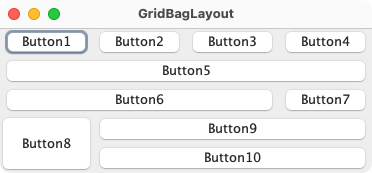
Figure 2: Horizontal, Left-to-Right
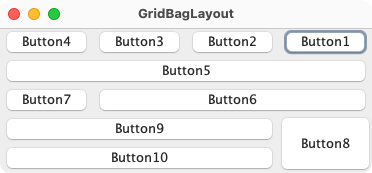
Figure 3: Horizontal, Right-to-Left
Each of the ten components has the fill field
of its associated GridBagConstraints object
set to GridBagConstraints.BOTH.
In addition, the components have the following non-default constraints:
weightx = 1.0
weightx = 1.0,
gridwidth = GridBagConstraints.REMAINDER
gridwidth = GridBagConstraints.REMAINDER
gridwidth = GridBagConstraints.RELATIVE
gridwidth = GridBagConstraints.REMAINDER
gridheight = 2,
weighty = 1.0
gridwidth = GridBagConstraints.REMAINDER
Here is the code that implements the example shown above:
import java.awt.Button;
import java.awt.EventQueue;
import java.awt.Frame;
import java.awt.GridBagConstraints;
import java.awt.GridBagLayout;

public class GridBagLayoutExample {

    private static void addButton(String name,
                                  GridBagLayout gridbag,
                                  GridBagConstraints c,
                                  Frame frame) {
        Button button = new Button(name);
        gridbag.setConstraints(button, c);
        frame.add(button);
    }

    public static void main(String[] args) throws Exception {
        EventQueue.invokeAndWait(() -> {
            Frame frame = new Frame("GridBagLayout");
            GridBagLayout gridbag = new GridBagLayout();
            GridBagConstraints c = new GridBagConstraints();
            frame.setLayout(gridbag);

            c.fill = GridBagConstraints.BOTH;
            c.weightx = 1.0;
            addButton("Button1", gridbag, c, frame);
            addButton("Button2", gridbag, c, frame);
            addButton("Button3", gridbag, c, frame);

            c.gridwidth = GridBagConstraints.REMAINDER; //end row
            addButton("Button4", gridbag, c, frame);

            c.weightx = 0.0;                //reset to the default
            addButton("Button5", gridbag, c, frame); //another row

            c.gridwidth = GridBagConstraints.RELATIVE; //next-to-last in row
            addButton("Button6", gridbag, c, frame);

            c.gridwidth = GridBagConstraints.REMAINDER; //end row
            addButton("Button7", gridbag, c, frame);

            c.gridwidth = 1;                //reset to the default
            c.gridheight = 2;
            c.weighty = 1.0;
            addButton("Button8", gridbag, c, frame);

            c.weighty = 0.0;                //reset to the default
            c.gridwidth = GridBagConstraints.REMAINDER; //end row
            c.gridheight = 1;               //reset to the default
            addButton("Button9", gridbag, c, frame);
            addButton("Button10", gridbag, c, frame);

            frame.pack();
            frame.setVisible(true);
        });
    }
}
java.awt.GridBagConstraints , java.awt.GridBagLayoutInfo , java.awt.ComponentOrientation
| Modifier and Type | Field and Description |
|---|---|
| public double[] | columnWeights
This field holds the overrides to the column weights. |
| public int[] | columnWidths
This field holds the overrides to the column minimum width. |
| private Component | |
| protected Hashtable | comptable
This hashtable maintains the association between a component and its gridbag constraints. |
| protected GridBagConstraints | defaultConstraints
This field holds a gridbag constraints instance
containing the default values, so if a component
does not have gridbag constraints associated with
it, then the component will be assigned a
copy of the |
| pack-priv static final int | |
| protected GridBagLayoutInfo | layoutInfo
This field holds the layout information for the gridbag. |
| protected static final int | MAXGRIDSIZE
This field is no longer used to reserve arrays and kept for backward compatibility. |
| protected static final int | MINSIZE
The smallest grid that can be laid out by the grid bag layout. |
| protected static final int | PREFERREDSIZE
The preferred grid size that can be laid out by the grid bag layout. |
| pack-priv transient boolean | |
| public int[] | rowHeights
This field holds the overrides to the row minimum heights. |
| public double[] | rowWeights
This field holds the overrides to the row weights. |
| private static final long | serialVersionUID
Use serialVersionUID from JDK 1.4 for interoperability. |
| Access | Constructor and Description |
|---|---|
| public |
| Modifier and Type | Method and Description |
|---|---|
| public void | addLayoutComponent(String name, Component comp)
Implements java. Has no effect, since this layout manager does not use a per-component string. |
| public void | addLayoutComponent(Component
the component to be added comp, Object an object that determines how
the component is added to the layout constraints)Implements java. Adds the specified component to the layout, using the specified
|
| protected void | adjustForGravity(GridBagConstraints
the constraints to be applied constraints, Rectangle the r)Rectangle to be adjustedAdjusts the x, y, width, and height fields to the correct values depending on the constraint geometry and pads. |
| protected void | AdjustForGravity(GridBagConstraints
the constraints to be applied constraints, Rectangle the r)Rectangle to be adjustedAdjusts the x, y, width, and height fields to the correct values depending on the constraint geometry and pads. |
| private void | alignAboveBaseline(GridBagConstraints cons, Rectangle r, int cellY, int cellHeight)
Positions the specified component above the baseline. |
| private void | alignBelowBaseline(GridBagConstraints cons, Rectangle r, int cellY, int cellHeight)
Positions below the baseline. |
| private void | alignOnBaseline(GridBagConstraints cons, Rectangle
available bounds for the component, is padded by insets and
ipady r, int the location of the row, does not include insets cellY, int the height of the row, does not take into account
insets cellHeight)Positions on the baseline. |
| protected void | |
| protected void | ArrangeGrid(Container
the layout container parent)This method is obsolete and supplied for backwards
compatibility only; new code should call |
| private boolean | calculateBaseline(Component c, GridBagConstraints constraints, Dimension size)
Calculate the baseline for the specified component. |
| private void | |
| public GridBagConstraints | Returns: the constraint for the specified component in this grid bag layout; a copy of the actual constraint object is returnedthe component to be queried comp)Gets the constraints for the specified component. |
| public float | Returns: the value0.5f to indicate centeredImplements java. Returns the alignment along the x axis. |
| public float | Returns: the value0.5f to indicate centeredImplements java. Returns the alignment along the y axis. |
| public int[][] | Returns: an array of two arrays, containing the widths of the layout columns and the heights of the layout rowsDetermines column widths and row heights for the layout grid. |
| protected GridBagLayoutInfo | Returns: theGridBagLayoutInfo for the set of childrenthe layout container parent, int either sizeflag)PREFERREDSIZE or
MINSIZEFills in an instance of |
| protected GridBagLayoutInfo | Returns: theGridBagLayoutInfo for the set of childrenthe layout container parent, int either sizeflag)PREFERREDSIZE or MINSIZEThis method is obsolete and supplied for backwards
compatibility only; new code should call |
| public Point | Returns: the graphics origin of the cell in the top-left corner of the layout gridDetermines the origin of the layout area, in the graphics coordinate space of the target container. |
| public double[][] | Returns: an array of two arrays, representing the horizontal weights of the layout columns and the vertical weights of the layout rowsDetermines the weights of the layout grid's columns and rows. |
| protected Dimension | Returns: aDimension object containing the
minimum sizethe layout container parent, GridBagLayoutInfo the layout info for this parent info)Figures out the minimum size of the
parent based on the information from |
| protected Dimension | Returns: aDimension object containing the
minimum sizethe layout container parent, GridBagLayoutInfo the layout info for this parent info)This method is obsolete and supplied for backwards
compatibility only; new code should call |
| public void | invalidateLayout(Container target)
Implements java. Invalidates the layout, indicating that if the layout manager has cached information it should be discarded. |
| public void | layoutContainer(Container
the container in which to do the layout parent)Implements java. Lays out the specified container using this grid bag layout. |
| public Point | Returns: an ordered pair of indexes that indicate which cell in the layout grid contains the point (x, y).the x coordinate of a point x, int the y coordinate of a point y)Determines which cell in the layout grid contains the point
specified by |
| protected GridBagConstraints | Returns: the constraints for the specified componentthe component to be queried comp)Retrieves the constraints for the specified component. |
| public Dimension | Returns: the maximum dimensions for this layoutthe container which needs to be laid out target)Implements java. Returns the maximum dimensions for this layout given the components in the specified target container. |
| public Dimension | Returns: the minimum size of theparent containerthe container in which to do the layout parent)Implements java. Determines the minimum size of the |
| public Dimension | Returns: the preferred size of theparent
containerthe container in which to do the layout parent)Implements java. Determines the preferred size of the |
| private long[] | |
| private void | removeConstraints(Component
the component to be modified comp)Removes the constraints for the specified component in this layout |
| public void | removeLayoutComponent(Component
the component to be removed. comp)Implements java. Removes the specified component from this layout. |
| public void | setConstraints(Component
the component to be modified comp, GridBagConstraints the constraints to be applied constraints)Sets the constraints for the specified component in this layout. |
| public String | Returns: a string representation of this grid bag layout.Overrides java. Returns a string representation of this grid bag layout's values. |
| columnWeights | back to summary |
|---|---|
| public double[] columnWeights This field holds the overrides to the column weights.
If this field is non- | |
| columnWidths | back to summary |
|---|---|
| public int[] columnWidths This field holds the overrides to the column minimum
width. If this field is non-
| |
| componentAdjusting | back to summary |
|---|---|
| private Component componentAdjusting | |
| comptable | back to summary |
|---|---|
| protected Hashtable<Component, GridBagConstraints> comptable This hashtable maintains the association between
a component and its gridbag constraints.
The Keys in
| |
| defaultConstraints | back to summary |
|---|---|
| protected GridBagConstraints defaultConstraints This field holds a gridbag constraints instance
containing the default values, so if a component
does not have gridbag constraints associated with
it, then the component will be assigned a
copy of the | |
| EMPIRICMULTIPLIER | back to summary |
|---|---|
| pack-priv static final int EMPIRICMULTIPLIER | |
| layoutInfo | back to summary |
|---|---|
| protected GridBagLayoutInfo layoutInfo This field holds the layout information
for the gridbag. The information in this field
is based on the most recent validation of the
gridbag.
If
| |
| MAXGRIDSIZE | back to summary |
|---|---|
| protected static final int MAXGRIDSIZE This field is no longer used to reserve arrays and kept for backward compatibility. Previously, this was the maximum number of grid positions (both horizontal and vertical) that could be laid out by the grid bag layout. Current implementation doesn't impose any limits on the size of a grid. | |
| MINSIZE | back to summary |
|---|---|
| protected static final int MINSIZE The smallest grid that can be laid out by the grid bag layout. | |
| PREFERREDSIZE | back to summary |
|---|---|
| protected static final int PREFERREDSIZE The preferred grid size that can be laid out by the grid bag layout. | |
| rightToLeft | back to summary |
|---|---|
| pack-priv transient boolean rightToLeft | |
| rowHeights | back to summary |
|---|---|
| public int[] rowHeights This field holds the overrides to the row minimum
heights. If this field is non-
| |
| rowWeights | back to summary |
|---|---|
| public double[] rowWeights This field holds the overrides to the row weights.
If this field is non- | |
| serialVersionUID | back to summary |
|---|---|
| private static final long serialVersionUID Use serialVersionUID from JDK 1.4 for interoperability. | |
| GridBagLayout | back to summary |
|---|---|
| public GridBagLayout() Creates a grid bag layout manager. | |
| addLayoutComponent | back to summary |
|---|---|
| public void addLayoutComponent(String name, Component comp) Implements java. Has no effect, since this layout manager does not use a per-component string. | |
| addLayoutComponent | back to summary |
|---|---|
| public void addLayoutComponent(Component comp, Object constraints) Implements java. Adds the specified component to the layout, using the specified
| |
| adjustForGravity | back to summary |
|---|---|
| protected void adjustForGravity(GridBagConstraints constraints, Rectangle r) Adjusts the x, y, width, and height fields to the correct
values depending on the constraint geometry and pads.
This method should only be used internally by
| |
| AdjustForGravity | back to summary |
|---|---|
| protected void AdjustForGravity(GridBagConstraints constraints, Rectangle r) Adjusts the x, y, width, and height fields to the correct values depending on the constraint geometry and pads.
This method is obsolete and supplied for backwards
compatibility only; new code should call
| |
| alignAboveBaseline | back to summary |
|---|---|
| private void alignAboveBaseline(GridBagConstraints cons, Rectangle r, int cellY, int cellHeight) Positions the specified component above the baseline. That is the bottom edge of the component will be aligned along the baseline. If the row does not have a baseline, this centers the component. | |
| alignBelowBaseline | back to summary |
|---|---|
| private void alignBelowBaseline(GridBagConstraints cons, Rectangle r, int cellY, int cellHeight) Positions below the baseline. | |
| alignOnBaseline | back to summary |
|---|---|
| private void alignOnBaseline(GridBagConstraints cons, Rectangle r, int cellY, int cellHeight) Positions on the baseline.
| |
| arrangeGrid | back to summary |
|---|---|
| protected void arrangeGrid(Container parent) Lays out the grid.
This method should only be used internally by
| |
| ArrangeGrid | back to summary |
|---|---|
| protected void ArrangeGrid(Container parent) This method is obsolete and supplied for backwards
compatibility only; new code should call
| |
| calculateBaseline | back to summary |
|---|---|
| private boolean calculateBaseline(Component c, GridBagConstraints constraints, Dimension size) Calculate the baseline for the specified component.
If | |
| centerVertically | back to summary |
|---|---|
| private void centerVertically(GridBagConstraints cons, Rectangle r, int cellHeight) | |
| getConstraints | back to summary |
|---|---|
| public GridBagConstraints getConstraints(Component comp) Gets the constraints for the specified component. A copy of
the actual
| |
| getLayoutAlignmentX | back to summary |
|---|---|
| public float getLayoutAlignmentX(Container parent) Implements java. Returns the alignment along the x axis. This specifies how the component would like to be aligned relative to other components. The value should be a number between 0 and 1 where 0 represents alignment along the origin, 1 is aligned the furthest away from the origin, 0.5 is centered, etc.
| |
| getLayoutAlignmentY | back to summary |
|---|---|
| public float getLayoutAlignmentY(Container parent) Implements java. Returns the alignment along the y axis. This specifies how the component would like to be aligned relative to other components. The value should be a number between 0 and 1 where 0 represents alignment along the origin, 1 is aligned the furthest away from the origin, 0.5 is centered, etc.
| |
| getLayoutDimensions | back to summary |
|---|---|
| public int[][] getLayoutDimensions() Determines column widths and row heights for the layout grid. Most applications do not call this method directly.
| |
| getLayoutInfo | back to summary |
|---|---|
| protected GridBagLayoutInfo getLayoutInfo(Container parent, int sizeflag) Fills in an instance of
This method should only be used internally by
| |
| GetLayoutInfo | back to summary |
|---|---|
| protected GridBagLayoutInfo GetLayoutInfo(Container parent, int sizeflag) This method is obsolete and supplied for backwards
compatibility only; new code should call
| |
| getLayoutOrigin | back to summary |
|---|---|
| public Point getLayoutOrigin() Determines the origin of the layout area, in the graphics coordinate
space of the target container. This value represents the pixel
coordinates of the top-left corner of the layout area regardless of
the
| |
| getLayoutWeights | back to summary |
|---|---|
| public double[][] getLayoutWeights() Determines the weights of the layout grid's columns and rows. Weights are used to calculate how much a given column or row stretches beyond its preferred size, if the layout has extra room to fill. Most applications do not call this method directly.
| |
| getMinSize | back to summary |
|---|---|
| protected Dimension getMinSize(Container parent, GridBagLayoutInfo info) Figures out the minimum size of the
parent based on the information from
| |
| GetMinSize | back to summary |
|---|---|
| protected Dimension GetMinSize(Container parent, GridBagLayoutInfo info) This method is obsolete and supplied for backwards
compatibility only; new code should call
| |
| invalidateLayout | back to summary |
|---|---|
| public void invalidateLayout(Container target) Implements java. Invalidates the layout, indicating that if the layout manager has cached information it should be discarded. | |
| layoutContainer | back to summary |
|---|---|
| public void layoutContainer(Container parent) Implements java. Lays out the specified container using this grid bag layout.
This method reshapes components in the specified container in
order to satisfy the constraints of this Most applications do not call this method directly.
| |
| location | back to summary |
|---|---|
| public Point location(int x, int y) Determines which cell in the layout grid contains the point
specified by
If the
| |
| lookupConstraints | back to summary |
|---|---|
| protected GridBagConstraints lookupConstraints(Component comp) Retrieves the constraints for the specified component.
The return value is not a copy, but is the actual
If
| |
| maximumLayoutSize | back to summary |
|---|---|
| public Dimension maximumLayoutSize(Container target) Implements java. Returns the maximum dimensions for this layout given the components in the specified target container.
| |
| minimumLayoutSize | back to summary |
|---|---|
| public Dimension minimumLayoutSize(Container parent) Implements java. Determines the minimum size of the Most applications do not call this method directly.
| |
| preferredLayoutSize | back to summary |
|---|---|
| public Dimension preferredLayoutSize(Container parent) Implements java. Determines the preferred size of the Most applications do not call this method directly.
| |
| preInitMaximumArraySizes | back to summary |
|---|---|
| private long[] preInitMaximumArraySizes(Container parent) | |
| removeConstraints | back to summary |
|---|---|
| private void removeConstraints(Component comp) Removes the constraints for the specified component in this layout
| |
| removeLayoutComponent | back to summary |
|---|---|
| public void removeLayoutComponent(Component comp) Implements java. Removes the specified component from this layout. Most applications do not call this method directly.
| |
| setConstraints | back to summary |
|---|---|
| public void setConstraints(Component comp, GridBagConstraints constraints) Sets the constraints for the specified component in this layout.
| |
| toString | back to summary |
|---|---|
| public String toString() Overrides java. Returns a string representation of this grid bag layout's values.
| |

