

GridLayout class is a layout manager that
lays out a container's components in a rectangular grid.
The container is divided into equal-sized rectangles,
and one component is placed in each rectangle.
For example, the following is a window that lays out six buttons
into three rows and two columns:
import java.awt.Button;
import java.awt.EventQueue;
import java.awt.Frame;
import java.awt.GridLayout;

public class GridLayoutExample {

    public static void main(String[] args) throws Exception {
        EventQueue.invokeAndWait(() -> {
            Frame frame = new Frame("GridLayout");
            frame.setLayout(new GridLayout(3, 2));
            frame.add(new Button("1"));
            frame.add(new Button("2"));
            frame.add(new Button("3"));
            frame.add(new Button("4"));
            frame.add(new Button("5"));
            frame.add(new Button("6"));
            frame.setSize(200, 200);
            frame.setVisible(true);
        });
    }
}
If the container's ComponentOrientation property is horizontal
and left-to-right, the above example produces the output shown in Figure 1.
If the container's ComponentOrientation property is horizontal
and right-to-left, the example produces the output shown in Figure 2.
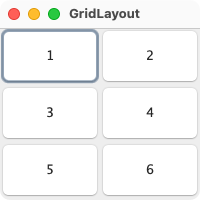
Figure 1: Horizontal, Left-to-Right
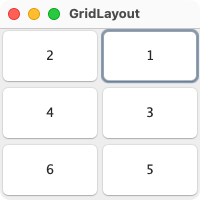
Figure 2: Horizontal, Right-to-Left
When both the number of rows and the number of columns have
been set to non-zero values, either by a constructor or
by the setRows and setColumns methods, the number of
columns specified is ignored. Instead, the number of
columns is determined from the specified number of rows
and the total number of components in the layout. So, for
example, if three rows and two columns have been specified
and nine components are added to the layout, they will
be displayed as three rows of three columns. Specifying
the number of columns affects the layout only when the
number of rows is set to zero.
| Modifier and Type | Field and Description |
|---|---|
| pack-priv int | cols
This is the number of columns specified for the grid. |
| pack-priv int | hgap
This is the horizontal gap (in pixels) which specifies the space between columns. |
| pack-priv int | rows
This is the number of rows specified for the grid. |
| private static final long | serialVersionUID
Use serialVersionUID from JDK 1.6 for interoperability. |
| pack-priv int | vgap
This is the vertical gap (in pixels) which specifies the space between rows. |
| Access | Constructor and Description |
|---|---|
| public | |
| public | GridLayout(int
the rows, with the value zero meaning
any number of rows. rows, int the columns, with the value zero meaning
any number of columns. cols)Creates a grid layout with the specified number of rows and columns. |
| public | GridLayout(int
the rows, with the value zero meaning
any number of rows rows, int the columns, with the value zero meaning
any number of columns cols, int the horizontal gap hgap, int the vertical gap vgap)Creates a grid layout with the specified number of rows and columns. |
| Modifier and Type | Method and Description |
|---|---|
| public void | addLayoutComponent(String
the name of the component name, Component the component to be added comp)Implements java. Adds the specified component with the specified name to the layout. |
| public int | |
| public int | |
| public int | |
| public int | |
| public void | layoutContainer(Container
the container in which to do the layout parent)Implements java. Lays out the specified container using this layout. |
| public Dimension | Returns: the minimum dimensions needed to lay out the subcomponents of the specified containerthe container in which to do the layout parent)Implements java. Determines the minimum size of the container argument using this grid layout. |
| public Dimension | Returns: the preferred dimensions to lay out the subcomponents of the specified containerthe container in which to do the layout parent)Implements java. Determines the preferred size of the container argument using this grid layout. |
| public void | removeLayoutComponent(Component
the component to be removed comp)Implements java. Removes the specified component from the layout. |
| public void | setColumns(int
the number of columns in this layout cols)Sets the number of columns in this layout to the specified value. |
| public void | setHgap(int
the horizontal gap between components hgap)Sets the horizontal gap between components to the specified value. |
| public void | setRows(int
the number of rows in this layout rows)Sets the number of rows in this layout to the specified value. |
| public void | setVgap(int
the vertical gap between components vgap)Sets the vertical gap between components to the specified value. |
| public String | Returns: a string representation of this grid layoutOverrides java. Returns the string representation of this grid layout's values. |
| cols | back to summary |
|---|---|
| pack-priv int cols This is the number of columns specified for the grid. The number of columns can be changed at any time. This should be a non negative integer, where '0' means 'any number' meaning that the number of Columns in that dimension depends on the other dimension.
| |
| hgap | back to summary |
|---|---|
| pack-priv int hgap This is the horizontal gap (in pixels) which specifies the space between columns. They can be changed at any time. This should be a non-negative integer.
| |
| rows | back to summary |
|---|---|
| pack-priv int rows This is the number of rows specified for the grid. The number of rows can be changed at any time. This should be a non negative integer, where '0' means 'any number' meaning that the number of Rows in that dimension depends on the other dimension.
| |
| serialVersionUID | back to summary |
|---|---|
| private static final long serialVersionUID Use serialVersionUID from JDK 1.6 for interoperability. | |
| vgap | back to summary |
|---|---|
| pack-priv int vgap This is the vertical gap (in pixels) which specifies the space between rows. They can be changed at any time. This should be a non negative integer.
| |
| GridLayout | back to summary |
|---|---|
| public GridLayout() Creates a grid layout with a default of one column per component, in a single row.
| |
| GridLayout | back to summary |
|---|---|
| public GridLayout(int rows, int cols) Creates a grid layout with the specified number of rows and columns. All components in the layout are given equal size.
One, but not both, of
| |
| GridLayout | back to summary |
|---|---|
| public GridLayout(int rows, int cols, int hgap, int vgap) Creates a grid layout with the specified number of rows and columns. All components in the layout are given equal size. In addition, the horizontal and vertical gaps are set to the specified values. Horizontal gaps are placed between each of the columns. Vertical gaps are placed between each of the rows.
One, but not both, of
All
| |
| addLayoutComponent | back to summary |
|---|---|
| public void addLayoutComponent(String name, Component comp) Implements java. Adds the specified component with the specified name to the layout. | |
| getColumns | back to summary |
|---|---|
| public int getColumns() Gets the number of columns in this layout.
| |
| getHgap | back to summary |
|---|---|
| public int getHgap() Gets the horizontal gap between components.
| |
| getRows | back to summary |
|---|---|
| public int getRows() Gets the number of rows in this layout.
| |
| getVgap | back to summary |
|---|---|
| public int getVgap() Gets the vertical gap between components.
| |
| layoutContainer | back to summary |
|---|---|
| public void layoutContainer(Container parent) Implements java. Lays out the specified container using this layout.
This method reshapes the components in the specified target
container in order to satisfy the constraints of the
The grid layout manager determines the size of individual components by dividing the free space in the container into equal-sized portions according to the number of rows and columns in the layout. The container's free space equals the container's size minus any insets and any specified horizontal or vertical gap. All components in a grid layout are given the same size.
| |
| minimumLayoutSize | back to summary |
|---|---|
| public Dimension minimumLayoutSize(Container parent) Implements java. Determines the minimum size of the container argument using this grid layout. The minimum width of a grid layout is the largest minimum width of all of the components in the container times the number of columns, plus the horizontal padding times the number of columns minus one, plus the left and right insets of the target container. The minimum height of a grid layout is the largest minimum height of all of the components in the container times the number of rows, plus the vertical padding times the number of rows minus one, plus the top and bottom insets of the target container.
| |
| preferredLayoutSize | back to summary |
|---|---|
| public Dimension preferredLayoutSize(Container parent) Implements java. Determines the preferred size of the container argument using this grid layout. The preferred width of a grid layout is the largest preferred width of all of the components in the container times the number of columns, plus the horizontal padding times the number of columns minus one, plus the left and right insets of the target container. The preferred height of a grid layout is the largest preferred height of all of the components in the container times the number of rows, plus the vertical padding times the number of rows minus one, plus the top and bottom insets of the target container.
| |
| removeLayoutComponent | back to summary |
|---|---|
| public void removeLayoutComponent(Component comp) Implements java. Removes the specified component from the layout.
| |
| setColumns | back to summary |
|---|---|
| public void setColumns(int cols) Sets the number of columns in this layout to the specified value.
Setting the number of columns has no effect on the layout
if the number of rows specified by a constructor or by
the
| |
| setHgap | back to summary |
|---|---|
| public void setHgap(int hgap) Sets the horizontal gap between components to the specified value.
| |
| setRows | back to summary |
|---|---|
| public void setRows(int rows) Sets the number of rows in this layout to the specified value.
| |
| setVgap | back to summary |
|---|---|
| public void setVgap(int vgap) Sets the vertical gap between components to the specified value.
| |
| toString | back to summary |
|---|---|
| public String toString() Overrides java. Returns the string representation of this grid layout's values.
| |

