

GroupLayout is a LayoutManager that hierarchically
groups components in order to position them in a Container.
GroupLayout is intended for use by builders, but may be
hand-coded as well.
Grouping is done by instances of the Group class. GroupLayout supports two types of groups. A sequential group
positions its child elements sequentially, one after another. A
parallel group aligns its child elements in one of four ways.
Each group may contain any number of elements, where an element is
a Group, Component, or gap. A gap can be thought
of as an invisible component with a minimum, preferred and maximum
size. In addition GroupLayout supports a preferred gap,
whose value comes from LayoutStyle.
Elements are similar to a spring. Each element has a range as
specified by a minimum, preferred and maximum. Gaps have either a
developer-specified range, or a range determined by LayoutStyle. The range for Components is determined from
the Component's getMinimumSize, getPreferredSize and getMaximumSize methods. In addition,
when adding Components you may specify a particular range
to use instead of that from the component. The range for a Group is determined by the type of group. A ParallelGroup's
range is the maximum of the ranges of its elements. A SequentialGroup's range is the sum of the ranges of its elements.
GroupLayout treats each axis independently. That is, there
is a group representing the horizontal axis, and a group
representing the vertical axis. The horizontal group is
responsible for determining the minimum, preferred and maximum size
along the horizontal axis as well as setting the x and width of the
components contained in it. The vertical group is responsible for
determining the minimum, preferred and maximum size along the
vertical axis as well as setting the y and height of the
components contained in it. Each Component must exist in both
a horizontal and vertical group, otherwise an IllegalStateException
is thrown during layout, or when the minimum, preferred or
maximum size is requested.
The following diagram shows a sequential group along the horizontal axis. The sequential group contains three components. A parallel group was used along the vertical axis.

To reinforce that each axis is treated independently the diagram shows the range of each group and element along each axis. The range of each component has been projected onto the axes, and the groups are rendered in blue (horizontal) and red (vertical). For readability there is a gap between each of the elements in the sequential group.
The sequential group along the horizontal axis is rendered as a solid blue line. Notice the sequential group is the sum of the children elements it contains.
Along the vertical axis the parallel group is the maximum of the height of each of the components. As all three components have the same height, the parallel group has the same height.
The following diagram shows the same three components, but with the parallel group along the horizontal axis and the sequential group along the vertical axis.

As c1 is the largest of the three components, the parallel
group is sized to c1. As c2 and c3 are smaller
than c1 they are aligned based on the alignment specified
for the component (if specified) or the default alignment of the
parallel group. In the diagram c2 and c3 were created
with an alignment of LEADING. If the component orientation were
right-to-left then c2 and c3 would be positioned on
the opposite side.
The following diagram shows a sequential group along both the horizontal and vertical axis.

GroupLayout provides the ability to insert gaps between
Components. The size of the gap is determined by an
instance of LayoutStyle. This may be turned on using the
setAutoCreateGaps method. Similarly, you may use
the setAutoCreateContainerGaps method to insert gaps
between components that touch the edge of the parent container and the
container.
The following builds a panel consisting of two labels in one column, followed by two textfields in the next column:
  JComponent panel = ...;
  GroupLayout layout = new GroupLayout(panel);
  panel.setLayout(layout);

  // Turn on automatically adding gaps between components
  layout.setAutoCreateGaps(true);

  // Turn on automatically creating gaps between components that touch
  // the edge of the container and the container.
  layout.setAutoCreateContainerGaps(true);

  // Create a sequential group for the horizontal axis.

  GroupLayout.SequentialGroup hGroup = layout.createSequentialGroup();

  // The sequential group in turn contains two parallel groups.
  // One parallel group contains the labels, the other the text fields.
  // Putting the labels in a parallel group along the horizontal axis
  // positions them at the same x location.
  //
  // Variable indentation is used to reinforce the level of grouping.
  hGroup.addGroup(layout.createParallelGroup().
           addComponent(label1).addComponent(label2));
  hGroup.addGroup(layout.createParallelGroup().
           addComponent(tf1).addComponent(tf2));
  layout.setHorizontalGroup(hGroup);

  // Create a sequential group for the vertical axis.
  GroupLayout.SequentialGroup vGroup = layout.createSequentialGroup();

  // The sequential group contains two parallel groups that align
  // the contents along the baseline. The first parallel group contains
  // the first label and text field, and the second parallel group contains
  // the second label and text field. By using a sequential group
  // the labels and text fields are positioned vertically after one another.
  vGroup.addGroup(layout.createParallelGroup(Alignment.BASELINE).
           addComponent(label1).addComponent(tf1));
  vGroup.addGroup(layout.createParallelGroup(Alignment.BASELINE).
           addComponent(label2).addComponent(tf2));
  layout.setVerticalGroup(vGroup);
When run the following is produced.
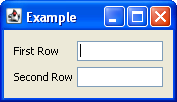
This layout consists of the following.
add methods of
Group.
add methods return
the caller. This allows for easy chaining of invocations. For
example, group.addComponent(label1).addComponent(label2); is
equivalent to
group.addComponent(label1); group.addComponent(label2);.
Groups; instead
use the create methods of GroupLayout.
| Modifier and Type | Class and Description |
|---|---|
| public static enum | GroupLayout.
Enumeration of the possible ways |
| private static class | GroupLayout.
Represents two springs that should have autopadding inserted between them. |
| private class | GroupLayout.
Spring reprensenting the distance between any number of sources and targets. |
| private class | GroupLayout.
An extension of |
| private class | GroupLayout.
Tracks the horizontal/vertical Springs for a Component. |
| private class | |
| private class | GroupLayout.
An extension of AutopaddingSpring used for container level padding. |
| private static class | GroupLayout.
Spring represented a certain amount of space. |
| public abstract class | GroupLayout.
|
| private static class | |
| public class | GroupLayout.
A |
| private class | GroupLayout.
Spring representing the preferred distance between two components. |
| public class | GroupLayout.
A |
| private abstract static class | GroupLayout.
Spring consists of a range: min, pref and max, a value some where in the middle of that, and a location. |
| private static class | GroupLayout.
Used by SequentialGroup in calculating resizability of springs. |
| Modifier and Type | Field and Description |
|---|---|
| private boolean | |
| private boolean | |
| private Map | |
| public static final int | DEFAULT_SIZE
Indicates the size from the component or gap should be used for a particular range value. |
| private boolean | |
| private boolean | honorsVisibility
If true, components that are not visible are treated as though they aren't there. |
| private GroupLayout. | horizontalGroup
Group responsible for layout along the horizontal axis. |
| private Container | |
| private static final int | |
| private boolean | |
| private LayoutStyle | layoutStyle
The LayoutStyle instance to use, if null the sharedInstance is used. |
| private static final int | |
| private static final int | |
| private static final int | |
| public static final int | PREFERRED_SIZE
Indicates the preferred size from the component or gap should be used for a particular range value. |
| private static final int | |
| private boolean | |
| private Set | |
| private static final int | |
| private GroupLayout. | verticalGroup
Group responsible for layout along the vertical axis. |
| Access | Constructor and Description |
|---|---|
| public | GroupLayout(Container
the host)Container the GroupLayout is
the LayoutManager forCreates a |
| Modifier and Type | Method and Description |
|---|---|
| public void | addLayoutComponent(String
the string to be associated with the component name, Component the component)Component to be addedImplements java. Notification that a |
| public void | addLayoutComponent(Component
the component added component, Object description of where to place the component constraints)Implements java. Notification that a |
| private Dimension | |
| private boolean | areParallelSiblings(Component source, Component target, int axis)
Returns |
| private void | |
| private void | |
| private static void | |
| private void | |
| private static void | |
| private static void | |
| public GroupLayout. | Returns: theParallelGroupwhether the group is resizable resizable, boolean whether the baseline is anchored to
the top or bottom of the group anchorBaselineToTop)Creates and returns a |
| public GroupLayout. | Returns: a newParallelGroupCreates and returns a |
| public GroupLayout. | Returns: a newParallelGroupthe alignment for the elements of the group alignmentCreates and returns a |
| public GroupLayout. | Returns: a newParallelGroupthe alignment for the elements of the group alignment,true if the group is resizable; if the group
is not resizable the preferred size is used for the
minimum and maximum size of the groupCreates and returns a |
| public GroupLayout. | |
| private void | |
| private GroupLayout. | createTopLevelGroup(GroupLayout.
Wraps the user specified group in a sequential group. |
| public boolean | Returns: true if gaps between the container and components that
border the container are automatically createdReturns |
| public boolean | Returns: true if gaps between components are automatically
createdReturns |
| private GroupLayout. | getComponentInfo(Component component)
Returns the |
| public boolean | Returns: whether component visibility is considered when sizing and positioning componentsReturns whether component visibility is considered when sizing and positioning components. |
| private GroupLayout. | Returns: theGroup responsible for positioning and
sizing component along the horizontal axisReturns the |
| public float | Returns: the alignment; this implementation returns.5the parent)Container hosting this LayoutManagerImplements java. Returns the alignment along the x axis. |
| public float | Returns: alignment; this implementation returns.5the parent)Container hosting this LayoutManagerImplements java. Returns the alignment along the y axis. |
| public LayoutStyle | Returns: theLayoutStyle used for calculating the preferred
gap between componentsReturns the |
| private LayoutStyle | |
| private GroupLayout. | Returns: theGroup responsible for positioning and
sizing component along the vertical axisReturns the |
| private void | insertAutopadding(boolean insert)
Adjusts the autopadding springs for the horizontal and vertical groups. |
| private void | |
| public void | invalidateLayout(Container
the parent)Container hosting this LayoutManagerImplements java. Invalidates the layout, indicating that if the layout manager has cached information it should be discarded. |
| private boolean | |
| public void | layoutContainer(Container
the container to be laid out parent)Implements java. Lays out the specified container. |
| public void | |
| public void | linkSize(int
the axis to link the size along; one of
axis, Component... SwingConstants.HORIZONTAL or
SwingConstants.VERTICALthe components)Components that are to have the same sizeForces the specified components to have the same size along the specified axis regardless of their preferred, minimum or maximum sizes. |
| public Dimension | Returns: the maximum size forparentthe container to return the size for parent)Implements java. Returns the maximum size for the specified container. |
| public Dimension | Returns: the minimum size forparentthe container to return the size for parent)Implements java. Returns the minimum size for the specified container. |
| public Dimension | Returns: the preferred size forparentthe container to return the preferred size for parent)Implements java. Returns the preferred size for the specified container. |
| private void | |
| private void | |
| public void | removeLayoutComponent(Component
the component to be removed component)Implements java. Notification that a |
| public void | |
| public void | setAutoCreateContainerGaps(boolean
whether a gap between the container and
components that touch the border of the container should
automatically be created autoCreateContainerPadding)Sets whether a gap between the container and components that touch the border of the container should automatically be created. |
| public void | setAutoCreateGaps(boolean
whether a gap between components is
automatically created autoCreatePadding)Sets whether a gap between components should automatically be created. |
| public void | setHonorsVisibility(boolean
whether component visibility is considered when
sizing and positioning components honorsVisibility)Sets whether component visibility is considered when sizing and positioning components. |
| public void | setHonorsVisibility(Component
the component component, Boolean whether visibility of this honorsVisibility)component should be
considered for sizing and positioningSets whether the component's visibility is considered for sizing and positioning. |
| public void | setHorizontalGroup(GroupLayout.
the groupGroup that positions and sizes
components along the horizontal axisSets the |
| public void | setLayoutStyle(LayoutStyle
the layoutStyle)LayoutStyle to useSets the |
| public void | setVerticalGroup(GroupLayout.
the groupGroup that positions and sizes
components along the vertical axisSets the |
| public String | Returns: a string representation of thisGroupLayoutOverrides java. Returns a string representation of this |

