


The user can type multiple words. The popup list is filtered checking if the string representation of an item contains all filter words (ignoring case).
After filtering the list, the user can select an entry by
When pressing ESCAPE while the popup is showing, the item that was selected when the popup opened will be re-selected (even if the user did select another item using the cursor keys.
Other than the ComboBox, the SearchableComboBox does open the Popup when using
the cursor keys (the ComboBox does only change the selected item without
opening the popup). This combined with the behavior of the ESCAPE key does allow to
go through the list of items with the cursor keys and than press ESCAPE to revert
the changes.
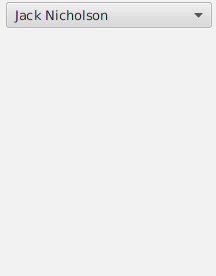
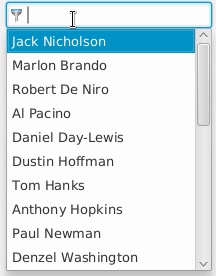
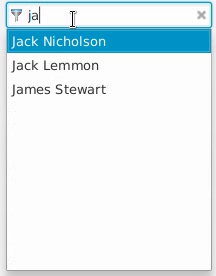
To select the first item ("Berlin"), the user can now either just press ENTER or TAB, or first select this item using the cursor DOWN key and press ENTER or TAB afterwards, or select this item using the mouse.
To select the second or third item, the user either must use the cursor keys first, use the mouse, or type more text until the searched item is the first (or only) item in the list.
If you want to modify an existing ComboBox you can set the skin to
SearchableComboBoxSkin (e.g. using ComboBox#setSkin(Skin) or in CSS.
SearchableComboBox
| Modifier and Type | Field and Description |
|---|---|
| private final ComboBox | filteredComboBox
A "normal" combobox used internally as a delegate to get the default combo box behavior. |
| private static final Image | |
| private T | previousValue
Used when pressing ESC |
| private final CustomTextField | searchField
The search field shown when the popup is shown. |
| Access | Constructor and Description |
|---|---|
| public |
| Modifier and Type | Method and Description |
|---|---|
| private void | |
| private void | |
| private void | |
| private ComboBox | |
| private FilteredList | |
| private CustomTextField | |
| private String | getDisplayText(T value)
Create a text for the given item, that can be used to compare with the filter text. |
| protected void | layoutChildren(double x, double y, double w, double h)
Overrides javafx. Called during the layout pass of the scenegraph. |
| private Predicate | |
| private Predicate | |
| private void | preventDefaultComboBoxKeyListener()
The default behavior of the ComboBoxListViewSkin is to close the popup on ENTER and SPACE, but we need to override this behavior. |
| private void |
| filteredComboBox | back to summary |
|---|---|
| private final ComboBox<T> filteredComboBox A "normal" combobox used internally as a delegate to get the default combo box behavior. This combo box contains the filtered items and handles the popup. | |
| filterIcon | back to summary |
|---|---|
| private static final Image filterIcon | |
| previousValue | back to summary |
|---|---|
| private T previousValue Used when pressing ESC | |
| searchField | back to summary |
|---|---|
| private final CustomTextField searchField The search field shown when the popup is shown. | |
| SearchableComboBoxSkin | back to summary |
|---|---|
| public SearchableComboBoxSkin(ComboBox<T> comboBox) | |
| bindSearchFieldAndFilteredComboBox | back to summary |
|---|---|
| private void bindSearchFieldAndFilteredComboBox() | |
| checkApplyAndCancel | back to summary |
|---|---|
| private void checkApplyAndCancel(KeyEvent e) Used to alter the behaviour. React on Enter, Tab and ESC. | |
| checkOpenPopup | back to summary |
|---|---|
| private void checkOpenPopup(KeyEvent e) Show the popup on UP, DOWN, and on beginning typing a word. | |
| createFilteredComboBox | back to summary |
|---|---|
| private ComboBox | |
| createFilteredList | back to summary |
|---|---|
| private FilteredList | |
| createSearchField | back to summary |
|---|---|
| private CustomTextField createSearchField() | |
| getDisplayText | back to summary |
|---|---|
| private String getDisplayText(T value) Create a text for the given item, that can be used to compare with the filter text. | |
| layoutChildren | back to summary |
|---|---|
| protected void layoutChildren(double x, double y, double w, double h) Overrides javafx. Doc from javafx. Called during the layout pass of the scenegraph.
| |
| predicate | back to summary |
|---|---|
| private Predicate Return the Predicate to filter the popup items based on the search field. | |
| predicate | back to summary |
|---|---|
| private Predicate Return the Predicate to filter the popup items based on the given search text. | |
| preventDefaultComboBoxKeyListener | back to summary |
|---|---|
| private void preventDefaultComboBoxKeyListener() The default behavior of the ComboBoxListViewSkin is to close the popup on ENTER and SPACE, but we need to override this behavior. | |
| updateFilter | back to summary |
|---|---|
| private void updateFilter() Called every time the filter text changes. | |