


Dialog class, and provides support for a number
of pre-built dialog types that can be easily shown to users to prompt for a
response. Therefore, for many users, the Alert class is the most suited class
for their needs (as opposed to using Dialog directly). Alternatively,
users who want to prompt a user for text input or to make a choice from a list
of options would be better served by using TextInputDialog and
ChoiceDialog, respectively.
When creating an Alert instance, users must pass in an AlertType
enumeration value. It is by passing in this value that the Alert instance will
configure itself appropriately (by setting default values for many of the
Dialog properties, including title,
header, and graphic,
as well as the default buttons that are expected in
a dialog of the given type.
To instantiate (but not yet show) an Alert, simply use code such as the following:
Alert alert = new Alert(AlertType.CONFIRMATION, "Are you sure you want to format your system?");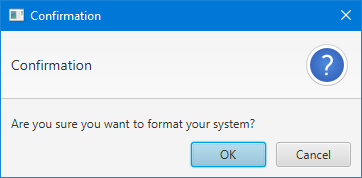
Once an Alert is instantiated, we must show it. More often than not, alerts (and dialogs in general) are shown in a modal and blocking fashion. 'Modal' means that the dialog prevents user interaction with the owning application whilst it is showing, and 'blocking' means that code execution stops at the point in which the dialog is shown. This means that you can show a dialog, await the user response, and then continue running the code that directly follows the show call, giving developers the ability to immediately deal with the user input from the dialog (if relevant).
JavaFX dialogs are modal by default (you can change this via the
initModality(javafx. API). To specify whether you want
blocking or non-blocking dialogs, developers simply choose to call
showAndWait() or show() (respectively). By default most
developers should choose to use showAndWait(), given the ease of
coding in these situations. Shown below is three code snippets, showing three
equally valid ways of showing the Alert dialog that was specified above:
Option 1: The 'traditional' approach
Optional<ButtonType> result = alert.showAndWait();
if (result.isPresent() && result.get() == ButtonType.OK) {
    formatSystem();
}
Option 2: The traditional + Optional approach
alert.showAndWait().ifPresent(response -> {
    if (response == ButtonType.OK) {
        formatSystem();
    }
});
Option 3: The fully lambda approach
alert.showAndWait()
     .filter(response -> response == ButtonType.OK)
     .ifPresent(response -> formatSystem());
There is no better or worse option of the three listed above, so developers
are encouraged to work to their own style preferences. The purpose of showing
the above is to help introduce developers to the Optional API, which
is new in Java 8 and may be foreign to many developers.
Dialog, AlertType, TextInputDialog, ChoiceDialog
| Modifier and Type | Class and Description |
|---|---|
| public static enum | Alert.
An enumeration containing the available, pre-built alert types that
the |
| Modifier and Type | Field and Description |
|---|---|
| private final ObjectProperty | |
| private final ListChangeListener | |
| private WeakReference | |
| private boolean | |
| private boolean | |
| private boolean | |
| private final InvalidationListener | |
| private boolean | |
| private final InvalidationListener |
| Access | Constructor and Description |
|---|---|
| public | |
| public |
| Modifier and Type | Method and Description |
|---|---|
| public final ObjectProperty | |
| public final Alert. | |
| public final ObservableList | Returns: anObservableList of all ButtonType instances that
are currently set inside this Alert instanceReturns an |
| public final void | |
| private void |
| alertType | back to summary |
|---|---|
| private final ObjectProperty<Alert. When creating an Alert instance, users must pass in an | |
| buttonsListener | back to summary |
|---|---|
| private final ListChangeListener<ButtonType> buttonsListener | |
| dialogPaneRef | back to summary |
|---|---|
| private WeakReference<DialogPane> dialogPaneRef | |
| hasCustomButtons | back to summary |
|---|---|
| private boolean hasCustomButtons | |
| hasCustomHeaderText | back to summary |
|---|---|
| private boolean hasCustomHeaderText | |
| hasCustomTitle | back to summary |
|---|---|
| private boolean hasCustomTitle | |
| headerTextListener | back to summary |
|---|---|
| private final InvalidationListener headerTextListener | |
| installingDefaults | back to summary |
|---|---|
| private boolean installingDefaults | |
| titleListener | back to summary |
|---|---|
| private final InvalidationListener titleListener | |
| Alert | back to summary |
|---|---|
| public Alert(Alert. Creates an alert with the given AlertType (refer to the By passing in an AlertType, default values for the
It is important to note that the one property that does not have a
default value set, and which therefore the developer must set, is the
| |
| Alert | back to summary |
|---|---|
| public Alert(Alert. Creates an alert with the given contentText, ButtonTypes, and AlertType
(refer to the By passing in a variable number of ButtonType arguments, the developer is directly overriding the default buttons that will be displayed in the dialog, replacing the pre-defined buttons with whatever is specified in the varargs array. By passing in an AlertType, default values for the
| |
| alertTypeProperty | back to summary |
|---|---|
| public final ObjectProperty | |
| getAlertType | back to summary |
|---|---|
| public final Alert. | |
| getButtonTypes | back to summary |
|---|---|
| public final ObservableList Returns an Readers should refer to the
| |
| setAlertType | back to summary |
|---|---|
| public final void setAlertType(Alert. | |
| updateListeners | back to summary |
|---|---|
| private void updateListeners() | |
Alert class can use to pre-populate various properties.
| Modifier and Type | Field and Description |
|---|---|
| public static final Alert. | CONFIRMATION
The CONFIRMATION alert type configures the Alert dialog to appear in a way that suggests the content of the dialog is seeking confirmation from the user. |
| public static final Alert. | ERROR
The ERROR alert type configures the Alert dialog to appear in a way that suggests that something has gone wrong. |
| public static final Alert. | INFORMATION
The INFORMATION alert type configures the Alert dialog to appear in a way that suggests the content of the dialog is informing the user of a piece of information. |
| public static final Alert. | NONE
The NONE alert type has the effect of not setting any default properties in the Alert. |
| public static final Alert. | WARNING
The WARNING alert type configures the Alert dialog to appear in a way that suggests the content of the dialog is warning the user about some fact or action. |
| Access | Constructor and Description |
|---|---|
| private |
| Modifier and Type | Method and Description |
|---|---|
| public static Alert. | |
| public static Alert. |
| CONFIRMATION | back to summary |
|---|---|
| public static final Alert. The CONFIRMATION alert type configures the Alert dialog to appear in a way that suggests the content of the dialog is seeking confirmation from the user. This includes a 'confirmation' image, an appropriate title and header, and both OK and Cancel buttons for the user to click on to dismiss the dialog. | |
| ERROR | back to summary |
|---|---|
| public static final Alert. The ERROR alert type configures the Alert dialog to appear in a way that suggests that something has gone wrong. This includes an 'error' image, an appropriate title and header, and just an OK button for the user to click on to dismiss the dialog. | |
| INFORMATION | back to summary |
|---|---|
| public static final Alert. The INFORMATION alert type configures the Alert dialog to appear in a way that suggests the content of the dialog is informing the user of a piece of information. This includes an 'information' image, an appropriate title and header, and just an OK button for the user to click on to dismiss the dialog. | |
| NONE | back to summary |
|---|---|
| public static final Alert. The NONE alert type has the effect of not setting any default properties in the Alert. | |
| WARNING | back to summary |
|---|---|
| public static final Alert. The WARNING alert type configures the Alert dialog to appear in a way that suggests the content of the dialog is warning the user about some fact or action. This includes a 'warning' image, an appropriate title and header, and just an OK button for the user to click on to dismiss the dialog. | |
| AlertType | back to summary |
|---|---|
| private AlertType() | |
| valueOf | back to summary |
|---|---|
| public static Alert. | |
| values | back to summary |
|---|---|
| public static Alert. | |