


result property.
DialogPane and provides the necessary API
to present it to end users. In JavaFX 8u40, this essentially means that the
DialogPane is shown to users inside a Stage, but future releases
may offer alternative options (such as 'lightweight' or 'internal' dialogs).
This API therefore is intentionally ignorant of the underlying implementation,
and attempts to present a common API for all possible implementations.
The Dialog class has a single generic type, R, which is used to represent
the type of the result property (and also, how to
convert from ButtonType to R, through the use of the
result converter Callback).
Critical note: It is critical that all developers who choose
to create their own dialogs by extending the Dialog class understand the
importance of the result converter property.
A result converter must always be set, whenever the R type is not
Void or ButtonType. If this is not heeded, developers will find
that they get ClassCastExceptions in their code, for failure to convert from
ButtonType via the result converter.
It is likely that most developers would be better served using either the
Alert class (for pre-defined, notification-style alerts), or either of
the two pre-built dialogs (TextInputDialog and ChoiceDialog),
depending on their needs.
Once a Dialog is instantiated, the next step is to configure it. Almost
all properties on Dialog are not related to the content of the Dialog, the
only exceptions are contentTextProperty(),
headerTextProperty(), and graphicProperty(), and these
properties are simply forwarding API onto the respective properties on the
DialogPane stored in the dialog pane
property. These three properties are forwarded from DialogPane for developer
convenience. For developers wanting to configure their dialog, they will in many
cases be required to use code along the lines of
dialog.getDialogPane().setExpandableContent(node).
After configuring these properties, all that remains is to consider whether
the buttons (created using ButtonType and the
DialogPane#createButton(ButtonType) method) are fully configured.
Developers will quickly find that the amount of configurability offered
via the ButtonType class is minimal. This is intentional, but does not
mean that developers can not modify the buttons created by the ButtonType
that have been specified. To do this, developers simply call the
DialogPane#lookupButton(ButtonType) method with the ButtonType
(assuming it has already been set in the DialogPane#getButtonTypes()
list. The returned Node is typically of type Button, but this depends
on if the DialogPane#createButton(ButtonType) method has been overridden. A
typical approach is therefore along the following lines:
 ButtonType loginButtonType = new ButtonType("Login", ButtonData.OK_DONE);
Dialog<String> dialog = new Dialog<>();
dialog.setTitle("Login Dialog");
dialog.setContentText("Would you like to log in?");
dialog.getDialogPane().getButtonTypes().add(loginButtonType);
boolean disabled = false; // computed based on content of text fields, for example
dialog.getDialogPane().lookupButton(loginButtonType).setDisable(disabled);
dialog.showAndWait();
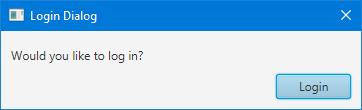
Once a Dialog is instantiated and fully configured, the next step is to show it. More often than not, dialogs are shown in a modal and blocking fashion. 'Modal' means that the dialog prevents user interaction with the owning application whilst it is showing, and 'blocking' means that code execution stops at the point in which the dialog is shown. This means that you can show a dialog, await the user response, and then continue running the code that directly follows the show call, giving developers the ability to immediately deal with the user input from the dialog (if relevant).
JavaFX dialogs are modal by default (you can change this via the
initModality(javafx. API). To specify whether you want
blocking or non-blocking dialogs, developers simply choose to call
showAndWait() or show() (respectively). By default most
developers should choose to use showAndWait(), given the ease of
coding in these situations. Shown below is three code snippets, showing three
equally valid ways of showing a dialog:
Option 1: The 'traditional' approach
 Optional<ButtonType> result = dialog.showAndWait();
if (result.isPresent() && result.get() == ButtonType.OK) {
    formatSystem();
}
Option 2: The traditional + Optional approach
 dialog.showAndWait().ifPresent(response -> {
    if (response == ButtonType.OK) {
        formatSystem();
    }
});
Option 3: The fully lambda approach
 dialog.showAndWait()
      .filter(response -> response == ButtonType.OK)
      .ifPresent(response -> formatSystem());
There is no better or worse option of the three listed above, so developers
are encouraged to work to their own style preferences. The purpose of showing
the above is to help introduce developers to the Optional API, which
is new in Java 8 and may be foreign to many developers.
In some circumstances it is desirable to prevent a dialog from closing
until some aspect of the dialog becomes internally consistent (e.g. a form
inside the dialog has all fields in a valid state). To do this, users of the
dialogs API should become familiar with the
DialogPane#lookupButton(ButtonType) method. By passing in a
ButtonType (that has already been set
in the button types list), users will be
returned a Node that is typically of type Button (but this depends
on if the DialogPane#createButton(ButtonType) method has been
overridden). With this button, users may add an event filter that is called
before the button does its usual event handling, and as such users may
prevent the event handling by consuming the event. Here's a simplified
example:
 final Button btOk = (Button) dlg.getDialogPane().lookupButton(ButtonType.OK);
btOk.addEventFilter(ActionEvent.ACTION, event -> {
    if (!validateAndStore()) {
        event.consume();
    }
});
It is important to understand what happens when a Dialog is closed, and also how a Dialog can be closed, especially in abnormal closing situations (such as when the 'X' button is clicked in a dialogs title bar, or when operating system specific keyboard shortcuts (such as alt-F4 on Windows) are entered). Fortunately, the outcome is well-defined in these situations, and can be best summarised in the following bullet points:
ButtonType whose ButtonData is of type
ButtonData#CANCEL_CLOSE.ButtonType whose ButtonData returns true
when ButtonData#isCancelButton() is called.DialogPane area of the dialog.
result property to whatever value is returned
from calling the result converter with
the first matching ButtonType.
result property will be null, and the
showAndWait() method will return Optional#empty(). This
later point means that, if you use either of option 2 or option 3 (as
presented earlier in this class documentation), the
Optional#ifPresent(java.util.function.Consumer) lambda will never
be called, and code will continue executing as if the dialog had not
returned any value at all.
Alert, TextInputDialog, ChoiceDialog
| Modifier and Type | Field and Description |
|---|---|
| pack-priv final FXDialog | |
| private ObjectProperty | dialogPane
The root node of the dialog, the |
| private final EventHandlerManager | |
| private static final PseudoClass | |
| private boolean | |
| private static final PseudoClass | |
| private ObjectProperty | onCloseRequest
Called when there is an external request to close this |
| private ObjectProperty | onHidden
Called just after the Dialog has been hidden. |
| private ObjectProperty | onHiding
Called just prior to the Dialog being hidden. |
| private ObjectProperty | onShowing
Called just prior to the Dialog being shown. |
| private ObjectProperty | onShown
Called just after the Dialog is shown. |
| private final ObjectProperty | |
| private final ObjectProperty |
| Access | Constructor and Description |
|---|---|
| public |
| Modifier and Type | Method and Description |
|---|---|
| public final <E extends Event> void | addEventFilter(EventType<E>
the type of the events received by the filter eventType, EventHandler<? super E> the event filter eventFilter)Overrides default javafx. Registers an event filter for this target. |
| public final <E extends Event> void | addEventHandler(EventType<E>
the type of the events received by the handler eventType, EventHandler<? super E> the event handler eventHandler)Overrides default javafx. Registers an event handler for this target. |
| public EventDispatchChain | buildEventDispatchChain(EventDispatchChain
the initial chain to build from tail)Implements javafx. Construct an event dispatch chain for this target. |
| public final void | |
| public final StringProperty | Returns: the property representing the content text for the dialog paneA property representing the content text for the dialog pane. |
| public final ObjectProperty | |
| public final String | Returns: the currently-set content text for this DialogPaneReturns the currently-set content text for this DialogPane. |
| public final DialogPane | |
| public final Node | |
| public final String | Returns: the currently-set header text for this DialogPaneReturns the currently-set header text for this DialogPane. |
| public final double | |
| public final Modality | |
| public final EventHandler | |
| public final EventHandler | |
| public final EventHandler | |
| public final EventHandler | |
| public final EventHandler | |
| public final Window | Returns: the owner Window.Retrieves the owner Window for this dialog, or null for an unowned dialog. |
| public final R | |
| public final Callback | |
| public final String | |
| public final double | |
| public final double | |
| public final double | |
| public final ObjectProperty | Returns: An ObjectProperty wrapping the current graphic.The dialog graphic, presented either in the header, if one is showing, or
to the left of the |
| public final StringProperty | Returns: a property representing the header text for the dialog paneA property representing the header text for the dialog pane. |
| public final ReadOnlyDoubleProperty | Returns: the property representing the height of the dialogProperty representing the height of the dialog. |
| public final void | |
| public final void | |
| public final void | |
| public final void | |
| public final boolean | |
| public final boolean | |
| public final ObjectProperty | |
| public final ObjectProperty | |
| public final ObjectProperty | |
| public final ObjectProperty | |
| public final ObjectProperty | |
| public final <E extends Event> void | removeEventFilter(EventType<E>
the event type from which to unregister eventType, EventHandler<? super E> the event filter eventFilter)Overrides default javafx. Unregisters a previously registered event filter from this target. |
| public final <E extends Event> void | removeEventHandler(EventType<E>
the event type from which to unregister eventType, EventHandler<? super E> the event handler eventHandler)Overrides default javafx. Unregisters a previously registered event handler from this target. |
| public final BooleanProperty | Returns: the property representing whether the dialog is resizableRepresents whether the dialog is resizable. |
| public final ObjectProperty | Returns: the API to convert theButtonType that the user clicked onAPI to convert the |
| public final ObjectProperty | Returns: a property representing what has been returned from the dialogA property representing what has been returned from the dialog. |
| public final void | setContentText(String
the string to show in the dialog content area contentText)Sets the string to show in the dialog content area. |
| public final void | |
| public final void | setGraphic(Node
The new dialog graphic, or null if no graphic should be shown. graphic)Sets the dialog graphic, which will be displayed either in the header, if
one is showing, or to the left of the |
| public final void | setHeaderText(String
the string to show in the dialog header area headerText)Sets the string to show in the dialog header area. |
| public final void | |
| public final void | |
| public final void | |
| public final void | |
| public final void | |
| public final void | |
| public final void | setResizable(boolean
true if dialog should be resizable. resizable)Sets whether the dialog can be resized by the user. |
| public final void | |
| pack-priv void | |
| public final void | |
| public final void | |
| public final void | |
| public final void | |
| public final void | |
| public final void | show()
Shows the dialog but does not wait for a user response (in other words, this brings up a non-blocking dialog). |
| public final Optional | showAndWait()
Shows the dialog and waits for the user response (in other words, brings up a blocking dialog, with the returned value the users input). |
| public final ReadOnlyBooleanProperty | Returns: the property representing whether the dialog is currently showingRepresents whether the dialog is currently showing. |
| public final StringProperty | |
| private void | |
| public final ReadOnlyDoubleProperty | Returns: the property representing the width of the dialogProperty representing the width of the dialog. |
| public final ReadOnlyDoubleProperty | |
| public final ReadOnlyDoubleProperty |
| dialog | back to summary |
|---|---|
| pack-priv final FXDialog dialog | |
| dialogPane | back to summary |
|---|---|
| private ObjectProperty<DialogPane> dialogPane The root node of the dialog, the | |
| eventHandlerManager | back to summary |
|---|---|
| private final EventHandlerManager eventHandlerManager | |
| HEADER_PSEUDO_CLASS | back to summary |
|---|---|
| private static final PseudoClass HEADER_PSEUDO_CLASS | |
| isClosing | back to summary |
|---|---|
| private boolean isClosing | |
| NO_HEADER_PSEUDO_CLASS | back to summary |
|---|---|
| private static final PseudoClass NO_HEADER_PSEUDO_CLASS | |
| onCloseRequest | back to summary |
|---|---|
| private ObjectProperty<EventHandler<DialogEvent>> onCloseRequest Called when there is an external request to close this | |
| onHidden | back to summary |
|---|---|
| private ObjectProperty<EventHandler<DialogEvent>> onHidden Called just after the Dialog has been hidden.
When the | |
| onHiding | back to summary |
|---|---|
| private ObjectProperty<EventHandler<DialogEvent>> onHiding Called just prior to the Dialog being hidden. | |
| onShowing | back to summary |
|---|---|
| private ObjectProperty<EventHandler<DialogEvent>> onShowing Called just prior to the Dialog being shown. | |
| onShown | back to summary |
|---|---|
| private ObjectProperty<EventHandler<DialogEvent>> onShown Called just after the Dialog is shown. | |
| resultConverterProperty | back to summary |
|---|---|
| private final ObjectProperty<Callback<ButtonType, R>> resultConverterProperty | |
| resultProperty | back to summary |
|---|---|
| private final ObjectProperty<R> resultProperty | |
| Dialog | back to summary |
|---|---|
| public Dialog() Creates a dialog without a specified owner. | |
| addEventFilter | back to summary |
|---|---|
| public final <E extends Event> void addEventFilter(EventType<E> eventType, EventHandler<? super E> eventFilter) Overrides default javafx. Doc from javafx. Registers an event filter for this target.
The filter is called when the target receives an
| |
| addEventHandler | back to summary |
|---|---|
| public final <E extends Event> void addEventHandler(EventType<E> eventType, EventHandler<? super E> eventHandler) Overrides default javafx. Doc from javafx. Registers an event handler for this target.
The handler is called when the target receives an
| |
| buildEventDispatchChain | back to summary |
|---|---|
| public EventDispatchChain buildEventDispatchChain(EventDispatchChain tail) Implements javafx. Doc from javafx. Construct an event dispatch chain for this target. The event dispatch
chain contains event dispatchers which might be interested in processing
of events targeted at this In the case the event target is part of some hierarchy, the chain for it is usually built from event dispatchers collected from the root of the hierarchy to the event target. The event dispatch chain is constructed by modifications to the provided initial event dispatch chain. The returned chain should have the initial chain at its end so the dispatchers should be prepended to the initial chain. The caller shouldn't assume that the initial chain remains unchanged nor that the returned value will reference a different chain.
| |
| close | back to summary |
|---|---|
| public final void close() Closes this | |
| contentTextProperty | back to summary |
|---|---|
| public final StringProperty contentTextProperty() A property representing the content text for the dialog pane. The content text
is lower precedence than the
| |
| dialogPaneProperty | back to summary |
|---|---|
| public final ObjectProperty | |
| getContentText | back to summary |
|---|---|
| public final String getContentText() Returns the currently-set content text for this DialogPane.
| |
| getDialogPane | back to summary |
|---|---|
| public final DialogPane getDialogPane() | |
| getGraphic | back to summary |
|---|---|
| public final Node getGraphic() | |
| getHeaderText | back to summary |
|---|---|
| public final String getHeaderText() Returns the currently-set header text for this DialogPane.
| |
| getHeight | back to summary |
|---|---|
| public final double getHeight() Returns the height of the dialog.
| |
| getModality | back to summary |
|---|---|
| public final Modality getModality() Retrieves the modality attribute for this dialog.
| |
| getOnCloseRequest | back to summary |
|---|---|
| public final EventHandler | |
| getOnHidden | back to summary |
|---|---|
| public final EventHandler | |
| getOnHiding | back to summary |
|---|---|
| public final EventHandler | |
| getOnShowing | back to summary |
|---|---|
| public final EventHandler | |
| getOnShown | back to summary |
|---|---|
| public final EventHandler | |
| getOwner | back to summary |
|---|---|
| public final Window getOwner() Retrieves the owner Window for this dialog, or null for an unowned dialog.
| |
| getResult | back to summary |
|---|---|
| public final R getResult() | |
| getResultConverter | back to summary |
|---|---|
| public final Callback | |
| getTitle | back to summary |
|---|---|
| public final String getTitle() Return the title of the dialog.
| |
| getWidth | back to summary |
|---|---|
| public final double getWidth() Returns the width of the dialog.
| |
| getX | back to summary |
|---|---|
| public final double getX() | |
| getY | back to summary |
|---|---|
| public final double getY() | |
| graphicProperty | back to summary |
|---|---|
| public final ObjectProperty The dialog graphic, presented either in the header, if one is showing, or
to the left of the
| |
| headerTextProperty | back to summary |
|---|---|
| public final StringProperty headerTextProperty() A property representing the header text for the dialog pane. The header text
is lower precedence than the
| |
| heightProperty | back to summary |
|---|---|
| public final ReadOnlyDoubleProperty heightProperty() Property representing the height of the dialog.
| |
| hide | back to summary |
|---|---|
| public final void hide() Hides this | |
| initModality | back to summary |
|---|---|
| public final void initModality(Modality modality) Specifies the modality for this dialog. This must be done prior to making the dialog visible. The modality is one of: Modality.NONE, Modality.WINDOW_MODAL, or Modality.APPLICATION_MODAL.
| |
| initOwner | back to summary |
|---|---|
| public final void initOwner(Window window) Specifies the owner
| |
| initStyle | back to summary |
|---|---|
| public final void initStyle(StageStyle style) Specifies the style for this dialog. This must be done prior to making the dialog visible. The style is one of: StageStyle.DECORATED, StageStyle.UNDECORATED, StageStyle.TRANSPARENT, StageStyle.UTILITY, or StageStyle.UNIFIED.
| |
| isResizable | back to summary |
|---|---|
| public final boolean isResizable() Returns whether or not the dialog is resizable.
| |
| isShowing | back to summary |
|---|---|
| public final boolean isShowing() Returns whether or not the dialog is showing.
| |
| onCloseRequestProperty | back to summary |
|---|---|
| public final ObjectProperty | |
| onHiddenProperty | back to summary |
|---|---|
| public final ObjectProperty | |
| onHidingProperty | back to summary |
|---|---|
| public final ObjectProperty | |
| onShowingProperty | back to summary |
|---|---|
| public final ObjectProperty | |
| onShownProperty | back to summary |
|---|---|
| public final ObjectProperty | |
| removeEventFilter | back to summary |
|---|---|
| public final <E extends Event> void removeEventFilter(EventType<E> eventType, EventHandler<? super E> eventFilter) Overrides default javafx. Doc from javafx. Unregisters a previously registered event filter from this target.
Since it is possible to register a single
| |
| removeEventHandler | back to summary |
|---|---|
| public final <E extends Event> void removeEventHandler(EventType<E> eventType, EventHandler<? super E> eventHandler) Overrides default javafx. Doc from javafx. Unregisters a previously registered event handler from this target.
Since it is possible to register a single
| |
| resizableProperty | back to summary |
|---|---|
| public final BooleanProperty resizableProperty() Represents whether the dialog is resizable.
| |
| resultConverterProperty | back to summary |
|---|---|
| public final ObjectProperty API to convert the
| |
| resultProperty | back to summary |
|---|---|
| public final ObjectProperty A property representing what has been returned from the dialog. A result
is generated through the
| |
| setContentText | back to summary |
|---|---|
| public final void setContentText(String contentText) Sets the string to show in the dialog content area. Note that the content text
is lower precedence than the
| |
| setDialogPane | back to summary |
|---|---|
| public final void setDialogPane(DialogPane value) | |
| setGraphic | back to summary |
|---|---|
| public final void setGraphic(Node graphic) Sets the dialog graphic, which will be displayed either in the header, if
one is showing, or to the left of the
| |
| setHeaderText | back to summary |
|---|---|
| public final void setHeaderText(String headerText) Sets the string to show in the dialog header area. Note that the header text
is lower precedence than the
| |
| setHeight | back to summary |
|---|---|
| public final void setHeight(double height) Sets the height of the dialog.
| |
| setOnCloseRequest | back to summary |
|---|---|
| public final void setOnCloseRequest(EventHandler<DialogEvent> value) | |
| setOnHidden | back to summary |
|---|---|
| public final void setOnHidden(EventHandler<DialogEvent> value) | |
| setOnHiding | back to summary |
|---|---|
| public final void setOnHiding(EventHandler<DialogEvent> value) | |
| setOnShowing | back to summary |
|---|---|
| public final void setOnShowing(EventHandler<DialogEvent> value) | |
| setOnShown | back to summary |
|---|---|
| public final void setOnShown(EventHandler<DialogEvent> value) | |
| setResizable | back to summary |
|---|---|
| public final void setResizable(boolean resizable) Sets whether the dialog can be resized by the user. Resizable dialogs can also be maximized ( maximize button becomes visible)
| |
| setResult | back to summary |
|---|---|
| public final void setResult(R value) | |
| setResultAndClose | back to summary |
|---|---|
pack-priv void setResultAndClose(ButtonType cmd, boolean close)
| |
| setResultConverter | back to summary |
|---|---|
| public final void setResultConverter(Callback<ButtonType, R> value) | |
| setTitle | back to summary |
|---|---|
| public final void setTitle(String title) Change the Title of the dialog.
| |
| setWidth | back to summary |
|---|---|
| public final void setWidth(double width) Sets the width of the dialog.
| |
| setX | back to summary |
|---|---|
| public final void setX(double x) | |
| setY | back to summary |
|---|---|
| public final void setY(double y) | |
| show | back to summary |
|---|---|
| public final void show() Shows the dialog but does not wait for a user response (in other words,
this brings up a non-blocking dialog). Users of this API must either
poll the
| |
| showAndWait | back to summary |
|---|---|
| public final Optional Shows the dialog and waits for the user response (in other words, brings up a blocking dialog, with the returned value the users input).
This method must be called on the JavaFX Application thread.
Additionally, it must either be called from an input event handler or
from the run method of a Runnable passed to
| |
| showingProperty | back to summary |
|---|---|
| public final ReadOnlyBooleanProperty showingProperty() Represents whether the dialog is currently showing.
| |
| titleProperty | back to summary |
|---|---|
| public final StringProperty titleProperty() Return the titleProperty of the dialog.
| |
| updatePseudoClassState | back to summary |
|---|---|
| private void updatePseudoClassState() | |
| widthProperty | back to summary |
|---|---|
| public final ReadOnlyDoubleProperty widthProperty() Property representing the width of the dialog.
| |
| xProperty | back to summary |
|---|---|
| public final ReadOnlyDoubleProperty xProperty() The horizontal location of this
| |
| yProperty | back to summary |
|---|---|
| public final ReadOnlyDoubleProperty yProperty() The vertical location of this
| |