


A popup control containing an ObservableList of menu items. The items
ObservableList allows for any MenuItem type to be inserted,
including its subclasses Menu, MenuItem, RadioMenuItem, CheckMenuItem and
CustomMenuItem. If an arbitrary Node needs to be
inserted into a menu, a CustomMenuItem can be used. One exception to this general rule is that
SeparatorMenuItem could be used for inserting a separator.
A common use case for this class is creating and showing context menus to users. To create a context menu using ContextMenu you can do the following:
final ContextMenu contextMenu = new ContextMenu();
contextMenu.setOnShowing(new EventHandler<WindowEvent>() {
    public void handle(WindowEvent e) {
        System.out.println("showing");
    }
});
contextMenu.setOnShown(new EventHandler<WindowEvent>() {
    public void handle(WindowEvent e) {
        System.out.println("shown");
    }
});

MenuItem item1 = new MenuItem("About");
item1.setOnAction(new EventHandler<ActionEvent>() {
    public void handle(ActionEvent e) {
        System.out.println("About");
    }
});
MenuItem item2 = new MenuItem("Preferences");
item2.setOnAction(new EventHandler<ActionEvent>() {
    public void handle(ActionEvent e) {
        System.out.println("Preferences");
    }
});
contextMenu.getItems().addAll(item1, item2);

final TextField textField = new TextField("Type Something");
textField.setContextMenu(contextMenu);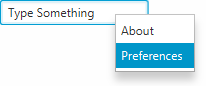
Control#setContextMenu(javafx. convenience
method can be used to set a context menu on on any control. The example above results in the
context menu being displayed on the right Side
of the TextField. Alternatively, an event handler can also be set on the control
to invoke the context menu as shown below.
textField.setOnAction(new EventHandler<ActionEvent>() {
    public void handle(ActionEvent e) {
        contextMenu.show(textField, Side.BOTTOM, 0, 0);
    }
});

Group root = (Group) scene.getRoot();
root.getChildren().add(textField);
In this example, the context menu is shown when the user clicks on the
Button (of course, you should use the
MenuButton control to do this rather than doing the above).
Note that the show function used in the code sample
above will result in the ContextMenu appearing directly beneath the
TextField. You can vary the Side to get the results you expect.
MenuItem, Menu
| Modifier and Type | Field and Description |
|---|---|
| private static final String | |
| private final ObservableList | |
| private ObjectProperty | onAction
Callback function to be informed when an item contained within this
|
| private boolean |
| Access | Constructor and Description |
|---|---|
| public | |
| public | ContextMenu(MenuItem...
the list of menu items items)Create a new ContextMenu initialized with the given items |
| Modifier and Type | Method and Description |
|---|---|
| protected Skin | createDefaultSkin()
Overrides javafx. Create a new instance of the default skin for this control. |
| private void | |
| public final ObservableList | |
| public final EventHandler | |
| public void | hide()
Overrides javafx. Hides this |
| pack-priv final boolean | |
| public final ObjectProperty | |
| public final void | |
| pack-priv final void | |
| public void | show(Node
the anchor node anchor, Side the side side, double the dx value for the x-axis dx, double the dy value for the y-axis dy)Shows the |
| public void | show(Node
the anchor node anchor, double the x position of the anchor in screen coordinates screenX, double the y position of the anchor in screen coordinates screenY)Overrides javafx. Shows the |
| DEFAULT_STYLE_CLASS | back to summary |
|---|---|
| private static final String DEFAULT_STYLE_CLASS | |
| items | back to summary |
|---|---|
| private final ObservableList<MenuItem> items | |
| onAction | back to summary |
|---|---|
| private ObjectProperty<EventHandler<ActionEvent>> onAction Callback function to be informed when an item contained within this
| |
| showRelativeToWindow | back to summary |
|---|---|
| private boolean showRelativeToWindow | |
| ContextMenu | back to summary |
|---|---|
| public ContextMenu() Create a new ContextMenu | |
| ContextMenu | back to summary |
|---|---|
| public ContextMenu(MenuItem... items) Create a new ContextMenu initialized with the given items
| |
| createDefaultSkin | back to summary |
|---|---|
| protected Skin Overrides javafx. Doc from javafx. Create a new instance of the default skin for this control. This is called to create a skin for the control if
no skin is provided via CSS | |
| doShow | back to summary |
|---|---|
| private void doShow(Node anchor, double screenX, double screenY) | |
| getItems | back to summary |
|---|---|
| public final ObservableList The menu items on the context menu. If this ObservableList is modified at runtime, the ContextMenu will update as expected.
| |
| getOnAction | back to summary |
|---|---|
| public final EventHandler | |
| hide | back to summary |
|---|---|
| public void hide() Overrides javafx. Hides this
If this
| |
| isShowRelativeToWindow | back to summary |
|---|---|
| pack-priv final boolean isShowRelativeToWindow() | |
| onActionProperty | back to summary |
|---|---|
| public final ObjectProperty | |
| setOnAction | back to summary |
|---|---|
| public final void setOnAction(EventHandler<ActionEvent> value) | |
| setShowRelativeToWindow | back to summary |
|---|---|
| pack-priv final void setShowRelativeToWindow(boolean value) | |
| show | back to summary |
|---|---|
| public void show(Node anchor, Side side, double dx, double dy) Shows the
To clarify the purpose of the This function is useful for finely tuning the position of a menu, relative to the parent node to ensure close alignment. | |
| show | back to summary |
|---|---|
| public void show(Node anchor, double screenX, double screenY) Overrides javafx. Shows the | |