

ListView control, with the addition of support for columns. For an
example on how to create a TableView, refer to the 'Creating a TableView'
control section below.
The TableView control has a number of features, including:
TableColumn API:
cell factories to
easily customize cell contents in both rendering and editing
states.
minWidth/
prefWidth/
maxWidth,
and also fixed width columns.
column nesting
resizing policies to
dictate what happens when the user resizes columns.
multiple column sorting by clicking
the column header (hold down Shift keyboard key whilst clicking on a
header to sort by multiple columns).
Note that TableView is intended to be used to visualize data - it is not
intended to be used for laying out your user interface. If you want to lay
your user interface out in a grid-like fashion, consider the
javafx. layout instead.
Creating a TableView is a multi-step process, and also depends on the
underlying data model needing to be represented. For this example we'll use
an ObservableList<Person>, as it is the simplest way of showing data in a
TableView. The Person class will consist of a first
name and last name properties. That is:
 public class Person {
    private StringProperty firstName;
    public void setFirstName(String value) { firstNameProperty().set(value); }
    public String getFirstName() { return firstNameProperty().get(); }
    public StringProperty firstNameProperty() {
        if (firstName == null) firstName = new SimpleStringProperty(this, "firstName");
        return firstName;
    }

    private StringProperty lastName;
    public void setLastName(String value) { lastNameProperty().set(value); }
    public String getLastName() { return lastNameProperty().get(); }
    public StringProperty lastNameProperty() {
        if (lastName == null) lastName = new SimpleStringProperty(this, "lastName");
        return lastName;
    }

    public Person(String firstName, String lastName) {
        setFirstName(firstName);
        setLastName(lastName);
    }
}
The data we will use for this example is:
 List<Person> members = List.of(
    new Person("William", "Reed"),
    new Person("James", "Michaelson"),
    new Person("Julius", "Dean"));
Firstly, we need to create a data model. As mentioned, for this example, we'll be using an ObservableList<Person>:
ObservableList<Person> teamMembers = FXCollections.observableArrayList(members);
Then we create a TableView instance:
 TableView<Person> table = new TableView<>();
table.setItems(teamMembers);
With the items set as such, TableView will automatically update whenever
the teamMembers list changes. If the items list is available
before the TableView is instantiated, it is possible to pass it directly into
the constructor:
TableView<Person> table = new TableView<>(teamMembers);
At this point we now have a TableView hooked up to observe the
teamMembers observableList. The missing ingredient
now is the means of splitting out the data contained within the model and
representing it in one or more TableColumn instances. To
create a two-column TableView to show the firstName and lastName properties,
we extend the last code sample as follows:
 TableColumn<Person, String> firstNameCol = new TableColumn<>("First Name");
firstNameCol.setCellValueFactory(new PropertyValueFactory<>(members.get(0).firstNameProperty().getName())));
TableColumn<Person, String> lastNameCol = new TableColumn<>("Last Name");
lastNameCol.setCellValueFactory(new PropertyValueFactory<>(members.get(0).lastNameProperty().getName())));

table.getColumns().setAll(firstNameCol, lastNameCol);
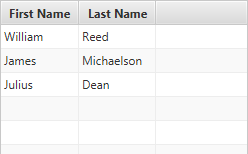
With the code shown above we have fully defined the minimum properties required to create a TableView instance. Running this code will result in the TableView being shown with two columns for firstName and lastName. Any other properties of the Person class will not be shown, as no TableColumns are defined.
The code shown above is the shortest possible code for creating a TableView
when the domain objects are designed with JavaFX properties in mind
(additionally, javafx. supports
normal JavaBean properties too, although there is a caveat to this, so refer
to the class documentation for more information). When this is not the case,
it is necessary to provide a custom cell value factory. More information
about cell value factories can be found in the TableColumn API
documentation, but briefly, here is how a TableColumn could be specified:
 firstNameCol.setCellValueFactory(new Callback<CellDataFeatures<Person, String>, ObservableValue<String>>() {
    public ObservableValue<String> call(CellDataFeatures<Person, String> p) {
        // p.getValue() returns the Person instance for a particular TableView row
        return p.getValue().firstNameProperty();
    }
});

// or with a lambda expression:
firstNameCol.setCellValueFactory(p -> p.getValue().firstNameProperty());
To track selection and focus, it is necessary to become familiar with the
SelectionModel and FocusModel classes. A TableView has at most
one instance of each of these classes, available from
selectionModel and
focusModel properties respectively.
Whilst it is possible to use this API to set a new selection model, in
most circumstances this is not necessary - the default selection and focus
models should work in most circumstances.
The default SelectionModel used when instantiating a TableView is
an implementation of the MultipleSelectionModel abstract class.
However, as noted in the API documentation for
the selectionMode
property, the default value is SelectionMode#SINGLE. To enable
multiple selection in a default TableView instance, it is therefore necessary
to do the following:
tableView.getSelectionModel().setSelectionMode(SelectionMode.MULTIPLE);
The visuals of the TableView can be entirely customized by replacing the
default row factory. A row factory is used to
generate TableRow instances, which are used to represent an entire
row in the TableView.
In many cases, this is not what is desired however, as it is more commonly
the case that cells be customized on a per-column basis, not a per-row basis.
It is therefore important to note that a TableRow is not a
TableCell. A TableRow is simply a container for zero or more
TableCell, and in most circumstances it is more likely that you'll
want to create custom TableCells, rather than TableRows. The primary use case
for creating custom TableRow instances would most probably be to introduce
some form of column spanning support.
You can create custom TableCell instances per column by assigning
the appropriate function to the TableColumn
cell factory property.
See the Cell class documentation for a more complete
description of how to write custom Cells.
TableView allows for it's cells to contain elements of any type, including
Node instances. Putting nodes into
the TableView cells is strongly discouraged, as it can
lead to unexpected results.
Important points to note:
Node instances directly into the TableView cells or its data model.cell factory to create the nodes for a
given cell and update them on demand using the data stored in the item for that cell.Nodes in the updateItem method of a custom cell factory.The following minimal example shows how to create a custom cell factory for TableView containing Nodes:
 class CustomColor {
   private SimpleObjectProperty<Color> color;

   CustomColor(Color col) {
     this.color = new SimpleObjectProperty<Color>(col);
   }
   public Color getColor() { return color.getValue(); }
   public void setColor(Color c) { color.setValue(c); }
   public SimpleObjectProperty<Color> colorProperty() { return color; }
 }

 TableView<CustomColor> tableview = new TableView<CustomColor>();

 ObservableList<CustomColor> colorList = FXCollections.observableArrayList();
 colorList.addAll(
     new CustomColor(Color.RED),
     new CustomColor(Color.GREEN),
     new CustomColor(Color.BLUE));

 TableColumn<CustomColor, Color> col = new TableColumn<CustomColor, Color>("Color");
 col.setCellValueFactory(data -> data.getValue().colorProperty());

 col.setCellFactory(p -> {
   return new TableCell<CustomColor, Color> () {
       private final Rectangle rectangle;
       {
           setContentDisplay(ContentDisplay.GRAPHIC_ONLY);
           rectangle = new Rectangle(10, 10);
       }

       @Override
       protected void updateItem(Color item, boolean empty) {
         super.updateItem(item, empty);

         if (item == null || empty) {
             setGraphic(null);
         } else {
             rectangle.setFill(item);
             setGraphic(rectangle);
         }
       }
    };
 });

 tableview.getColumns().add(col);
 tableview.setItems(colorList);
This example has an anonymous custom TableCell class in the custom cell factory.
Note that the Rectangle (Node) object needs to be created in the instance initialization block
or the constructor of the custom TableCell class and updated/used in its updateItem method.
Prior to JavaFX 8.0, the TableView control would treat the
items list as the view model, meaning that any changes to
the list would be immediately reflected visually. TableView would also modify
the order of this list directly when a user initiated a sort. This meant that
(again, prior to JavaFX 8.0) it was not possible to have the TableView return
to an unsorted state (after iterating through ascending and descending
orders).
Starting with JavaFX 8.0 (and the introduction of SortedList), it
is now possible to have the collection return to the unsorted state when
there are no columns as part of the TableView
sort order. To do this, you must create a SortedList
instance, and bind its
comparator
property to the TableView comparator property,
list so:
 // create a SortedList based on the provided ObservableList
SortedList sortedList = new SortedList(FXCollections.observableArrayList(2, 1, 3));

// create a TableView with the sorted list set as the items it will show
final TableView<Integer> tableView = new TableView<>(sortedList);

// bind the sortedList comparator to the TableView comparator
sortedList.comparatorProperty().bind(tableView.comparatorProperty());

// Don't forget to define columns!
This control supports inline editing of values, and this section attempts to give an overview of the available APIs and how you should use them.
Firstly, cell editing most commonly requires a different user interface
than when a cell is not being edited. This is the responsibility of the
Cell implementation being used. For TableView, it is highly
recommended that editing be
per-TableColumn,
rather than per row, as more often than not
you want users to edit each column value differently, and this approach allows
for editors specific to each column. It is your choice whether the cell is
permanently in an editing state (e.g. this is common for CheckBox cells),
or to switch to a different UI when editing begins (e.g. when a double-click
is received on a cell).
To know when editing has been requested on a cell,
simply override the javafx. method, and
update the cell text and
graphic properties as
appropriate (e.g. set the text to null and set the graphic to be a
TextField). Additionally, you should also override
Cell#cancelEdit() to reset the UI back to its original visual state
when the editing concludes. In both cases it is important that you also
ensure that you call the super method to have the cell perform all duties it
must do to enter or exit its editing mode.
Once your cell is in an editing state, the next thing you are most probably
interested in is how to commit or cancel the editing that is taking place. This is your
responsibility as the cell factory provider. Your cell implementation will know
when the editing is over, based on the user input (e.g. when the user presses
the Enter or ESC keys on their keyboard). When this happens, it is your
responsibility to call Cell#commitEdit(Object) or
Cell#cancelEdit(), as appropriate.
When you call Cell#commitEdit(Object) an event is fired to the
TableView, which you can observe by adding an EventHandler via
TableColumn#setOnEditCommit(javafx.. Similarly,
you can also observe edit events for
edit start
and edit cancel.
By default the TableColumn edit commit handler is non-null, with a default
handler that attempts to overwrite the property value for the
item in the currently-being-edited row. It is able to do this as the
Cell#commitEdit(Object) method is passed in the new value, and this
is passed along to the edit commit handler via the
CellEditEvent that is
fired. It is simply a matter of calling
javafx. to
retrieve this value.
It is very important to note that if you call
TableColumn#setOnEditCommit(javafx. with your own
EventHandler, then you will be removing the default handler. Unless
you then handle the writeback to the property (or the relevant data source),
nothing will happen. You can work around this by using the
TableColumn#addEventHandler(javafx.
method to add a TableColumn#editCommitEvent() EventType with
your desired EventHandler as the second argument. Using this method,
you will not replace the default implementation, but you will be notified when
an edit commit has occurred.
Hopefully this summary answers some of the commonly asked questions. Fortunately, JavaFX ships with a number of pre-built cell factories that handle all the editing requirements on your behalf. You can find these pre-built cell factories in the javafx.scene.control.cell package.
TableColumn, TablePosition
| Modifier and Type | Class and Description |
|---|---|
| public static class | TableView.
the type of the objects contained within the TableView items list S>An immutable wrapper class for use in the TableView
|
| private static class | |
| pack-priv static class | TableView.
A primitive selection model implementation, using a List<integer> to store all selected indices. |
| public static class | TableView.
the type of the item contained within the TableView S>A |
| public abstract static class | TableView.
the type of the item contained within the TableView S>A simple extension of the |
| Modifier and Type | Field and Description |
|---|---|
| private final InvalidationListener | |
| private final InvalidationListener | |
| private ObjectProperty | |
| private final ObservableList | |
| private final ListChangeListener | |
| private final InvalidationListener | |
| private final InvalidationListener | |
| private final InvalidationListener | |
| private ReadOnlyObjectWrapper | comparator
The comparator property is a read-only property that is representative of the
current state of the |
| public static final Callback | CONSTRAINED_RESIZE_POLICY
Deprecated
since 20. Use CONSTRAINED_RESIZE_POLICY_FLEX_LAST_COLUMN instead.
Simple policy that ensures the width of all visible leaf columns in this table sum up to equal the width of the table itself. |
| public static final Callback | CONSTRAINED_RESIZE_POLICY_ALL_COLUMNS
A resize policy that adjusts other columns in order to fit the table width. |
| public static final Callback | CONSTRAINED_RESIZE_POLICY_FLEX_LAST_COLUMN
A resize policy that adjusts columns, starting with the last one, in order to fit the table width. |
| public static final Callback | CONSTRAINED_RESIZE_POLICY_FLEX_NEXT_COLUMN
A resize policy that adjusts columns, starting with the next one, in order to fit the table width. |
| public static final Callback | CONSTRAINED_RESIZE_POLICY_LAST_COLUMN
A resize policy that adjusts the last column in order to fit the table width. |
| public static final Callback | CONSTRAINED_RESIZE_POLICY_NEXT_COLUMN
A resize policy that adjusts the next column in order to fit the table width. |
| public static final Callback | CONSTRAINED_RESIZE_POLICY_SUBSEQUENT_COLUMNS
A resize policy that adjusts subsequent columns in order to fit the table width. |
| private double | |
| public static final Callback | DEFAULT_SORT_POLICY
The default |
| private static final String | |
| private BooleanProperty | |
| private ReadOnlyObjectWrapper | |
| private DoubleProperty | |
| private ObjectProperty | |
| private boolean | |
| private ObjectProperty | |
| private final WeakHashMap | |
| private Object[] | |
| private TableUtil. | |
| private ObjectProperty | onScrollTo
Called when there's a request to scroll an index into view using |
| private ObjectProperty | onScrollToColumn
Called when there's a request to scroll a column into view using |
| private ObjectProperty | onSort
Called when there's a request to sort the control. |
| private ObjectProperty | |
| private static final PseudoClass | |
| private static final PseudoClass | |
| private ObjectProperty | |
| private ObjectProperty | |
| pack-priv static final String | |
| private boolean | |
| private ObservableList | |
| private ObjectProperty | sortPolicy
The sort policy specifies how sorting in this TableView should be performed. |
| private BooleanProperty | |
| public static final Callback | UNCONSTRAINED_RESIZE_POLICY
Very simple resize policy that just resizes the specified column by the provided delta and shifts all other columns (to the right of the given column) further to the right (when the delta is positive) or to the left (when the delta is negative). |
| private final ObservableList | |
| private final ObservableList | |
| private final WeakInvalidationListener | |
| private final WeakInvalidationListener | |
| private final WeakListChangeListener | |
| private final WeakInvalidationListener | |
| private final WeakInvalidationListener | |
| private final WeakInvalidationListener |
| Access | Constructor and Description |
|---|---|
| public | |
| public | TableView(ObservableList<S>
The items to insert into the TableView, and the list to watch
for changes (to automatically show in the TableView). items)Creates a TableView with the content provided in the items ObservableList. |
| Modifier and Type | Method and Description |
|---|---|
| private void | |
| public final ObjectProperty | Returns: columnResizePolicy propertyCalled when the user completes a column-resize operation. |
| public final ReadOnlyObjectProperty | |
| private ReadOnlyObjectWrapper | |
| protected Skin | createDefaultSkin()
Overrides javafx. Create a new instance of the default skin for this control. |
| private void | |
| public void | edit(int
the row row, TableColumn<S, ?> the column column)Causes the cell at the given row/column view indexes to switch into its editing state, if it is not already in it, and assuming that the TableView and column are also editable. |
| public final BooleanProperty | Returns: the editable propertySpecifies whether this TableView is editable - only if the TableView, the TableColumn (if applicable) and the TableCells within it are both editable will a TableCell be able to go into their editing state. |
| public final ReadOnlyObjectProperty | Returns: the editingCell propertyRepresents the current cell being edited, or null if there is no cell being edited. |
| private ReadOnlyObjectWrapper | |
| public final DoubleProperty | Returns: fixedCellSize propertySpecifies whether this control has cells that are a fixed height (of the specified value). |
| public final ObjectProperty | Returns: focusModel propertyRepresents the currently-installed |
| public static List | Returns: theCssMetaDataHides javafx. Gets the |
| public final Callback | |
| public final ObservableList | |
| public final Comparator | |
| public List | getControlCssMetaData()
Overrides javafx. Gets the unmodifiable list of the control's CSS-styleable properties. |
| public final TablePosition | |
| public final double | Returns: A double representing the fixed cell size of this control, or a value less than or equal to zero if fixed cell size mode is disabled.Returns the fixed cell size value. |
| public final TableView. | |
| public final ObservableList | |
| public final EventHandler | |
| public final EventHandler | |
| public final EventHandler | |
| public final Node | |
| public final Callback | |
| public final TableView. | |
| public final ObservableList | Returns: An ObservableList containing zero or more TableColumn instances.The sortOrder list defines the order in which |
| public final Callback | |
| public TableColumn | Returns: the TableColumn in the given column index, relative to all other visible leaf columnsthe column column)Returns the TableColumn in the given column index, relative to all other visible leaf columns. |
| public ObservableList | Returns: an unmodifiable list containing the currently visible leaf columnsReturns an unmodifiable list containing the currently visible leaf columns. |
| public int | Returns: the position of the given column, relative to all other visible leaf columnsthe column column)Returns the position of the given column, relative to all other visible leaf columns. |
| public final boolean | |
| public final boolean | |
| public final ObjectProperty | |
| public final ObjectProperty | |
| public final ObjectProperty | |
| public final ObjectProperty | |
| public final ObjectProperty | Returns: placeholder propertyThis Node is shown to the user when the table has no content to show. |
| public Object | queryAccessibleAttribute(AccessibleAttribute attribute, Object... parameters)
Overrides javafx. This method is called by the assistive technology to request the value for an attribute. |
| public void | |
| public boolean | Returns: true if column resize is allowedthe column column, double the delta delta)Applies the currently installed resize policy against the given column, resizing it based on the delta value provided. |
| public final ObjectProperty | |
| public void | scrollTo(int
The index of an item that should be visible to the user. index)Scrolls the TableView so that the given index is visible within the viewport. |
| public void | scrollTo(S
The object that should be visible to the user. object)Scrolls the TableView so that the given object is visible within the viewport. |
| public void | scrollToColumn(TableColumn<S, ?>
The column that should be visible to the user. column)Scrolls the TableView so that the given column is visible within the viewport. |
| public void | scrollToColumnIndex(int
The index of a column that should be visible to the user. columnIndex)Scrolls the TableView so that the given index is visible within the viewport. |
| public final ObjectProperty | Returns: selectionModel propertyThe SelectionModel provides the API through which it is possible to select single or multiple items within a TableView, as well as inspect which items have been selected by the user. |
| public final void | |
| private void | |
| private void | |
| public final void | |
| private void | |
| public final void | setFixedCellSize(double
The new fixed cell size value, or a value less than or equal
to zero (or Region.USE_COMPUTED_SIZE) to disable. value)Sets the new fixed cell size for this control. |
| public final void | |
| public final void | |
| public final void | |
| public final void | |
| public final void | |
| public final void | |
| public final void | |
| public final void | |
| public final void | |
| public final void | |
| public void | |
| public final ObjectProperty | |
| public final BooleanProperty | Returns: the tableMenuButtonVisible propertyThis controls whether a menu button is available when the user clicks in a designated space within the TableView, within which is a radio menu item for each TableColumn in this table. |
| private void |

