

ToggleButton is a specialized control which has the ability to be
selected. Typically a ToggleButton is rendered similarly to a Button.
However, they are two different types of Controls. A Button is a "command"
button which invokes a function when clicked. A ToggleButton on the
other hand is simply a control with a Boolean indicating whether it has been
selected.
ToggleButton can also be placed in groups. By default, a
ToggleButton is not in a group. When in groups, only one
ToggleButton at a time within that group can be selected. To put two
ToggleButtons in the same group, simply assign them both the same
value for ToggleGroup.
Unlike RadioButtons, ToggleButtons in a
ToggleGroup do not attempt to force at least one selected
ToggleButton in the group. That is, if a ToggleButton is
selected, clicking on it will cause it to become unselected. With
RadioButton, clicking on the selected button in the group will have
no effect.
Example:
 ToggleButton tb1 = new ToggleButton("toggle button 1");
ToggleButton tb2 = new ToggleButton("toggle button 2");
ToggleButton tb3 = new ToggleButton("toggle button 3");
ToggleGroup group = new ToggleGroup();
tb1.setToggleGroup(group);
tb2.setToggleGroup(group);
tb3.setToggleGroup(group);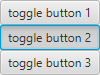
MnemonicParsing is enabled by default for ToggleButton.
| Modifier and Type | Field and Description |
|---|---|
| private static final String | |
| private static final PseudoClass | |
| private BooleanProperty | selected
Indicates whether this toggle button is selected. |
| private ObjectProperty | toggleGroup
The |
| Access | Constructor and Description |
|---|---|
| public | |
| public | ToggleButton(String
A text string for its label. text)Creates a toggle button with the specified text as its label. |
| public | ToggleButton(String
A text string for its label. text, Node the icon for its label. graphic)Creates a toggle button with the specified text and icon for its label. |
| Modifier and Type | Method and Description |
|---|---|
| protected Skin | createDefaultSkin()
Overrides javafx. Create a new instance of the default skin for this control. |
| public void | fire()
Implements abstract javafx. Invoked when a user gesture indicates that an event for this
|
| protected Pos | getInitialAlignment()
Overrides javafx. Returns the initial alignment state of this control, for use by the JavaFX CSS engine to correctly set its initial value. |
| public final ToggleGroup | getToggleGroup()
Implements javafx. Returns The |
| private void | |
| public final boolean | isSelected()
Implements javafx. Indicates whether this |
| public Object | queryAccessibleAttribute(AccessibleAttribute attribute, Object... parameters)
Overrides javafx. This method is called by the assistive technology to request the value for an attribute. |
| public final BooleanProperty | selectedProperty()
Implements javafx. The selected state for this |
| public final void | setSelected(boolean value)
Implements javafx. Sets this |
| public final void | setToggleGroup(ToggleGroup value)
Implements javafx. Sets the |
| public final ObjectProperty | toggleGroupProperty()
Implements javafx. The |
| DEFAULT_STYLE_CLASS | back to summary |
|---|---|
| private static final String DEFAULT_STYLE_CLASS | |
| PSEUDO_CLASS_SELECTED | back to summary |
|---|---|
| private static final PseudoClass PSEUDO_CLASS_SELECTED | |
| selected | back to summary |
|---|---|
| private BooleanProperty selected Indicates whether this toggle button is selected. This can be manipulated programmatically. | |
| toggleGroup | back to summary |
|---|---|
| private ObjectProperty<ToggleGroup> toggleGroup The | |
| ToggleButton | back to summary |
|---|---|
| public ToggleButton() Creates a toggle button with an empty string for its label. | |
| ToggleButton | back to summary |
|---|---|
| public ToggleButton(String text) Creates a toggle button with the specified text as its label.
| |
| ToggleButton | back to summary |
|---|---|
| public ToggleButton(String text, Node graphic) Creates a toggle button with the specified text and icon for its label. | |
| createDefaultSkin | back to summary |
|---|---|
| protected Skin Overrides javafx. Doc from javafx. Create a new instance of the default skin for this control. This is called to create a skin for the control if
no skin is provided via CSS
| |
| fire | back to summary |
|---|---|
| public void fire() Implements abstract javafx. Doc from javafx. Invoked when a user gesture indicates that an event for this
If invoked, this method will be executed regardless of the status of
| |
| getInitialAlignment | back to summary |
|---|---|
| protected Pos getInitialAlignment() Overrides javafx. Returns the initial alignment state of this control, for use by the JavaFX CSS engine to correctly set its initial value. This method is overridden to use Pos.CENTER initially.
| |
| getToggleGroup | back to summary |
|---|---|
| public final ToggleGroup getToggleGroup() Implements javafx. Doc from javafx. Returns The
| |
| initialize | back to summary |
|---|---|
| private void initialize() | |
| isSelected | back to summary |
|---|---|
| public final boolean isSelected() Implements javafx. Doc from javafx. Indicates whether this
| |
| queryAccessibleAttribute | back to summary |
|---|---|
| public Object queryAccessibleAttribute(AccessibleAttribute attribute, Object... parameters) Overrides javafx. Doc from javafx. This method is called by the assistive technology to request the value for an attribute.
This method is commonly overridden by subclasses to implement
attributes that are required for a specific role.
| |
| selectedProperty | back to summary |
|---|---|
| public final BooleanProperty selectedProperty() Implements javafx. Doc from javafx. The selected state for this
| |
| setSelected | back to summary |
|---|---|
| public final void setSelected(boolean value) Implements javafx. Doc from javafx. Sets this
| |
| setToggleGroup | back to summary |
|---|---|
| public final void setToggleGroup(ToggleGroup value) Implements javafx. Doc from javafx. Sets the
| |
| toggleGroupProperty | back to summary |
|---|---|
| public final ObjectProperty Implements javafx. Doc from javafx. The
| |

