

TreeItem value
property for all tree items in this TreeView.
TreeItem). By using a TreeView, it is possible to drill down into the
children of a TreeItem, recursively until a TreeItem has no children (that is,
it is a leaf node in the tree). To facilitate this, unlike controls
like ListView, in TreeView it is necessary to only
specify the root node.
For more information on building up a tree using this approach, refer to the
TreeItem class documentation. Briefly however, to create a TreeView,
you should do something along the lines of the following:
 TreeItem<String> root = new TreeItem<>("Root Node");
root.setExpanded(true);
root.getChildren().addAll(
    new TreeItem<>("Item 1"),
    new TreeItem<>("Item 2"),
    new TreeItem<>("Item 3")
);
TreeView<String> treeView = new TreeView<>(root);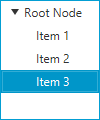
A TreeView may be configured to optionally hide the root node by setting the
showRoot property to false. If the root
node is hidden, there is one less level of indentation, and all children
nodes of the root node are shown. By default, the root node is shown in the
TreeView.
To track selection and focus, it is necessary to become familiar with the
SelectionModel and FocusModel classes. A TreeView has at most
one instance of each of these classes, available from
selectionModel and
focusModel properties respectively.
Whilst it is possible to use this API to set a new selection model, in
most circumstances this is not necessary - the default selection and focus
models should work in most circumstances.
The default SelectionModel used when instantiating a TreeView is
an implementation of the MultipleSelectionModel abstract class.
However, as noted in the API documentation for
the selectionMode
property, the default value is SelectionMode#SINGLE. To enable
multiple selection in a default TreeView instance, it is therefore necessary
to do the following:
treeView.getSelectionModel().setSelectionMode(SelectionMode.MULTIPLE);
The visuals of the TreeView can be entirely customized by replacing the
default cell factory. A cell factory is used to
generate TreeCell instances, which are used to represent an item in the
TreeView. See the Cell class documentation for a more complete
description of how to write custom Cells.
TreeView allows for its cells to contain elements of any type, including
Node instances. Putting nodes into
the TreeView cells is strongly discouraged, as it can
lead to unexpected results.
Important points to note:
Node instances directly into the TreeView cells or its data model.cell factory to create the nodes for a
given cell and update them on demand using the data stored in the item for that cell.Nodes in the updateItem method of a custom cell factory.The following minimal example shows how to create a custom cell factory for TreeView containing Nodes:
 TreeItem<Color> treeRoot = new TreeItem<>();
 treeRoot.setExpanded(true);
 TreeView<Color> treeView = new TreeView<>(treeRoot);

 treeRoot.getChildren().addAll(
     new TreeItem<>(Color.RED),
     new TreeItem<>(Color.GREEN),
     new TreeItem<>(Color.BLUE));

 treeView.setCellFactory(p -> {
     return new TreeCell<Color>() {
     private final Rectangle rectangle;
     {
         setContentDisplay(ContentDisplay.GRAPHIC_ONLY);
         rectangle = new Rectangle(10, 10);
     }

     @Override
     protected void updateItem(Color item, boolean empty) {
         super.updateItem(item, empty);

         if (item == null || empty) {
             setGraphic(null);
         } else {
             rectangle.setFill(item);
             setGraphic(rectangle);
         }
     }
 };});
This example has an anonymous custom TreeCell class in the custom cell factory.
Note that the Rectangle (Node) object needs to be created in the instance initialization block
or the constructor of the custom TreeCell class and updated/used in its updateItem method.
This control supports inline editing of values, and this section attempts to give an overview of the available APIs and how you should use them.
Firstly, cell editing most commonly requires a different user interface
than when a cell is not being edited. This is the responsibility of the
Cell implementation being used. For TreeView, this is the responsibility
of the cell factory. It is your choice whether the cell is
permanently in an editing state (e.g. this is common for CheckBox cells),
or to switch to a different UI when editing begins (e.g. when a double-click
is received on a cell).
To know when editing has been requested on a cell,
simply override the javafx. method, and
update the cell text and
graphic properties as
appropriate (e.g. set the text to null and set the graphic to be a
TextField). Additionally, you should also override
Cell#cancelEdit() to reset the UI back to its original visual state
when the editing concludes. In both cases it is important that you also
ensure that you call the super method to have the cell perform all duties it
must do to enter or exit its editing mode.
Once your cell is in an editing state, the next thing you are most probably
interested in is how to commit or cancel the editing that is taking place. This is your
responsibility as the cell factory provider. Your cell implementation will know
when the editing is over, based on the user input (e.g. when the user presses
the Enter or ESC keys on their keyboard). When this happens, it is your
responsibility to call Cell#commitEdit(Object) or
Cell#cancelEdit(), as appropriate.
When you call Cell#commitEdit(Object) an event is fired to the
TreeView, which you can observe by adding an EventHandler via
TreeView#setOnEditCommit(javafx.. Similarly,
you can also observe edit events for
edit start
and edit cancel.
By default the TreeView edit commit handler is non-null, with a default
handler that attempts to overwrite the property value for the
item in the currently-being-edited row. It is able to do this as the
Cell#commitEdit(Object) method is passed in the new value, and this
is passed along to the edit commit handler via the
EditEvent that is fired. It is simply a matter of calling
EditEvent#getNewValue() to retrieve this value.
It is very important to note that if you call
TreeView#setOnEditCommit(javafx. with your own
EventHandler, then you will be removing the default handler. Unless
you then handle the writeback to the property (or the relevant data source),
nothing will happen. You can work around this by using the
TreeView#addEventHandler(javafx.
method to add a TreeView#editCommitEvent() EventType with
your desired EventHandler as the second argument. Using this method,
you will not replace the default implementation, but you will be notified when
an edit commit has occurred.
Hopefully this summary answers some of the commonly asked questions. Fortunately, JavaFX ships with a number of pre-built cell factories that handle all the editing requirements on your behalf. You can find these pre-built cell factories in the javafx.scene.control.cell package.
TreeItem, TreeCell
| Modifier and Type | Class and Description |
|---|---|
| public static class | TreeView.
The type of the input, which is the same type as the TreeView
itself. T>An |
| private static class | |
| pack-priv static class | |
| pack-priv static class |
| Access | Constructor and Description |
|---|---|
| public | |
| public |
| Modifier and Type | Method and Description |
|---|---|
| public final ObjectProperty | Returns: the cell factory propertyRepresents the cell factory that will be used for creating TreeCells, which are used to represent items in the TreeView. |
| protected Skin | createDefaultSkin()
Overrides javafx. Create a new instance of the default skin for this control. |
| public void | |
| public final BooleanProperty | Returns: the editable propertySpecifies whether this TreeView is editable - only if the TreeView and the TreeCells within it are both editable will a TreeCell be able to go into their editing state. |
| public static < the type of the TreeItem instances used in this TreeView T> EventType | Returns: An EventType that indicates some edit event has occurred.An EventType that indicates some edit event has occurred. |
| public static < the type of the TreeItem instances used in this TreeView T> EventType | Returns: An EventType used to indicate that an edit event has just been canceled.An EventType used to indicate that an edit event has just been canceled within the TreeView upon which the event was fired. |
| public static < the type of the TreeItem instances used in this TreeView T> EventType | Returns: An EventType that is used to indicate that an edit in a TreeView has been committed.An EventType that is used to indicate that an edit in a TreeView has been committed. |
| public final ReadOnlyObjectProperty | Returns: the editing item propertyA property used to represent the TreeItem currently being edited in the TreeView, if editing is taking place, or null if no item is being edited. |
| private ReadOnlyObjectWrapper | |
| public static < the type of the TreeItem instances used in this TreeView T> EventType | Returns: An EventType used to indicate that an edit event has started.An EventType used to indicate that an edit event has started within the TreeView upon which the event was fired. |
| public final ReadOnlyIntegerProperty | |
| public final DoubleProperty | Returns: the fixed cell size propertySpecifies whether this control has cells that are a fixed height (of the specified value). |
| public final ObjectProperty | Returns: the focus model propertyThe FocusModel provides the API through which it is possible to control focus on zero or one rows of the TreeView. |
| public final Callback | Returns: the cell factoryReturns the cell factory that will be used for creating TreeCells, which are used to represent items in the TreeView, or null if no custom cell factory has been set. |
| public static List | Returns: theCssMetaDataHides javafx. Gets the |
| public List | getControlCssMetaData()
Overrides javafx. Gets the unmodifiable list of the control's CSS-styleable properties. |
| public final TreeItem | Returns: the TreeItem that is currently being edited in the TreeViewReturns the TreeItem that is currently being edited in the TreeView, or null if no item is being edited. |
| public final int | |
| public final double | Returns: A double representing the fixed cell size of this control, or a value less than or equal to zero if fixed cell size mode is disabled.Returns the fixed cell size value. |
| public final FocusModel | Returns: the currently installedFocusModelReturns the currently installed |
| public static int | Returns: An integer representing the number of parents above the given node, or -1 if the given TreeItem is null.The TreeItem for which the level is needed. node)
Deprecated
since 8u20. This method does not correctly calculate the distance from the
given TreeItem to the root of the TreeView.
Returns the number of levels of 'indentation' of the given TreeItem,
based on how many times |
| public final EventHandler | Returns: theEventHandler that will be called when the user cancels
an editReturns the |
| public final EventHandler | Returns: theEventHandler that will be called when the user commits
an editReturns the |
| public final EventHandler | Returns: theEventHandler when the user begins an editReturns the |
| public EventHandler | |
| public final TreeItem | Returns: The current root node, or null if no root node exists.Returns the current root node of this TreeView, or null if no root node is specified. |
| public int | Returns: An integer representing the location in the current TreeView of the first instance of the given TreeItem, or -1 if it is null or can not be found (for example, if a parent (all the way up to the root) is collapsed).The TreeItem for which the index is sought. item)Returns the index position of the given TreeItem, assuming that it is currently accessible through the tree hierarchy (most notably, that all parent tree items are expanded). |
| public final MultipleSelectionModel | Returns: the currently installed selection modelReturns the currently installed selection model. |
| public TreeItem | Returns: The TreeItem in the given index, or null if it is out of bounds.The index of the TreeItem being sought. row)Returns the TreeItem in the given index, or null if it is out of bounds. |
| public int | Returns: An integer representing the number of parents above the given node, or -1 if the given TreeItem is null.The TreeItem for which the level is needed. node)Returns the number of levels of 'indentation' of the given TreeItem, based on how many times getParent() can be recursively called. |
| public final boolean | |
| public final boolean | Returns: true if the root of the TreeView should be shownReturns true if the root of the TreeView should be shown, and false if it should not. |
| protected void | layoutChildren()
Overrides javafx. Invoked during the layout pass to layout the children in this
|
| public final ObjectProperty | Returns: the event handler will be fired when the user cancels editing a cellThis event handler will be fired when the user cancels editing a cell. |
| public final ObjectProperty | Returns: the event handler when the user performs an action that result in their editing input being persistedThis property is used when the user performs an action that should result in their editing input being persisted. |
| public final ObjectProperty | Returns: the event handler when the user successfully initiates editingThis event handler will be fired when the user successfully initiates editing. |
| public ObjectProperty | |
| public Object | queryAccessibleAttribute(AccessibleAttribute attribute, Object... parameters)
Overrides javafx. This method is called by the assistive technology to request the value for an attribute. |
| public void | |
| public final ObjectProperty | |
| public void | scrollTo(int
The index that should be made visible to the user, assuming
of course that it is greater than, or equal to 0, and less than the
number of the visible items in the TreeView. index)Scrolls the TreeView such that the item in the given index is visible to the end user. |
| public final ObjectProperty | Returns: the selection model propertyThe SelectionModel provides the API through which it is possible to select single or multiple items within a TreeView, as well as inspect which rows have been selected by the user. |
| public final void | setCellFactory(Callback<TreeView<T>, TreeCell<T>>
The value)Callback to use for generating TreeCell instances,
or null if the default cell factory should be used.Sets the cell factory that will be used for creating TreeCells, which are used to represent items in the TreeView. |
| public final void | |
| private void | |
| private void | |
| public final void | setFixedCellSize(double
The new fixed cell size value, or a value less than or equal
to zero (or Region.USE_COMPUTED_SIZE) to disable. value)Sets the new fixed cell size for this control. |
| public final void | setFocusModel(FocusModel<TreeItem<T>>
the value)FocusModel to be usedSets the |
| public final void | setOnEditCancel(EventHandler<TreeView.
the valueEventHandler that will be called when the user
cancels an editSets the |
| public final void | setOnEditCommit(EventHandler<TreeView.
the valueEventHandler that will be called when the user
commits an editSets the |
| public final void | setOnEditStart(EventHandler<TreeView.
the valueEventHandler that will be called when the user
begins an editSets the |
| public void | |
| public final void | |
| public final void | setSelectionModel(MultipleSelectionModel<TreeItem<T>>
the value)MultipleSelectionModel to be usedSets the |
| public final void | setShowRoot(boolean
If true, the root TreeItem will be shown, and if false it
will be hidden. value)Specifies whether the root |
| public final BooleanProperty | Returns: the show root propertyProperty that represents whether or not the TreeView root node is visible. |
| private void | |
| private void |

