

The RichTextArea control has a number of features, including:
paragraph-oriented model, up to ~2 billion rows
inline attributes
single selection
input map which allows for easy behavior customization and extension
The following example creates an editable control with the default RichTextModel:
RichTextArea textArea = new RichTextArea();
appendText(), insertText(), replaceText(), applyStyle(),
setStyle(), or clear() can be used to modify text programmatically:
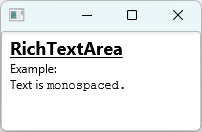
// create styles
  StyleAttributeMap heading = StyleAttributeMap.builder().setBold(true).setUnderline(true).setFontSize(18).build();
  StyleAttributeMap mono = StyleAttributeMap.builder().setFontFamily("Monospaced").build();

  RichTextArea textArea = new RichTextArea();
  // build the content
  textArea.setUndoRedoEnabled(false);
  textArea.appendText("RichTextArea\n", heading);
  textArea.appendText("Example:\nText is ", StyleAttributeMap.EMPTY);
  textArea.appendText("monospaced.\n", mono);
  textArea.setUndoRedoEnabled(true);
A view-only information control requires a different model. The following example illustrates how to create a model that uses a stylesheet for styling:
SimpleViewOnlyStyledModel m = new SimpleViewOnlyStyledModel();
    // add text segment using CSS style name (requires a stylesheet)
    m.addWithStyleNames("RichTextArea ", "HEADER");
    // add text segment using inline styles
    m.addWithInlineStyle("Demo", "-fx-font-size:200%; -fx-font-weight:bold;");
    // add newline
    m.nl();

    RichTextArea textArea = new RichTextArea(m);
A number of standard models can be used with RichTextArea, each addressing a specific use case:
| Model Class | Description |
|---|---|
| Base class (abstract) |
├─ | Default model for RichTextArea |
├─ | Unstyled text model |
│ └─ | Default model for CodeArea |
└─ | Base class for a view-only model (abstract) |
└─ | In-memory view-only styled model |
The RichTextArea control maintains a single contiguous selection segment
as a part of the SelectionModel. Additionally,
anchorPositionProperty() and caretPositionProperty() read-only properties
are derived from the selectionProperty() for convenience.
InputMap
leftDecorator
and rightDecorator properties
StyledTextModel
| Modifier and Type | Class and Description |
|---|---|
| private static class | RichTextArea.
Defines styleable properties at the class level |
| public static class | RichTextArea.
Function tags serve as identifiers of methods that can be customized via the |
| Modifier and Type | Field and Description |
|---|---|
| private RTAccessibilityHelper | |
| private SimpleStyleableObjectProperty | |
| private SimpleStyleableObjectProperty | |
| private StyleableBooleanProperty | |
| private ReadOnlyObjectWrapper | |
| private ReadOnlyObjectWrapper | |
| private SimpleBooleanProperty | |
| private StyleableBooleanProperty | |
| private final InputMap | |
| private SimpleObjectProperty | |
| private SimpleObjectProperty | |
| private SimpleObjectProperty | |
| private ReadOnlyBooleanWrapper | |
| private SimpleObjectProperty | |
| private final SelectionModel | |
| protected static final StyleHandlerRegistry | styleHandlerRegistry
The style handler registry instance, made available for use by subclasses to add support for new style attributes. |
| private ReadOnlyBooleanWrapper | |
| private StyleableBooleanProperty | |
| private StyleableBooleanProperty | |
| private StyleableBooleanProperty |
| Access | Constructor and Description |
|---|---|
| public | |
| public |
| Modifier and Type | Method and Description |
|---|---|
| private RTAccessibilityHelper | |
| public final ReadOnlyProperty | Returns: the anchor position propertyTracks the selection anchor position within the document. |
| public final TextPos | Returns: the text position at the end of the appended text, or null if editing is disabledthe text to append text, StyleAttributeMap the style attributes attrs)Appends the styled text to the end of the document. |
| public final TextPos | Returns: the text position at the end of the appended text, or null if editing is disabledthe text to append text)Appends the styled text to the end of the document. |
| public final TextPos | Returns: the text position at the end of the appended text, or null if editing is disabledthe input stream in)Appends the styled content to the end of the document. |
| public void | applyStyle(TextPos
the start of text range start, TextPos the end of text range end, StyleAttributeMap the style attributes to apply attrs)Applies the specified style to the selected range. |
| public void | |
| private DataFormat | |
| public final ObjectProperty | Returns: the caret blink period propertyDetermines the caret blink period. |
| public final ReadOnlyProperty | Returns: the caret position propertyTracks the caret position within the document. |
| public final void | |
| public final void | |
| public final void | |
| public final void | |
| public final ObjectProperty | Returns: the content padding propertySpecifies the padding for the RichTextArea content. |
| public void | copy()
When selection exists, copies the selected rich text to the clipboard in all the formats supported by the model. |
| public final void | copy(DataFormat
the data format to use format)Copies the selected text in the specified format to the clipboard. |
| protected RichTextAreaSkin | createDefaultSkin()
Overrides javafx. Create a new instance of the default skin for this control. |
| public void | |
| public void | |
| public void | |
| public void | deleteParagraphStart()
Deletes text from the caret position to the start of the paragraph, ignoring existing selection. |
| public void | deleteWordNextEnd()
Deletes from the caret positon to the end of next word, ignoring existing selection. |
| public void | deleteWordNextStart()
Deletes from the caret positon to the start of next word, ignoring existing selection. |
| public void | deleteWordPrevious()
Deletes (multiple) empty paragraphs or text from the caret position to the start of the previous word, ignoring existing selection. |
| public void | |
| public final BooleanProperty | Returns: the display caret propertyThis property controls whether caret will be displayed or not. |
| public final ReadOnlyObjectProperty | Returns: the document areaProvides the bounds to the document area in local coordinates. |
| private final ReadOnlyObjectWrapper | |
| private ReadOnlyObjectWrapper | |
| public final ReadOnlyProperty | Returns: the drop target propertyThis property indicates the target text position during drag-and-drop operations. |
| public final BooleanProperty | Returns: the editable propertyIndicates whether this RichTextArea can be edited by the user, provided the model is also writable. |
| public void | |
| public final void | |
| public void | executeAccessibleAction(AccessibleAction action, Object... parameters)
Overrides javafx. This method is called by the assistive technology to request the action indicated by the argument should be executed. |
| public final void | executeDefault(FunctionTag
the function tag tag)Executes the default function mapped to the specified tag. |
| public final void | |
| public final StyleAttributeMap | Returns: the non-nullStyleAttributeMap instanceReturns |
| public final TextPos | |
| public final Duration | |
| public final TextPos | |
| public static List | Returns: theCssMetaDataHides javafx. Gets the |
| public final Insets | |
| public List | getControlCssMetaData()
Overrides javafx. Gets the unmodifiable list of the control's CSS-styleable properties. |
| public final Bounds | |
| public final TextPos | Returns: the text positionReturns a TextPos corresponding to the end of the document. |
| public final TextPos | |
| public final InputMap | |
| public final StyleAttributeMap | |
| public final SideDecorator | |
| public final LineEnding | Returns: the model's line ending valueConvenience method which delegates to |
| public final StyledTextModel | |
| private StyleAttributeMap | |
| public final int | |
| public final TextPos | Returns: text positionparagraph index index)Returns a TextPos corresponding to the end of paragraph. |
| public final String | Returns: the non-null plain text stringthe paragraph index index)Returns the plain text at the specified paragraph index. |
| public final SideDecorator | |
| public final SelectionSegment | |
| public final StyleAttributeMap | Returns: the style attributes, never nullthe text position pos, boolean whether to pick preceding style at the segment boundary forInsert)Returns the |
| public StyleHandlerRegistry | Returns: the style handler registryReturns the style handler registry for this control. |
| private final boolean | Returns: true if all the text fit in the bufferthe start position start, TextPos the end position end, StringBuilder the buffer to copy to sb, int the maximum number of characters to copy, must be >= 0 limit)Copies the plain text between `start` and `end` positions to the provided buffer. |
| public final TextPos | Returns: the text position, or nullthe screen x coordinate screenX, double the screen y coordinate screenY)Finds a text position corresponding to the specified screen coordinates. |
| public final boolean | Returns: true when an non-empty selection existsThis convenience method returns true when a non-empty selection exists. |
| public final BooleanProperty | Returns: the highlight current paragraph propertyIndicates whether the current paragraph will be visually highlighted. |
| private static StyleHandlerRegistry | |
| public void | |
| public final ObjectProperty | Returns: the insert styles propertySpecifies the styles to be in effect for the characters to be inserted via user input. |
| public void | |
| public final TextPos | Returns: the text position at the end of the appended text, or null if editing is disabledthe insert position pos, String the text to inser text, StyleAttributeMap the style attributes attrs)Inserts the styled text at the specified position. |
| public final TextPos | Returns: the text position at the end of the appended text, or null if editing is disabledthe insert position pos, StyledInput the input stream in)Inserts the styled content at the specified position. |
| public final boolean | |
| public final boolean | |
| public final boolean | |
| public final boolean | |
| public final boolean | |
| public final boolean | Returns: true if undo/redo functionality is enabled in the modelIndicates whether undo/redo functionality is enabled in the model. |
| public final boolean | |
| public final boolean | |
| public final boolean | |
| public final ObjectProperty | Returns: the left decorator propertySpecifies the left-side paragraph decorator. |
| public final ObjectProperty | Returns: the model propertyDetermines the |
| public void | moveDocumentEnd()
Moves the caret to after the last character of the text, clearing an existing selection. |
| public void | moveDocumentStart()
Moves the caret to before the first character of the text, clearing an existing selection. |
| public void | |
| public void | |
| public void | moveLineEnd()
Moves the caret to the end of the visual text line at caret, clearing an existing selection. |
| public void | moveLineStart()
Moves the caret to the start of the visual text line at caret, clearing an existing selection. |
| public void | moveParagraphDown()
Moves the caret to the end of the current paragraph, or, if already there, to the end of the next paragraph. |
| public void | moveParagraphEnd()
Moves the caret to the end of the paragraph at caret, clearing an existing selection. |
| public void | moveParagraphStart()
Moves the caret to the start of the current paragraph, clearing an existing selection. |
| public void | moveParagraphUp()
Moves the caret to the start of the current paragraph, or, if already there, to the start of the previous paragraph. |
| public void | |
| public void | |
| public void | moveWordLeft()
Moves the caret to the beginning of previous word in a left-to-right setting (or the beginning of the next word in a right-to-left setting), clearing an existing selection. |
| public void | |
| public void | |
| public void | moveWordPrevious()
Moves the caret to the beginning of previous word, clearing an existing selection. |
| public void | moveWordRight()
Moves the caret to the beginning of next word in a left-to-right setting (or the beginning of the previous word in a right-to-left setting), clearing an existing selection. |
| public void | |
| public void | |
| public void | paste()
Pastes the clipboard content at the caret, or, if selection exists, replacing the selected text. |
| public void | paste(DataFormat
the data format to use format)Pastes the clipboard content at the caret, or, if selection exists, replacing the selected text. |
| public final void | pastePlainText()
Pastes the plain text clipboard content at the caret, or, if selection exists, replacing the selected text. |
| public Object | queryAccessibleAttribute(AccessibleAttribute attribute, Object... parameters)
Overrides javafx. This method is called by the assistive technology to request the value for an attribute. |
| public final void | read(DataFormat
the data format f, InputStream the input stream in)Calls the model to replace the current document with the content read from the stream using
the specified |
| public final void | read(InputStream
the input stream in)Calls the model to replace the current document with the content read from the input stream. |
| public void | |
| public final ReadOnlyBooleanProperty | Returns: the read-only propertyThe property describes if it's currently possible to redo the latest change of the content that was undone. |
| public final TextPos | Returns: the new caret position at the end of inserted text, or null if the change cannot be madethe start text position start, TextPos the end text position end, String the input text text)Replaces the specified range with the new text. |
| public final TextPos | Returns: the new caret position at the end of inserted text, or null if the change cannot be madethe start text position start, TextPos the end text position end, StyledInput the input stream in)Replaces the specified range with the new input. |
| private StyleResolver | |
| private RichTextAreaSkin | |
| public final ObjectProperty | Returns: the right decorator propertySpecifies the right-side paragraph decorator. |
| public final void | |
| public final void | |
| public void | selectAll()
Selects all the text in the document: the anchor is set at the document start, while the caret is positioned at the end of the document. |
| public void | |
| public final ReadOnlyProperty | |
| public void | |
| public void | |
| public void | |
| public void | |
| public void | selectParagraphDown()
Extends selection to the end of the current paragraph, or, if already at the end, to the end of the next paragraph. |
| public void | |
| public void | |
| public void | selectParagraphUp()
Extends selection to the start of the current paragraph, or, if already at the start, to the start of the previous paragraph. |
| public void | |
| public void | |
| public void | |
| public void | |
| public void | |
| public void | |
| public void | |
| public void | selectWordLeft()
Moves the caret to the beginning of previous word in a left-to-right setting, or to the beginning of the next word in a right-to-left setting. |
| public void | |
| public void | |
| public void | |
| public void | selectWordRight()
Moves the caret to the beginning of next word in a left-to-right setting, or to the beginning of the previous word in a right-to-left setting. |
| public final void | |
| public final void | |
| public final void | |
| private final void | |
| public final void | setDropTarget(double
the screen x coordinate screenX, double the screen y coordinate screenY)Attempts to set the drop target position at the specified screen coordinates. |
| public final void | |
| public final void | |
| public final void | |
| public final void | |
| public final void | setLineEnding(LineEnding
the line ending value, cannot be null value)Sets the model's line ending characters. |
| public final void | |
| public final void | |
| public final void | setStyle(TextPos
the start of text range start, TextPos the end of text range end, StyleAttributeMap the style attributes to set attrs)Sets the specified style to the selected range. |
| public final void | setUndoRedoEnabled(boolean
true to enable undo/redo on)Controls whether undo/redo functionality is enabled in the model. |
| public final void | |
| public final void | |
| public final void | |
| public void | |
| public final ReadOnlyBooleanProperty | Returns: the read-only propertyThe property describes if it's currently possible to undo the latest change of the content that was done. |
| public final BooleanProperty | Returns: the use content height propertyDetermines whether the preferred height is the same as the content height. |
| public final BooleanProperty | Returns: the use content width propertyDetermines whether the preferred width is the same as the content width. |
| protected void | |
| pack-priv VFlow | |
| public final BooleanProperty | Returns: the wrap text propertyIndicates whether text should be wrapped in this RichTextArea. |
| public final void | write(DataFormat
the data format f, OutputStream the output stream out)Calls the model to writes the current document to the output stream using the specified |
| public final void | write(OutputStream
the output stream out)Calls the model to write the current document to the output stream, using the highest priority |

