


SpreadsheetView. Grid.
SpreadsheetCellType which has its own SpreadsheetCellEditor
in order to control very closely the possible modifications.
Different SpreadsheetCellTypes are available
depending on the data you want to represent in your SpreadsheetView.
You can use the different static method provided in
SpreadsheetCellType in order to create the specialized
SpreadsheetCell that suits your need.
If you want to create a SpreadsheetCell of your own, you simply have to
use one of the provided constructor. Usually you will let your SpreadsheetCellType
create the cells. For example
SpreadsheetCellType..
You will also have to provide a custom SpreadsheetCellEditor.
row and column span. You
can specify if you want the cell to be editable or not using
setEditable(boolean). Be advised that a cell with a rowSpan means
that the cell will replace all the cells situated in the rowSpan range. Same
with the column span.
GridBase#spanColumn(int, int, int)
or GridBase#spanRow(int, int, int). These methods will handle the span
for you.
SpreadsheetCellType and then specify for each cell their format with
setFormat(String). You will then have the guaranty that all your
cells will have a LocalDate as a value, but the value will be displayed
differently for each cell. This will also guaranty that copy/paste and other
operation will be compatible since every cell will share the same
SpreadsheetCellType.
SpreadsheetCell cell = SpreadsheetCellType.DATE.createCell(row, column, rowSpan, colSpan,
        LocalDate.now().plusDays((int) (Math.random() * 10))); // Random value
// given here
final double random = Math.random();
if (random < 0.25) {
    cell.setFormat("EEEE d");
} else if (random < 0.5) {
    cell.setFormat("dd/MM :YY");
} else {
    cell.setFormat("dd/MM/YYYY");
}

Popup when clicked. This is useful when some
non editable cell wants to display several actions to take on the grid. This
feature is completely different from the Filter. Filters are shown on
one particular row whereas popup can be added to every cell.
setGraphic(Node) in order to specify the graphic you want.
If you specify an ImageView, the SpreadsheetView will try to resize it in
order to fit the space available in the cell.
For example :
cell.setGraphic(new ImageView(new Image(getClass().getResourceAsStream("icons/exclamation.png"))));
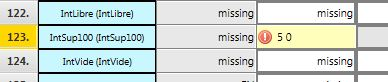
activateCorner(org.controlsfx.control.spreadsheet.SpreadsheetCell.CornerPosition) .
This allow you to activate or deactivate some graphics on the cell in every
corner. Right now it's a little red triangle but you can modify this in your CSS by
using the "cell-corner" style class.
.cell-corner.top-left{
    -fx-background-color: red;
    -fx-shape : "M 0 0 L 1 0 L 0 1 z";
}

setTooltip(java.lang.String) .
getStyleClass(). You just have to create and custom that class in
your CSS stylesheet associated with your SpreadsheetView. Also note
that all SpreadsheetCell have a "spreadsheet-cell" styleClass
added by default. Here is a example :
cell.getStyleClass().add("row_header");
And in the CSS:
 .spreadsheet-cell.row_header{
    -fx-background-color: #b4d4ad ;
    -fx-background-insets: 0, 0 1 1 0;
    -fx-alignment: center;
}
SpreadsheetCellType
types. The generation is random here so you will want to replace the logic to
suit your needs.
private SpreadsheetCell<?> generateCell(int row, int column, int rowSpan, int colSpan) {
    List<String> stringListTextCell = Arrays.asList("Shanghai","Paris","New York City","Bangkok","Singapore","Johannesburg","Berlin","Wellington","London","Montreal");
    final double random = Math.random();
    if (random < 0.10) {
        List<String> stringList = Arrays.asList("China","France","New Zealand","United States","Germany","Canada");
        cell = SpreadsheetCellType.LIST(stringList).createCell(row, column, rowSpan, colSpan, stringList.get((int) (Math.random() * 6)));
    } else if (random >= 0.10 && random < 0.25) {
        cell = SpreadsheetCellType.STRING.createCell(row, column, rowSpan, colSpan,stringListTextCell.get((int)(Math.random()*10)));
    } else if (random >= 0.25 && random < 0.75) {
        cell = SpreadsheetCellType.DOUBLE.createCell(row, column, rowSpan, colSpan,(double)Math.round((Math.random()*100)*100)/100);
    } else {
        cell = SpreadsheetCellType.DATE.createCell(row, column, rowSpan, colSpan, LocalDate.now().plusDays((int)(Math.random()*10)));
    }
    return cell;
}
SpreadsheetView, SpreadsheetCellEditor, SpreadsheetCellType
| Modifier and Type | Field and Description |
|---|---|
| private List | |
| private final int | |
| private int | |
| private static final int | EDITABLE_BIT_POSITION
Private Fields |
| private final EventHandlerManager | |
| private final StringProperty | |
| private final ObjectProperty | |
| private static final int | |
| private final ObjectProperty | |
| private static final int | |
| private int | propertyContainer
This variable handles all boolean values of this SpreadsheetCell inside its bits. |
| private final int | |
| private int | |
| private ObservableSet | |
| private final StringProperty | |
| private final StringProperty | |
| private String | |
| private final SpreadsheetCellType | |
| private static final int |
| Access | Constructor and Description |
|---|---|
| public | SpreadsheetCellBase(final int row, final int column, final int rowSpan, final int columnSpan)
Constructs a SpreadsheetCell with the given configuration. |
| public | SpreadsheetCellBase(final int row, final int column, final int rowSpan, final int columnSpan, final SpreadsheetCellType<?> type)
Constructs a SpreadsheetCell with the given configuration. |
| Modifier and Type | Method and Description |
|---|---|
| public void | activateCorner(SpreadsheetCell.
Implements org. Activates the given |
| public <E extends Event> void | addEventHandler(EventType<E> eventType, EventHandler<? super E> eventHandler)
Overrides default javafx. Implements org. Registers an event handler to this SpreadsheetCell. |
| public EventDispatchChain | buildEventDispatchChain(EventDispatchChain tail)
Implements javafx. Construct an event dispatch chain for this target. |
| public void | deactivateCorner(SpreadsheetCell.
Implements org. This deactivates the given |
| public final boolean | equals(Object obj)
Overrides java. Indicates whether some other object is "equal to" this one. |
| public final StringProperty | formatProperty()
Implements org. Returns the |
| public final SpreadsheetCellType | getCellType()
Implements org. Returns the |
| public final int | getColumn()
Implements org. Returns the column index of this cell. |
| public final int | getColumnSpan()
Implements org. Returns how much this cell is spanning in column, 1 means the cell is not spanning. |
| private int | |
| public final String | getFormat()
Implements org. Returns the format of this cell or an empty string if no format has been specified. |
| public Node | getGraphic()
Implements org. Returns the graphic node associated with this cell. |
| public final Object | getItem()
Implements org. Returns the value contained in this cell. |
| public List | getOptionsForEditor()
Implements org. If some options cannot be factorized in a |
| public List | getPopupItems()
Implements org. If |
| public final int | getRow()
Implements org. Returns the row index of this cell. |
| public final int | getRowSpan()
Implements org. Returns how much this cell is spanning in row, 1 means the cell is not spanning. |
| public String | getStyle()
Implements org. A string representation of the CSS style associated with this specific Node. |
| public final ObservableSet | getStyleClass()
Implements org. Returns an |
| public final String | getText()
Implements org. Returns the String representation currently used for display in the
|
| public Optional | getTooltip()
Implements org. Returns the tooltip for this cell. |
| public ObjectProperty | graphicProperty()
Implements org. Returns the |
| public final int | |
| public boolean | hasPopup()
Implements org. Returns true if this cell needs to display a popup when clicked in order
to show some |
| public boolean | isCellGraphic()
Implements org. Returns |
| public boolean | isCornerActivated(SpreadsheetCell.
Implements org. Returns |
| public final boolean | isEditable()
Implements org. Returns |
| private boolean | |
| public boolean | isWrapText()
Implements org. If a run of text exceeds the width of the Labeled, then this variable indicates whether the text should wrap onto another line. |
| public final ObjectProperty | itemProperty()
Implements org. The item property represents the currently-set value inside this
|
| public boolean | match(Object value)
Implements org. Verifies that the upcoming cell value can be set to the current cell. |
| public <E extends Event> void | removeEventHandler(EventType<E> eventType, EventHandler<? super E> eventHandler)
Overrides default javafx. Implements org. Unregisters a previously registered event handler from this SpreadsheetCell. |
| public void | setCellGraphic(boolean isBrowser)
Implements org. If |
| public final void | setColumnSpan(int columnSpan)
Implements org. Sets how much this cell is spanning in column. |
| public final void | setEditable(boolean editable)
Implements org. Change the editable state of this cell |
| public final void | setFormat(String format)
Implements org. Sets a new format for this cell. |
| public void | setGraphic(Node graphic)
Implements org. Sets a graphic for this cell. |
| public void | setHasPopup(boolean value)
Implements org. Sets to |
| public final void | setItem(Object value)
Implements org. Sets the value of the property Item. |
| private boolean | Returns: whether a change has really occured.Set the specified bit position at the value specified by flag. |
| public final void | setRowSpan(int rowSpan)
Implements org. Sets how much this cell is spanning in row. |
| public void | setStyle(String style)
Implements org. A string representation of the CSS style associated with this specific Node. |
| public void | |
| public void | setWrapText(boolean wrapText)
Implements org. If a run of text exceeds the width of the Labeled, then this variable indicates whether the text should wrap onto another line. |
| public StringProperty | styleProperty()
Implements org. A string representation of the CSS style associated with this specific Node. |
| public final ReadOnlyStringProperty | textProperty()
Implements org. Returns the StringProperty of the representation of the value. |
| public String | |
| protected void |
| actionsList | back to summary |
|---|---|
| private List<MenuItem> actionsList | |
| column | back to summary |
|---|---|
| private final int column | |
| columnSpan | back to summary |
|---|---|
| private int columnSpan | |
| EDITABLE_BIT_POSITION | back to summary |
|---|---|
| private static final int EDITABLE_BIT_POSITION Private Fields | |
| eventHandlerManager | back to summary |
|---|---|
| private final EventHandlerManager eventHandlerManager | |
| format | back to summary |
|---|---|
| private final StringProperty format | |
| graphic | back to summary |
|---|---|
| private final ObjectProperty<Node> graphic | |
| IS_BROWSER_POSITION | back to summary |
|---|---|
| private static final int IS_BROWSER_POSITION | |
| item | back to summary |
|---|---|
| private final ObjectProperty<Object> item | |
| POPUP_BIT_POSITION | back to summary |
|---|---|
| private static final int POPUP_BIT_POSITION | |
| propertyContainer | back to summary |
|---|---|
| private int propertyContainer This variable handles all boolean values of this SpreadsheetCell inside its bits. Instead of using regular boolean, we use that int so that we can reduce memory usage to the bare minimum. | |
| row | back to summary |
|---|---|
| private final int row | |
| rowSpan | back to summary |
|---|---|
| private int rowSpan | |
| styleClass | back to summary |
|---|---|
| private ObservableSet<String> styleClass | |
| styleProperty | back to summary |
|---|---|
| private final StringProperty styleProperty | |
| text | back to summary |
|---|---|
| private final StringProperty text | |
| tooltip | back to summary |
|---|---|
| private String tooltip | |
| type | back to summary |
|---|---|
| private final SpreadsheetCellType<T> type | |
| WRAP_BIT_POSITION | back to summary |
|---|---|
| private static final int WRAP_BIT_POSITION | |
| SpreadsheetCellBase | back to summary |
|---|---|
| public SpreadsheetCellBase(final int row, final int column, final int rowSpan, final int columnSpan) Constructs a SpreadsheetCell with the given configuration.
Use the | |
| SpreadsheetCellBase | back to summary |
|---|---|
| public SpreadsheetCellBase(final int row, final int column, final int rowSpan, final int columnSpan, final SpreadsheetCellType<?> type) Constructs a SpreadsheetCell with the given configuration. | |
| activateCorner | back to summary |
|---|---|
| public void activateCorner(SpreadsheetCell. Implements org. Doc from org. Activates the given
| |
| addEventHandler | back to summary |
|---|---|
| public <E extends Event> void addEventHandler(EventType<E> eventType, EventHandler<? super E> eventHandler) Overrides default javafx. Implements org. Doc from org. Registers an event handler to this SpreadsheetCell.
| |
| buildEventDispatchChain | back to summary |
|---|---|
| public EventDispatchChain buildEventDispatchChain(EventDispatchChain tail) Implements javafx. Doc from javafx. Construct an event dispatch chain for this target. The event dispatch
chain contains event dispatchers which might be interested in processing
of events targeted at this In the case the event target is part of some hierarchy, the chain for it is usually built from event dispatchers collected from the root of the hierarchy to the event target. The event dispatch chain is constructed by modifications to the provided initial event dispatch chain. The returned chain should have the initial chain at its end so the dispatchers should be prepended to the initial chain. The caller shouldn't assume that the initial chain remains unchanged nor that the returned value will reference a different chain.
| |
| deactivateCorner | back to summary |
|---|---|
| public void deactivateCorner(SpreadsheetCell. Implements org. Doc from org. This deactivates the given
| |
| equals | back to summary |
|---|---|
| public final boolean equals(Object obj) Overrides java. Doc from java. Indicates whether some other object is "equal to" this one.
The
An equivalence relation partitions the elements it operates on into equivalence classes; all the members of an equivalence class are equal to each other. Members of an equivalence class are substitutable for each other, at least for some purposes.
| |
| formatProperty | back to summary |
|---|---|
| public final StringProperty formatProperty() Implements org. Doc from org. Returns the
| |
| getCellType | back to summary |
|---|---|
| public final SpreadsheetCellType Implements org. Doc from org. Returns the
| |
| getColumn | back to summary |
|---|---|
| public final int getColumn() Implements org. Doc from org. Returns the column index of this cell.
| |
| getColumnSpan | back to summary |
|---|---|
| public final int getColumnSpan() Implements org. Doc from org. Returns how much this cell is spanning in column, 1 means the cell is not spanning.
| |
| getCornerBitNumber | back to summary |
|---|---|
| private int getCornerBitNumber(SpreadsheetCell. Return the Bit position for each corner. | |
| getFormat | back to summary |
|---|---|
| public final String getFormat() Implements org. Doc from org. Returns the format of this cell or an empty string if no format has been specified.
| |
| getGraphic | back to summary |
|---|---|
| public Node getGraphic() Implements org. Doc from org. Returns the graphic node associated with this cell. Returns null if nothing has been associated.
| |
| getItem | back to summary |
|---|---|
| public final Object getItem() Implements org. Doc from org. Returns the value contained in this cell.
| |
| getOptionsForEditor | back to summary |
|---|---|
| public List Implements org. Doc from org. If some options cannot be factorized in a
| |
| getPopupItems | back to summary |
|---|---|
| public List Implements org. Doc from org. If
| |
| getRow | back to summary |
|---|---|
| public final int getRow() Implements org. Doc from org. Returns the row index of this cell.
| |
| getRowSpan | back to summary |
|---|---|
| public final int getRowSpan() Implements org. Doc from org. Returns how much this cell is spanning in row, 1 means the cell is not spanning.
| |
| getStyle | back to summary |
|---|---|
| public String getStyle() Implements org. Doc from org. A string representation of the CSS style associated with this specific Node. This is analogous to the "style" attribute of an HTML element. Note that, like the HTML style attribute, this variable contains style properties and values and not the selector portion of a style rule.
| |
| getStyleClass | back to summary |
|---|---|
| public final ObservableSet Implements org. Doc from org. Returns an
| |
| getText | back to summary |
|---|---|
| public final String getText() Implements org. Doc from org. Returns the String representation currently used for display in the
| |
| getTooltip | back to summary |
|---|---|
| public Optional Implements org. Doc from org. Returns the tooltip for this cell.
| |
| graphicProperty | back to summary |
|---|---|
| public ObjectProperty Implements org. Doc from org. Returns the
| |
| hashCode | back to summary |
|---|---|
| public final int hashCode() Overrides java. Doc from java. Returns a hash code value for this object. This method is
supported for the benefit of hash tables such as those provided by
The general contract of
| |
| hasPopup | back to summary |
|---|---|
| public boolean hasPopup() Implements org. Doc from org. Returns true if this cell needs to display a popup when clicked in order
to show some
| |
| isCellGraphic | back to summary |
|---|---|
| public boolean isCellGraphic() Implements org. Doc from org. Returns | |
| isCornerActivated | back to summary |
|---|---|
| public boolean isCornerActivated(SpreadsheetCell. Implements org. Doc from org. Returns
| |
| isEditable | back to summary |
|---|---|
| public final boolean isEditable() Implements org. Doc from org. Returns
| |
| isSet | back to summary |
|---|---|
private boolean isSet(int position)
| |
| isWrapText | back to summary |
|---|---|
| public boolean isWrapText() Implements org. Doc from org. If a run of text exceeds the width of the Labeled, then this variable indicates whether the text should wrap onto another line.
| |
| itemProperty | back to summary |
|---|---|
| public final ObjectProperty Implements org. Doc from org. The item property represents the currently-set value inside this
| |
| match | back to summary |
|---|---|
| public boolean match(Object value) Implements org. Doc from org. Verifies that the upcoming cell value can be set to the current cell. This is currently used by the Copy/Paste.
| |
| removeEventHandler | back to summary |
|---|---|
| public <E extends Event> void removeEventHandler(EventType<E> eventType, EventHandler<? super E> eventHandler) Overrides default javafx. Implements org. Doc from org. Unregisters a previously registered event handler from this SpreadsheetCell.
| |
| setCellGraphic | back to summary |
|---|---|
| public void setCellGraphic(boolean isBrowser) Implements org. Doc from org. If | |
| setColumnSpan | back to summary |
|---|---|
| public final void setColumnSpan(int columnSpan) Implements org. Doc from org. Sets how much this cell is spanning in column. See
| |
| setEditable | back to summary |
|---|---|
| public final void setEditable(boolean editable) Implements org. Doc from org. Change the editable state of this cell
| |
| setFormat | back to summary |
|---|---|
| public final void setFormat(String format) Implements org. Doc from org. Sets a new format for this cell. This format will be used by
| |
| setGraphic | back to summary |
|---|---|
| public void setGraphic(Node graphic) Implements org. Doc from org. Sets a graphic for this cell. It is displayed aside with the text if any is specified. Otherwise it's fully displayed in the cell.
| |
| setHasPopup | back to summary |
|---|---|
| public void setHasPopup(boolean value) Implements org. Doc from org. Sets to
| |
| setItem | back to summary |
|---|---|
| public final void setItem(Object value) Implements org. Doc from org. Sets the value of the property Item. This should be used only at
initialization. Prefer
| |
| setMask | back to summary |
|---|---|
| private boolean setMask(boolean flag, int position) Set the specified bit position at the value specified by flag.
| |
| setRowSpan | back to summary |
|---|---|
| public final void setRowSpan(int rowSpan) Implements org. Doc from org. Sets how much this cell is spanning in row. See
| |
| setStyle | back to summary |
|---|---|
| public void setStyle(String style) Implements org. Doc from org. A string representation of the CSS style associated with this specific Node. This is analogous to the "style" attribute of an HTML element. Note that, like the HTML style attribute, this variable contains style properties and values and not the selector portion of a style rule.
| |
| setTooltip | back to summary |
|---|---|
| public void setTooltip(String tooltip) Set a new tooltip for this cell. | |
| setWrapText | back to summary |
|---|---|
| public void setWrapText(boolean wrapText) Implements org. Doc from org. If a run of text exceeds the width of the Labeled, then this variable indicates whether the text should wrap onto another line.
| |
| styleProperty | back to summary |
|---|---|
| public StringProperty styleProperty() Implements org. Doc from org. A string representation of the CSS style associated with this specific Node. This is analogous to the "style" attribute of an HTML element. Note that, like the HTML style attribute, this variable contains style properties and values and not the selector portion of a style rule.
| |
| textProperty | back to summary |
|---|---|
| public final ReadOnlyStringProperty textProperty() Implements org. Doc from org. Returns the StringProperty of the representation of the value.
| |
| toString | back to summary |
|---|---|
| public String toString() Overrides java. Doc from java. Returns a string representation of the object.
Satisfying this method's contract implies a non-
| |
| updateText | back to summary |
|---|---|
| protected void updateText() Update the text for the SpreadsheetView. This method is automatically called whenever the item property or the filter property has changed. In addition it can be called manually whenever an update of the text is necessary, e.g. in a case where the item itself has changed to such an amount that the text representation has changed aswell. In this case the item property itself has not changed, so no automatic text update will be triggered.
| |