


TableView
control but with different functionalities and use cases. The aim is to have
a powerful grid where data can be written and retrieved.
SpreadsheetView so that they
are always visible on screen.SpreadsheetView so that
they are always visible on screen.Picker can be placed above column header or to the side of the
row header.Comparator.getFixedRows() and getFixedColumns(). But you
are strongly advised to check if it's possible to do so with
SpreadsheetColumn#isColumnFixable() for the frozen columns and with
isRowFixable(int) for the frozen rows.
areRowsFixable(java.util.List) or areSpreadsheetColumnsFixable(java.util.List)
to verify if you can freeze them. Be sure to add them all in once otherwise the
system will detect that a span is going out of bounds and will throw an
exception.
Calling those methods prior
every move will ensure that no exception will be thrown.
setShowRowHeader(boolean) or setShowColumnHeader(boolean).
getRowPickers() and getColumnPickers() along with an
instance of Picker. You can override the Picker#onClick()
method in order to react when the user click on the picker.


Picker picker = new Picker() {
         @Override
         public void onClick() {
         //If my details are hidden
             if (getHiddenRows().get(3)) {
                 showRow(3);
                 showRow(4);
                 showRow(5);
                 showRow(6);
             } else {
                 hideRow(3);
                 hideRow(4);
                 hideRow(5);
                 hideRow(6);
             }
         }
};
getRowPickers().put(2, picker);
SpreadsheetCellType of the receiving cell. Pasting a Double into a
String will work but the reverse operation will not.
SpreadsheetCellType Value Verification documentation for more
information.
Rows and columns can be hidden if you need to. Simply call showRow(int) or hideRow(int) in order to toggle the visibility of a row. Same
for the column.
Note that the span of the cell (in row or column) will automatically adapt
based on the visible rows or columns. You have nothing to do.
Because toggling visibility have an impact on the Grid, if you have a lot of
rows/columns to show or hide, you may consider setting them all directly by
using setHiddenRows(java.. The BitSet represent
all your rows/columns and the bit associated to it represent its visibility.
setZoomFactor(java.lang.Double) . We recommend using value between 2 and 0.1.
TableView, you instantiate the
underlying model, a Grid. You will create some rows filled with SpreadsheetCell.
int rowCount = 15;
    int columnCount = 10;
    GridBase grid = new GridBase(rowCount, columnCount);

    ObservableList<ObservableList<SpreadsheetCell>> rows = FXCollections.observableArrayList();
    for (int row = 0; row < grid.getRowCount(); ++row) {
        final ObservableList<SpreadsheetCell> list = FXCollections.observableArrayList();
        for (int column = 0; column < grid.getColumnCount(); ++column) {
            list.add(SpreadsheetCellType.STRING.createCell(row, column, 1, 1,"value"));
        }
        rows.add(list);
    }
    grid.setRows(rows);

    SpreadsheetView spv = new SpreadsheetView(grid);
At that moment you can span some of the cells with the convenient method
provided by the grid. Then you just need to instantiate the SpreadsheetView. 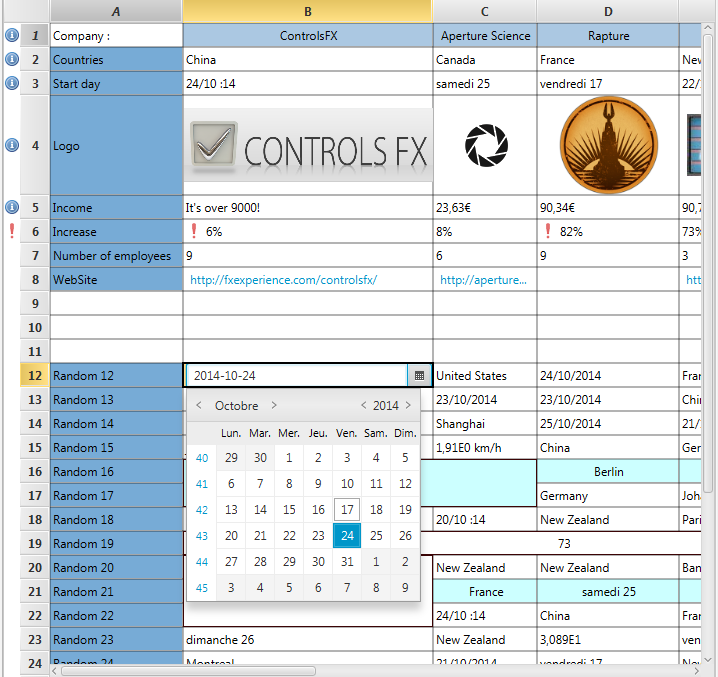
SpreadsheetCell, SpreadsheetCellBase, SpreadsheetColumn, Grid, GridBase, Picker
| Modifier and Type | Class and Description |
|---|---|
| public static class | SpreadsheetView.
This event is thrown on the SpreadsheetView when the user resize a column with its mouse. |
| public static class | SpreadsheetView.
This event is thrown on the SpreadsheetView when the user resize a row with its mouse. |
| public static enum | SpreadsheetView.
The SpanType describes in which state each cell can be.</center> |
| Modifier and Type | Field and Description |
|---|---|
| private CellGraphicFactory | |
| private final SpreadsheetGridView | cellsView
Private Fields * * |
| private HashMap | |
| private final ObservableMap | |
| private ObservableList | |
| private final BitSet | columnWidthSet
Since the default with applied to TableColumn is 80. |
| private final ChangeListener | |
| private static final double | DEFAULT_ROW_HEADER_WIDTH
Default width of the VerticalHeader. |
| private Map | |
| private FilteredList | |
| private Integer | |
| private final ObservableList | |
| private final ListChangeListener | |
| private final ObservableList | |
| private final ListChangeListener | fixedRowsListener
********************************************************************* * private listeners ******************************************************************** |
| private final BooleanProperty | |
| private final BooleanProperty | |
| private DataFormat | |
| private SimpleObjectProperty | |
| pack-priv final SpreadsheetHandle | |
| private final EventHandler | |
| private IdentityHashMap | |
| private final EventHandler | |
| private static final double | |
| private static final double | |
| private BitSet | |
| private final DoubleProperty | rowHeaderWidth
The vertical header width, just for the Label, not the Pickers. |
| private HashMap | |
| private final ObservableMap | |
| private final SpreadsheetViewSelectionModel | |
| private final BooleanProperty | |
| private final BooleanProperty | |
| private SortedList | |
| private static final double | |
| private String | |
| private DoubleProperty | |
| private final KeyCombination | |
| private final KeyCombination | |
| private final KeyCombination | |
| private final KeyCombination | |
| private final KeyCombination | |
| private final KeyCombination | |
| private final KeyCombination | |
| private final KeyCombination |
| Access | Constructor and Description |
|---|---|
| public | |
| public | SpreadsheetView(final Grid
The Grid that contains the items to be rendered grid)Creates a SpreadsheetView control with the |
| Modifier and Type | Method and Description |
|---|---|
| public boolean | Returns: true if the List of columns can be frozen together.This method is the same as |
| public boolean | Returns: true if the List of row can be frozen together.Indicates whether a List of rows can be frozen or not. |
| public boolean | Returns: true if the List of columns can be frozen together.Indicates whether a List of |
| private void | |
| pack-priv void | columnWidthSet(int indexColumn)
Used by |
| public ObjectProperty | Returns: an ObjectProperty wrapping the comparator used in the SpreadsheetView.Return an ObjectProperty wrapping the comparator used in the SpreadsheetView. |
| private void | |
| private String | |
| private void | |
| public void | |
| public void | |
| public void | |
| public void | edit(int row, SpreadsheetColumn column)
Causes the cell at the given row/column view indexes to switch into its editing state, if it is not already in it, and assuming that the SpreadsheetView and column are also editable. |
| public final BooleanProperty | Returns: the BooleanProperty associated with the editableProperty.Specifies whether this SpreadsheetView is editable - only if the
SpreadsheetView, and the |
| public ReadOnlyObjectProperty | Returns: the current cell being edited, or null if there is no cell being edited.Represents the current cell being edited, or null if there is no cell being edited. |
| public ReadOnlyBooleanProperty | Returns: the Boolean property associated with the allowance of freezing or unfreezing some columns.Return the Boolean property associated with the allowance of freezing or unfreezing some columns. |
| public ReadOnlyBooleanProperty | Returns: the Boolean property associated with the allowance of freezing or unfreezing some rows.Return the Boolean property associated with the allowance of freezing or unfreezing some rows. |
| public CellGraphicFactory | Returns: the CellGraphicFactoryReturns the CellGraphicFactory if set that provide implementation for
browser in |
| pack-priv final SpreadsheetGridView | |
| pack-priv final GridViewSkin | |
| public ObservableMap | |
| public final ObservableList | Returns: An ObservableList of theSpreadsheetColumnReturn an ObservableList of the |
| public int | Returns: the current column span of a Cell.Return the current column span of a Cell considering all hidden columns. |
| public Comparator | Returns: the comparator used in theSortedList for the
SpreadsheetView.Return the comparator used in the |
| public TablePosition | Returns: aTablePosition of cell being currently edited.Return a |
| public final Optional | Returns: the editor associated with the CellType.Return the editor associated with the CellType. |
| public int | Returns: the row where theFilter will be shown.Return the row where the |
| public int | Returns: the index used in the SpreadsheetView.Given a row index base on the |
| public int | Returns: the model rowGiven an index on the SpreadsheetView, it will return the model row by simply considering the hidden rows (and not the actual sort if any). |
| public ObservableList | Returns: an ObservableList of the frozen columns.You can freeze or unfreeze a column by modifying this list. |
| public ObservableList | Returns: an ObservableList of integer representing the frozen rows.You can freeze or unfreeze a row by modifying this list. |
| public final Grid | Returns: the model Grid used by the SpreadsheetViewReturn the model Grid used by the SpreadsheetView |
| public double | Returns: the value of the horizontal scrollbar.Return the value of the horizontal scrollbar. |
| public BitSet | Returns: a BitSet of the Hidden columns, where true means the column is hidden.Return a BitSet of the Hidden columns, where true means the column is hidden. |
| public BitSet | Returns: a BitSet of the Hidden rows, where true means the row is hidden.Return a BitSet of the Hidden rows, where true means the row is hidden. |
| public ObservableList | Returns: the current list of rows.Return the current list of rows set in the SpreadsheetView as they appear on the screen. |
| public int | Returns: an index based on thegetColumns() list of the
SpreadsheetView.Given a column index based on the visible column list, for example when
dealing with |
| public int | Returns: aGrid index it is related to.a row index based on the viewRow)SpreadsheetViewGiven an index on the |
| public final Node | Returns: the Node used as a placeholder that is shown when the SpreadsheetView has no content to show.Gets the value of the placeholder property. |
| public int | Returns: the current reverse row span for the given cellthe considered cell, int SpreadsheetCellthe current row position of this cell index)Return the exact opposite of |
| public final double | |
| public double | |
| public ObservableMap | |
| public int | Returns: the current row span for the given cellthe considered cell, int SpreadsheetCellthe current row position of this cell index)Return the current row span for the given cell at the given position in the Table. |
| public int | Returns: the row span for the given cell.Return the row span for the given cell without considering the actual sort. |
| private static Grid | Returns: the sample GridThis static method creates a sample Grid with 100 rows and 15 columns. |
| public SpreadsheetViewSelectionModel | Returns: SpreadsheetViewSelectionModelReturn the selectionModel used by the SpreadsheetView. |
| public SpreadsheetView. | Returns: TheSpanType of a cellReturn the |
| public ContextMenu | Returns: the ContextMenu to use.Create a menu on rightClick with two options: Copy/Paste This can be overridden by developers for custom behavior. |
| private TableColumn | |
| public String | getUserAgentStylesheet()
Overrides javafx. An implementation may specify its own user-agent styles for this Region, and its children, by overriding this method. |
| public double | Returns: the value of the vertical scrollbar.Return the value of the vertical scrollbar. |
| public int | Returns: an index based on the visible columns in the SpreadsheetView.Given a column index based on the |
| private int | |
| public int | Returns: the ViewRow if possible, -1 or another row if the row is hidden.the row retrieved in modelRow)SpreadsheetCell#getRow()Given the row of a |
| public final Double | Returns: the zoomFactor used for the SpreadsheetView.Return the zoomFactor used for the SpreadsheetView. |
| public final ReadOnlyObjectProperty | Returns: aReadOnlyObjectProperty.Return a |
| public void | |
| public void | |
| public void | |
| private void | |
| public boolean | Returns: true if the column if freezableIndicate whether this column can be frozen or not. |
| public boolean | Returns: true if this column index (regarding togetColumns() is
hidden.Return true if this column index (regarding to |
| public final boolean | Returns: a boolean telling if the SpreadsheetView is editable.Gets the value of the property editable. |
| private boolean | isEditionKey(KeyEvent keyEvent)
We want NOT to go in edition if we're pressing SHIFT and if we're using the navigation keys. |
| public boolean | Returns: whether change to frozen columns are allowed.Return whether change to frozen columns are allowed. |
| public boolean | Returns: whether change to frozen rows are allowed.Return whether change to frozen rows are allowed. |
| public boolean | Returns: true if the row can be frozen.Indicate whether a row can be frozen or not. |
| public boolean | |
| public final boolean | Returns: a boolean telling whether the column Header is shownReturn if the Column Header is showing. |
| public final boolean | Returns: a boolean telling if the row Header is being shownReturn if the row Header is showing. |
| protected void | |
| public void | |
| private void | |
| private void | |
| private void | pasteSeveralValues(ArrayList<ClipboardCell> list)
If we have several source values to paste into one cell, we do it. |
| public final ObjectProperty | placeholderProperty()
This Node is shown to the user when the SpreadsheetView has no content to show. |
| public void | resizeRowsToDefault()
This method will wipe all changes made to the row's height and set all row's height back to their default height defined in the model Grid. |
| public void | |
| public void | resizeRowsToMaximum()
This method will first apply |
| public final DoubleProperty | Returns: A DoubleProperty.This DoubleProperty represents the width of the rowHeader. |
| public void | scrollToColumn(SpreadsheetColumn column)
Scrolls the SpreadsheetView so that the given |
| public void | scrollToColumnIndex(int modelColumn)
Scrolls the SpreadsheetView so that the given column index is visible. |
| public void | scrollToRow(int
the row to scroll to row)Scrolls the |
| public void | setCellGraphicFactory(CellGraphicFactory<T extends Node>
the CellGraphicFactory cellGraphicFactory)Sets the CellGraphicFactory that will provide an implementation for cell
that have |
| public void | setComparator(Comparator<ObservableList<SpreadsheetCell>>
the comparator that will sort the rows. comparator)Sets a new Comparator for the SpreadsheetView in order to sort the rows. |
| public final void | |
| public void | |
| public void | setFixingColumnsAllowed(boolean b)
If set to true, user will be allowed to freeze and unfreeze the columns. |
| public void | setFixingRowsAllowed(boolean b)
If set to true, user will be allowed to freeze and unfreeze the rows. |
| public final void | |
| public void | |
| private void | |
| public void | |
| public void | |
| public final void | setPlaceholder(final Node
the node to show when the SpreadsheetView has no content to show. placeholder)Sets the value of the placeholder property |
| public final void | |
| public final void | |
| public final void | |
| public void | |
| public final void | |
| public void | |
| public final BooleanProperty | Returns: the BooleanProperty associated with the column Header.BooleanProperty associated with the column Header. |
| public void | |
| public final BooleanProperty | Returns: the BooleanProperty associated with the row Header.BooleanProperty associated with the row Header. |
| private void | tryPasteCell(int row, int column, ClipboardCell change)
Try to paste the given value into the given position. |
| private void | |
| private void | |
| public final DoubleProperty | Returns: the zoomFactor used for the SpreadsheetView.Return the zoomFactor used for the SpreadsheetView. |