

Life-cycle
The entry point for JavaFX applications is the Application class. The JavaFX runtime does the following, in order, whenever an application is launched:
Platform#startup(Runnable) for more information)init methodstart methodPlatform#exitimplicitExit
attribute on Platform is truestop methodNote that the start method is abstract and must be overridden.
The init and stop methods have concrete implementations
that do nothing.
The Application subclass must be declared public and must have a
public no-argument constructor.
Calling Platform#exit is the preferred way to explicitly terminate
a JavaFX Application. Directly calling System#exit is
an acceptable alternative, but doesn't allow the Application stop
method to run.
A JavaFX Application should not attempt to use JavaFX after the
FX toolkit has terminated or from a ShutdownHook, that is, after the
stop method returns or System#exit is called.
Note
The JavaFX classes must be loaded from a set of
named javafx.* modules on the module path.
Loading the JavaFX classes from the classpath is not supported.
See Platform.
for more information.
Deploying an Application as a Module
If the Application subclass is in a named module then that class
must be accessible to the javafx.graphics module.
Otherwise, an exception will be thrown when the application is launched.
This means that
in addition to the class itself being declared public, the module must
export
(or open) the containing package to
at least the javafx.graphics module.
For example, if com.foo.MyApplication is in the foo.app
module, the module-info.java might look like this:
module foo.app {
    exports com.foo to javafx.graphics;
}
Parameters
Application parameters are available by calling the getParameters
method from the init method, or any time after the init
method has been called.
Threading
JavaFX creates an application thread for running the application start
method, processing input events, and running animation timelines. Creation
of JavaFX Scene and Stage objects as well as modification of
scene graph operations to live objects (those objects already
attached to a scene) must be done on the JavaFX application thread.
The Java launcher loads and initializes the specified Application class on the JavaFX Application Thread. If there is no main method in the Application class, or if the main method calls Application.launch(), then an instance of the Application is then constructed on the JavaFX Application Thread.
The init method is called on the launcher thread, not on the
JavaFX Application Thread.
This means that an application must not construct a Scene
or a Stage in the init method.
An application may construct other JavaFX objects in the init
method.
All the unhandled exceptions on the JavaFX application thread that occur during
event dispatching, running animation timelines, or any other code, are forwarded
to the thread's uncaught
exception handler.
Example
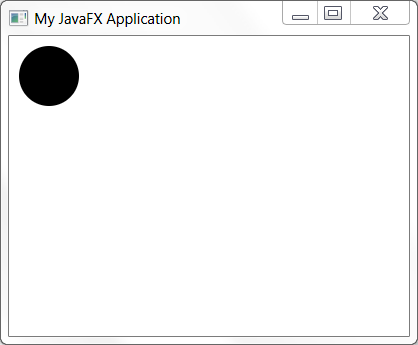
The following example will illustrate a simple JavaFX application.
import javafx.application.Application;
import javafx.scene.Group;
import javafx.scene.Scene;
import javafx.scene.shape.Circle;
import javafx.stage.Stage;

public class MyApp extends Application {
    public void start(Stage stage) {
        Circle circ = new Circle(40, 40, 30);
        Group root = new Group(circ);
        Scene scene = new Scene(root, 400, 300);

        stage.setTitle("My JavaFX Application");
        stage.setScene(scene);
        stage.show();
    }
}
The above example will produce the following:
Platform
| Modifier and Type | Class and Description |
|---|---|
| public abstract static class | Application.
Encapsulates the set of parameters for an application. |
| Modifier and Type | Field and Description |
|---|---|
| private HostServices | |
| public static final String | STYLESHEET_CASPIAN
Constant for user agent stylesheet for the "Caspian" theme. |
| public static final String | STYLESHEET_MODENA
Constant for user agent stylesheet for the "Modena" theme. |
| private static String |
| Access | Constructor and Description |
|---|---|
| public |
| Modifier and Type | Method and Description |
|---|---|
| public final HostServices | Returns: the HostServices providerGets the HostServices provider for this application. |
| public final Application. | Returns: the parameters for this Application, or null if called from the constructor.Retrieves the parameters for this Application, including any arguments passed on the command line. |
| public static String | Returns: The URL to the stylesheet as a String.Get the user agent stylesheet used by the whole application. |
| public void | |
| public static void | launch(Class<? extends Application>
the application class that is constructed and executed
by the launcher. appClass, String... the command line arguments passed to the application.
An application may get these parameters using the
args)getParameters() method.Launch a standalone application. |
| public static void | launch(String...
the command line arguments passed to the application.
An application may get these parameters using the
args)getParameters() method.Launch a standalone application. |
| public final void | notifyPreloader(Preloader.
the application-generated preloader notification infoNotifies the preloader with an application-generated notification. |
| public static void | setUserAgentStylesheet(String
The URL to the stylesheet as a String. url)Set the user agent stylesheet used by the whole application. |
| public abstract void | |
| public void | stop()
This method is called when the application should stop, and provides a convenient place to prepare for application exit and destroy resources. |
| hostServices | back to summary |
|---|---|
| private HostServices hostServices | |
| STYLESHEET_CASPIAN | back to summary |
|---|---|
| public static final String STYLESHEET_CASPIAN Constant for user agent stylesheet for the "Caspian" theme. Caspian is the theme that shipped as default in JavaFX 2.x.
| |
| STYLESHEET_MODENA | back to summary |
|---|---|
| public static final String STYLESHEET_MODENA Constant for user agent stylesheet for the "Modena" theme. Modena is the default theme for JavaFX 8.x.
| |
| userAgentStylesheet | back to summary |
|---|---|
| private static String userAgentStylesheet | |
| Application | back to summary |
|---|---|
| public Application() Constructs a new | |
| getHostServices | back to summary |
|---|---|
| public final HostServices getHostServices() Gets the HostServices provider for this application. This provides the ability to get the code base and document base for this application, and to show a web page in a browser.
| |
| getParameters | back to summary |
|---|---|
| public final Application. Retrieves the parameters for this Application, including any arguments passed on the command line. Note this method should not be called from the Application constructor, as it will return null. It may be called in the init() method or any time after that.
| |
| getUserAgentStylesheet | back to summary |
|---|---|
| public static String getUserAgentStylesheet() Get the user agent stylesheet used by the whole application. This is used to provide default styling for all ui controls and other nodes. A value of null means the platform default stylesheet is being used. Note This method must be called on the JavaFX Application Thread.
| |
| init | back to summary |
|---|---|
| public void init() throws Exception The application initialization method. This method is called immediately after the Application class is loaded and constructed. An application may override this method to perform initialization prior to the actual starting of the application. The implementation of this method provided by the Application class does nothing. Note This method is not called on the JavaFX Application Thread. An application must not construct a Scene or a Stage in this method. An application may construct other JavaFX objects in this method.
| |
| launch | back to summary |
|---|---|
| public static void launch(Class<? extends Application> appClass, String... args) Launch a standalone application. This method is typically called
from the
The launch method does not return until the application has exited,
either via a call to Typical usage is:
    public static void main(String[] args) {
        Application.launch(MyApp.class, args);
    }
where MyApp is a subclass of Application.
| |
| launch | back to summary |
|---|---|
| public static void launch(String... args) Launch a standalone application. This method is typically called
from the
The launch method does not return until the application has exited,
either via a call to Typical usage is:
    public static void main(String[] args) {
        Application.launch(args);
    }
| |
| notifyPreloader | back to summary |
|---|---|
| public final void notifyPreloader(Preloader. Notifies the preloader with an application-generated notification.
Application code calls this method with a PreloaderNotification that is
delivered to the
Note the notification will be delivered only to the preloader's
handleApplicationNotification() method; this means, for example, that
if this method is called with a ProgressNotification, that notification
will not be delivered to the
| |
| setUserAgentStylesheet | back to summary |
|---|---|
| public static void setUserAgentStylesheet(String url) Set the user agent stylesheet used by the whole application. This is used
to provide default styling for all ui controls and other nodes. Each
release of JavaFX may have a new default value for this so if you need
to guarantee consistency you will need to call this method and choose
what default you would like for your application. A value of null will
restore the platform default stylesheet. This property can also be set
on the command line with The URL is a hierarchical URI of the form [scheme:][//authority][path]. If the URL does not have a [scheme:] component, the URL is considered to be the [path] component only. Any leading '/' character of the [path] is ignored and the [path] is treated as a path relative to the root of the application's classpath.
The RFC 2397 "data" scheme for URLs is supported in addition to the protocol handlers that
are registered for the application.
If a URL uses the "data" scheme and the MIME type is either empty, "text/plain", or "text/css",
the payload will be interpreted as a CSS file.
If the MIME type is "application/octet-stream", the payload will be interpreted as a binary
CSS file (see Note This method must be called on the JavaFX Application Thread.
| |
| start | back to summary |
|---|---|
| public abstract void start(Stage primaryStage) throws Exception The main entry point for all JavaFX applications. The start method is called after the init method has returned, and after the system is ready for the application to begin running. Note This method is called on the JavaFX Application Thread. | |
| stop | back to summary |
|---|---|
| public void stop() throws Exception This method is called when the application should stop, and provides a convenient place to prepare for application exit and destroy resources. The implementation of this method provided by the Application class does nothing. Note This method is called on the JavaFX Application Thread.
| |
Note that the application and the preloader both get the same set of parameters for a given run of an application.
| Access | Constructor and Description |
|---|---|
| public |
| Modifier and Type | Method and Description |
|---|---|
| public abstract Map | Returns: a read-only map of named parameters.Retrieves a read-only map of the named parameters. |
| public abstract List | Returns: a read-only list of raw application argumentsRetrieves a read-only list of the raw arguments. |
| public abstract List | Returns: a read-only list of unnamed parameters.Retrieves a read-only list of the unnamed parameters. |
| Parameters | back to summary |
|---|---|
| public Parameters() Constructs a new | |
| getNamed | back to summary |
|---|---|
| public abstract Map Retrieves a read-only map of the named parameters. It may be empty, but is never null. Named parameters include any command line arguments of the form: "--name=value". | |
| getRaw | back to summary |
|---|---|
| public abstract List Retrieves a read-only list of the raw arguments. This list may be empty, but is never null. In the case of a standalone application, it is the ordered list of arguments specified on the command line. For named parameters, each <name,value> pair is represented as a single argument of the form: "--name=value". | |
| getUnnamed | back to summary |
|---|---|
| public abstract List Retrieves a read-only list of the unnamed parameters. This list may be empty, but is never null. The named parameters, that is the parameters that are represented as <name,value> pairs, are filtered out. | |

