

Stage class is the top level JavaFX container.
The primary Stage is constructed by the platform. Additional Stage
objects may be constructed by the application.
Stage objects must be constructed and modified on the JavaFX Application Thread.
The JavaFX Application Thread is created as part of the startup process for
the JavaFX runtime. See the javafx. class and
the Platform#startup(Runnable) method for more information.
Some Stage properties are read-only, even though they have
corresponding set methods, because they can be changed externally by the
underlying platform, and therefore must not be bindable.
Further, these properties might be ignored on some platforms, depending on
whether or not there is a window manager and how it is configured.
For example, a platform without a window manager might ignore the
iconified property.
Style
A stage has one of the following styles:
StageStyle#DECORATED - a stage with a solid white background and
platform decorations.StageStyle#UNDECORATED - a stage with a solid white background
and no decorations.StageStyle#TRANSPARENT - a stage with a transparent background
and no decorations.StageStyle#UTILITY - a stage with a solid white background and
minimal platform decorations.StageStyle#EXTENDED - a decorated stage with a custom HeaderBar.The style must be initialized before the stage is made visible.
On some platforms decorations might not be available. For example, on some mobile or embedded devices. In these cases a request for a DECORATED or UTILITY window will be accepted, but no decorations will be shown.
Owner
A stage can optionally have an owner Window. When a window is a stage's owner, it is said to be the parent of that stage.
Owned Stages are tied to the parent Window. An owned stage will always be on top of its parent window. When a parent window is closed or iconified, then all owned windows will be affected as well. Owned Stages cannot be independantly iconified.
The owner must be initialized before the stage is made visible.
Modality
A stage has one of the following modalities:
Modality#NONE - a stage that does not block any other window.Modality#WINDOW_MODAL - a stage that blocks input events from
being delivered to all windows from its owner (parent) to its root.
Its root is the closest ancestor window without an owner.Modality#APPLICATION_MODAL - a stage that blocks input events from
being delivered to all windows from the same application, except for those
from its child hierarchy.When a window is blocked by a modal stage its Z-order relative to its ancestors
is preserved, and it receives no input events and no window activation events,
but continues to animate and render normally.
Note that showing a modal stage does not necessarily block the caller. The
show method returns immediately regardless of the modality of the stage.
Use the showAndWait method if you need to block the caller until
the modal stage is hidden (closed).
The modality must be initialized before the stage is made visible.
Example:
import javafx.application.Application;
import javafx.scene.Group;
import javafx.scene.Scene;
import javafx.scene.text.Font;
import javafx.scene.text.Text;
import javafx.stage.Stage;

public class HelloWorld extends Application {

    @Override public void start(Stage stage) {
        Text text = new Text(10, 40, "Hello World!");
        text.setFont(new Font(40));
        Scene scene = new Scene(new Group(text));

        stage.setTitle("Welcome to JavaFX!");
        stage.setScene(scene);
        stage.sizeToScene();
        stage.show();
    }

    public static void main(String[] args) {
        Application.launch(args);
    }
}
produces the following on Windows:

produces the following on Mac OSX:

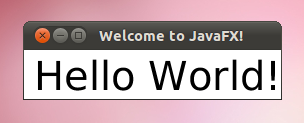
produces the following on Linux:
| Modifier and Type | Class and Description |
|---|---|
| private static class | Stage.
This class holds attached properties for the |
| private class |
| Modifier and Type | Field and Description |
|---|---|
| private ReadOnlyBooleanWrapper | alwaysOnTop
Defines whether this |
| private Stage. | |
| private ReadOnlyBooleanWrapper | fullScreen
Specifies whether this |
| private final ObjectProperty | |
| private final ObjectProperty | fullScreenExitHint
Specifies the text to show when a user enters full screen mode, usually used to indicate the way a user should go about exiting out of full screen mode. |
| private ReadOnlyBooleanWrapper | iconified
Defines whether the |
| private ObservableList | icons
Defines the icon images to be used in the window decorations and when minimized. |
| private boolean | |
| private boolean | |
| private DoubleProperty | maxHeight
Defines the maximum height of this |
| private ReadOnlyBooleanWrapper | maximized
Defines whether the |
| private DoubleProperty | maxWidth
Defines the maximum width of this |
| private DoubleProperty | minHeight
Defines the minimum height of this |
| private DoubleProperty | minWidth
Defines the minimum width of this |
| private Modality | |
| private Window | |
| private boolean | |
| private BooleanProperty | resizable
Defines whether the |
| private static final StagePeerListener. | |
| private StageStyle | |
| private StringProperty | title
Defines the title of the |
| Access | Constructor and Description |
|---|---|
| public | |
| public |
| Modifier and Type | Method and Description |
|---|---|
| public final ReadOnlyBooleanProperty | |
| private ReadOnlyBooleanWrapper | |
| public void | |
| private void | |
| private void | |
| public final ObjectProperty | |
| public final ObjectProperty | Returns: the property.Get the property for the Full Screen exit key combination. |
| public final ReadOnlyBooleanProperty | |
| private ReadOnlyBooleanWrapper | |
| private Stage. | |
| public final String | |
| public final KeyCombination | Returns: the current setting (null for system default)Get the current sequence used to exit Full Screen mode. |
| public final ObservableList | Returns: An observable list of icons of this windowGets the icon images to be used in the window decorations and when minimized. |
| public final double | |
| public final double | |
| public final double | |
| public final double | |
| public final Modality | |
| public final Window | Returns: the owner Window.Retrieves the owner Window for this stage, or null for an unowned stage. |
| public final StageStyle | |
| public final String | |
| pack-priv Window | |
| public final ReadOnlyBooleanProperty | |
| private final ReadOnlyBooleanWrapper | |
| public final void | |
| public final void | |
| public final void | |
| public final boolean | |
| public final boolean | |
| public final boolean | |
| private boolean | |
| public final boolean | |
| pack-priv boolean | |
| public final boolean | |
| pack-priv boolean | isSizeToSceneAllowed()
Overrides javafx. Determines whether the |
| public final DoubleProperty | |
| public final ReadOnlyBooleanProperty | |
| private final ReadOnlyBooleanWrapper | |
| public final DoubleProperty | |
| public final DoubleProperty | |
| public final DoubleProperty | |
| public final BooleanProperty | |
| public final void | |
| public final void | |
| public final void | |
| public final void | setFullScreenExitKeyCombination(KeyCombination
the key combination to exit on keyCombination)Specifies the KeyCombination that will allow the user to exit full screen mode. |
| public final void | |
| pack-priv void | |
| public final void | |
| public final void | |
| public final void | |
| public final void | |
| public final void | |
| pack-priv void | |
| public final void | |
| public final void | setScene(Scene value)
Overrides javafx. Specify the scene to be used on this stage. |
| public final void | |
| public final void | show()
Overrides javafx. Attempts to show this Window by setting visibility to true |
| public void | showAndWait()
Shows this stage and waits for it to be hidden (closed) before returning to the caller. |
| public final StringProperty | |
| public void | |
| public void |

