

A MenuItem that can be toggled between selected and unselected states.
It is intended that CheckMenuItem be used in conjunction with the
Menu or ContextMenu controls.
Creating and inserting a CheckMenuItem into a Menu is shown below.
CheckMenuItem subsystem1 = new CheckMenuItem("Enabled");
subsystem1.setOnAction(e -> System.out.println("subsystem1 #1 Enabled!"));

Menu menu = new Menu("Subsystems");
menu.getItems().add(subsystem1);
MenuBar menuBar = new MenuBar(menu);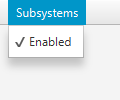
Of course, the approach shown above separates out the definition of the CheckMenuItem from the Menu, but this needn't be so.
To ascertain the current state of the CheckMenuItem, you should refer to the
selected boolean. An example use case may be the following example:
final checkMenuItem = new CheckMenuItem("Show Widget");
subsystem1.setOnAction(e -> System.out.println("Show the widget!"));
private final BooleanProperty widgetShowing();
public final boolean isWidgetShowing() { return widgetShowing.get(); )
public final void setWidgetShowing(boolean value) {
    widgetShowingProperty().set(value);
}
public final BooleanProperty widgetShowingProperty() {
    if (widgetShowing == null) {
        widgetShowing = new SimpleBooleanProperty(this, "widgetShowing", true);
    }
    return widgetShowing;
}

widgetShowing.bind(checkMenuItem.selected);
Typically a CheckMenuItem will be rendered such that, when selected, it shows a check (or tick) mark in the area normally reserved for the MenuItem graphic. Of course, this will vary depending on the skin and styling specified.
Menu, MenuItem, RadioMenuItem
| Modifier and Type | Field and Description |
|---|---|
| private static final String | |
| private BooleanProperty | selected
Represents the current state of this CheckMenuItem. |
| private static final String |
| Access | Constructor and Description |
|---|---|
| public | |
| public | CheckMenuItem(String
the display text text)Constructs a CheckMenuItem and sets the display text with the specified text. |
| public | CheckMenuItem(String
the display text text, Node the graphic Node graphic)Constructs a CheckMenuItem and sets the display text with the specified text
and sets the graphic |
| Modifier and Type | Method and Description |
|---|---|
| public final boolean | |
| public final BooleanProperty | |
| public final void |
| DEFAULT_STYLE_CLASS | back to summary |
|---|---|
| private static final String DEFAULT_STYLE_CLASS | |
| selected | back to summary |
|---|---|
| private BooleanProperty selected Represents the current state of this CheckMenuItem. Bind to this to be informed whenever the user interacts with the CheckMenuItem (and causes the selected state to be toggled).
| |
| STYLE_CLASS_SELECTED | back to summary |
|---|---|
| private static final String STYLE_CLASS_SELECTED | |
| CheckMenuItem | back to summary |
|---|---|
| public CheckMenuItem() Creates an empty | |
| CheckMenuItem | back to summary |
|---|---|
| public CheckMenuItem(String text) Constructs a CheckMenuItem and sets the display text with the specified text.
| |
| CheckMenuItem | back to summary |
|---|---|
| public CheckMenuItem(String text, Node graphic) Constructs a CheckMenuItem and sets the display text with the specified text
and sets the graphic | |
| isSelected | back to summary |
|---|---|
| public final boolean isSelected() | |
| selectedProperty | back to summary |
|---|---|
| public final BooleanProperty selectedProperty() | |
| setSelected | back to summary |
|---|---|
| public final void setSelected(boolean value) | |

