

A popup menu of actionable items which is displayed to the user only upon request. When a menu is visible, in most use cases, the user can select one menu item before the menu goes back to its hidden state. This means the menu is a good place to put important functionality that does not necessarily need to be visible at all times to the user.
Menus are typically placed in a MenuBar, or as a submenu of another Menu.
If the intention is to offer a context menu when the user right-clicks in a
certain area of their user interface, then this is the wrong control to use.
This is because when Menu is added to the scenegraph, it has a visual
representation that will result in it appearing on screen. Instead,
ContextMenu should be used in this circumstance.
Creating a Menu and inserting it into a MenuBar is easy, as shown below:
 Menu menu1 = new Menu("File");
MenuBar menuBar = new MenuBar(menu1);
A Menu is a subclass of MenuItem which means that it can be inserted
into a Menu's items ObservableList, resulting in a submenu being created:
 MenuItem menu12 = new MenuItem("Open");
menu1.getItems().add(menu12);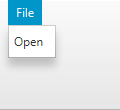
The items ObservableList allows for any MenuItem type to be inserted,
including its subclasses Menu, MenuItem, RadioMenuItem, CheckMenuItem,
CustomMenuItem and SeparatorMenuItem. In order to insert an arbitrary Node to
a Menu, a CustomMenuItem can be used. One exception to this general rule is that
SeparatorMenuItem could be used for inserting a separator.
MenuBar, MenuItem
| Modifier and Type | Field and Description |
|---|---|
| private static final String | |
| private final ObservableList | |
| public static final EventType | ON_HIDDEN
Called when the contextMenu for this menu is hidden. |
| public static final EventType | ON_HIDING
Called when the contextMenu for this menu will be hidden. |
| public static final EventType | ON_SHOWING
Called when the contextMenu for this menu will be shown. |
| public static final EventType | ON_SHOWN
Called when the contextMenu for this menu shows. |
| private ObjectProperty | |
| private ObjectProperty | |
| private ObjectProperty | |
| private ObjectProperty | |
| private ReadOnlyBooleanWrapper | showing
Indicates whether the |
| private static final String |
| Access | Constructor and Description |
|---|---|
| public | |
| public | |
| public | |
| public | Menu(String
the text to display on the menu button text, Node the graphic to display on the menu button graphic, MenuItem... The items to display in the popup menu. items)Constructs a Menu and sets the display text with the specified text,
the graphic |
| Modifier and Type | Method and Description |
|---|---|
| public EventDispatchChain | buildEventDispatchChain(EventDispatchChain tail)
Overrides javafx. Implements javafx. Construct an event dispatch chain for this target. |
| public final ObservableList | |
| public final EventHandler | |
| public final EventHandler | |
| public final EventHandler | |
| public final EventHandler | |
| public void | |
| public final boolean | |
| public final ObjectProperty | |
| public final ObjectProperty | |
| public final ObjectProperty | Returns: the on showing propertyCalled just prior to the |
| public final ObjectProperty | |
| public final void | |
| public final void | |
| public final void | |
| public final void | |
| private void | |
| public void | show()
If the Menu is not disabled and the |
| public final ReadOnlyBooleanProperty | |
| private ReadOnlyBooleanWrapper |
| DEFAULT_STYLE_CLASS | back to summary |
|---|---|
| private static final String DEFAULT_STYLE_CLASS | |
| items | back to summary |
|---|---|
| private final ObservableList<MenuItem> items | |
| ON_HIDDEN | back to summary |
|---|---|
| public static final EventType<Event> ON_HIDDEN Called when the contextMenu for this menu is hidden. However if the contextMenu is empty then this will not be called. | |
| ON_HIDING | back to summary |
|---|---|
| public static final EventType<Event> ON_HIDING Called when the contextMenu for this menu will be hidden. However if the contextMenu is empty then this will not be called. | |
| ON_SHOWING | back to summary |
|---|---|
| public static final EventType<Event> ON_SHOWING Called when the contextMenu for this menu will be shown. However if the contextMenu is empty then this will not be called. | |
| ON_SHOWN | back to summary |
|---|---|
| public static final EventType<Event> ON_SHOWN Called when the contextMenu for this menu shows. However if the contextMenu is empty then this will not be called. | |
| onHidden | back to summary |
|---|---|
| private ObjectProperty<EventHandler<Event>> onHidden | |
| onHiding | back to summary |
|---|---|
| private ObjectProperty<EventHandler<Event>> onHiding | |
| onShowing | back to summary |
|---|---|
| private ObjectProperty<EventHandler<Event>> onShowing | |
| onShown | back to summary |
|---|---|
| private ObjectProperty<EventHandler<Event>> onShown | |
| showing | back to summary |
|---|---|
| private ReadOnlyBooleanWrapper showing Indicates whether the
| |
| STYLE_CLASS_SHOWING | back to summary |
|---|---|
| private static final String STYLE_CLASS_SHOWING | |
| Menu | back to summary |
|---|---|
| public Menu() Constructs a Menu with an empty string for its display text.
| |
| Menu | back to summary |
|---|---|
| public Menu(String text) Constructs a Menu and sets the display text with the specified text.
| |
| Menu | back to summary |
|---|---|
| public Menu(String text, Node graphic) Constructs a Menu and sets the display text with the specified text
and sets the graphic | |
| Menu | back to summary |
|---|---|
| public Menu(String text, Node graphic, MenuItem... items) Constructs a Menu and sets the display text with the specified text,
the graphic | |
| buildEventDispatchChain | back to summary |
|---|---|
| public EventDispatchChain buildEventDispatchChain(EventDispatchChain tail) Overrides javafx. Implements javafx. Doc from javafx. Construct an event dispatch chain for this target. The event dispatch
chain contains event dispatchers which might be interested in processing
of events targeted at this In the case the event target is part of some hierarchy, the chain for it is usually built from event dispatchers collected from the root of the hierarchy to the event target. The event dispatch chain is constructed by modifications to the provided initial event dispatch chain. The returned chain should have the initial chain at its end so the dispatchers should be prepended to the initial chain. The caller shouldn't assume that the initial chain remains unchanged nor that the returned value will reference a different chain.
| |
| getItems | back to summary |
|---|---|
| public final ObservableList The items to show within this menu. If this ObservableList is modified at runtime, the Menu will update as expected.
| |
| getOnHidden | back to summary |
|---|---|
| public final EventHandler | |
| getOnHiding | back to summary |
|---|---|
| public final EventHandler | |
| getOnShowing | back to summary |
|---|---|
| public final EventHandler | |
| getOnShown | back to summary |
|---|---|
| public final EventHandler | |
| hide | back to summary |
|---|---|
| public void hide() Hides the
| |
| isShowing | back to summary |
|---|---|
| public final boolean isShowing() | |
| onHiddenProperty | back to summary |
|---|---|
| public final ObjectProperty Called just after the
| |
| onHidingProperty | back to summary |
|---|---|
| public final ObjectProperty Called just prior to the
| |
| onShowingProperty | back to summary |
|---|---|
| public final ObjectProperty Called just prior to the
| |
| onShownProperty | back to summary |
|---|---|
| public final ObjectProperty Called just after the
| |
| setOnHidden | back to summary |
|---|---|
| public final void setOnHidden(EventHandler<Event> value) | |
| setOnHiding | back to summary |
|---|---|
| public final void setOnHiding(EventHandler<Event> value) | |
| setOnShowing | back to summary |
|---|---|
| public final void setOnShowing(EventHandler<Event> value) | |
| setOnShown | back to summary |
|---|---|
| public final void setOnShown(EventHandler<Event> value) | |
| setShowing | back to summary |
|---|---|
| private void setShowing(boolean value) | |
| show | back to summary |
|---|---|
| public void show() If the Menu is not disabled and the
| |
| showingProperty | back to summary |
|---|---|
| public final ReadOnlyBooleanProperty showingProperty() | |
| showingPropertyImpl | back to summary |
|---|---|
| private ReadOnlyBooleanWrapper showingPropertyImpl() | |

